Your business can appear in a ChatGPT answer before anyone on your team has claimed its profile. The description may draw on your website and other sources, while your team has little visibility into how often customers encounter it.
OpenAI’s Businesses in ChatGPT beta, announced on November 10, 2026, gives eligible businesses a way to manage the information they provide and see aggregate engagement data through Business Hub. Eligible US businesses can also publish a Business Agent to answer customer questions.
For marketing teams, this creates a useful starting point: verify the business, correct its details, and establish a first-party measurement baseline. Claiming a profile does not guarantee that ChatGPT will recommend the business more often. Improving how your brand is represented still requires work beyond the profile itself.
Key Takeaways
- Business Hub lets eligible businesses claim a profile and provide current business information. Retailers can also connect product feeds.
- Claim approval and Persona identity verification are separate stages. The blue check appears after Persona approval.
- Insights include mentions, website clicks, and discovery topics. Businesses do not receive individual customer prompts or conversations.
- Business Agents initially serve eligible US ecommerce and online service businesses. They answer questions in a separate, labeled conversation.
- Use Business Hub alongside prompt-level monitoring and website analytics to investigate visibility and measure business outcomes.
What Is ChatGPT Business Hub
Business Hub is the management dashboard for Businesses in ChatGPT. It brings profile claiming, business information, product feeds, and engagement insights into one place. For eligible businesses, it also provides the setup process for a Business Agent.
These features serve different purposes. The business profile helps customers understand the company. A product feed supplies catalog information such as price and availability. Insights show aggregate activity, while a Business Agent lets a customer ask the business follow-up questions through an AI conversation.
Keeping those roles separate matters. Uploading a feed does not publish an agent, and publishing an agent is not a requirement for using profile insights. Advertising is another separate choice.
The distinction also helps prevent confusion with ChatGPT Business, the workplace subscription. Businesses in ChatGPT is a program for managing a company’s presence in ChatGPT; it is not the same product as a subscription for employees.
Who Can Claim a Business in ChatGPT
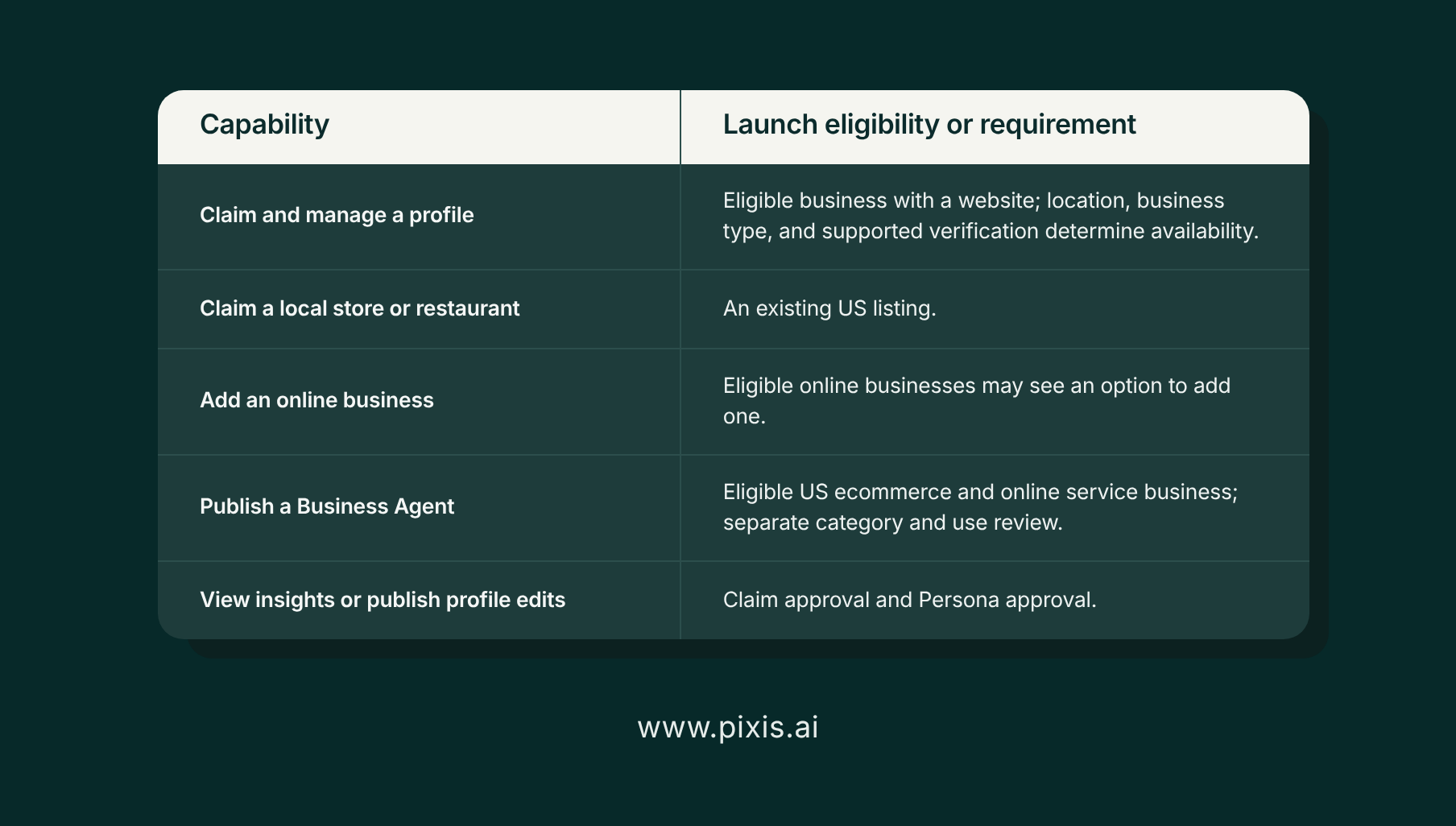
The person claiming a business must own it or be authorized to represent it. Eligibility depends on the business’s location and type, as well as whether the required verification is supported. A website is part of the initial eligibility requirements.
Claiming is free and does not require an Ads account or a ChatGPT Enterprise agreement. Existing OpenAI Enterprise customers and advertisers can work with their OpenAI representative on the claim process.
Profile eligibility is broader than agent eligibility. At launch, Business Agents are available to eligible ecommerce and online service businesses in the United States. Approval to manage a profile does not automatically mean the business can publish an agent.
Local businesses have a more limited setup path. Local stores and restaurants can currently claim an existing US listing. Eligible online businesses may have the option to add a business if no listing exists. Check the options offered for the specific business rather than assuming every account has the same access.
How to Claim Your Business in ChatGPT
The process has two approval stages: verifying the connection to the business and completing identity verification. Plan for both before expecting access to publishing or insights.
Want every step in one place? Download our Claim Your Business in ChatGPT guide (PDF) and keep it open while you set up your profile.
1. Choose the Account That Will Manage the Business
Sign in with the ChatGPT account intended to administer the profile. Open Business Hub, either directly or through the ChatGPT sidebar.
Decide who should hold administrator access before starting. For an agency-managed account, confirm the arrangement with the business owner so the profile has a clear long-term owner.
2. Find the Correct Listing
Search for the business by name and select the matching profile. Check the website and identifying details before confirming administrator access, especially when several businesses share a similar name.
If no matching listing appears, eligible online businesses may see an option to add one. A listing marked “Contact support” requires help from OpenAI to obtain access. If someone else has already claimed the profile, use the ownership dispute process.
3. Verify Your Connection to the Business
Choose one of the methods offered in Business Hub. Options can include a code sent to a business phone or email address, a DNS TXT record added to the website’s domain, or a Shopify connection.
For DNS verification, follow the displayed record instructions and check how your DNS provider handles the host field. Some providers append the domain automatically. Entering the full domain again can create the wrong record. Allow for propagation before returning to verify it.
4. Wait for the Claim Decision
OpenAI reviews the claim and sends a decision or a request for additional information by email. Submitting the claim is not the same as receiving approval. Review times can vary, so avoid promising a fixed activation date internally.
5. Complete Persona Identity Verification
After claim approval, complete the Persona check. This can require government-issued identification, business registration information, and evidence that you are authorized to represent the company. Match the information to official records.
The verified blue check appears after Persona approval. Publishing profile edits, connecting a product feed, and viewing insights also require that approval. An eligible Business Agent has its own review and publishing steps.
6. Update the Profile and Assign Access
Review the business website, description, category, and visual assets. Add relevant delivery and return policies. OpenAI reviews submitted changes before they appear publicly.
Teammates and agencies can be added using their own accounts. Keep administrator access deliberate and use invitations rather than sharing credentials. Account or workspace requirements may affect who can be invited.
What You Can Update After Verification
A verified profile lets you submit corrections to the website, business description, product or service category, logo, cover photo, and relevant policies.
Start with information that could change a customer’s decision. An incorrect category can misrepresent what you sell. An outdated return policy can create expectations your team cannot meet. A description that no longer reflects your services can attract unsuitable inquiries.
OpenAI’s Businesses in ChatGPT policy requires an authorized representative and accurate information. Keep descriptions specific and substantiate factual claims rather than filling the profile with broad promotional language.
Profile information is one input into ChatGPT’s answers. Your website and third-party sources still matter, and approved updates may take time to appear. Correcting the profile should therefore be accompanied by correcting the same information wherever it appears publicly.
Be deliberate when creating a new profile. OpenAI says approval of a new profile created through Persona automatically publishes it. Its setup guidance also states that only unpublished drafts can be deleted; support cannot delete, unpublish, or hide a published profile as part of a setup or ownership request.
How Product Feeds Fit Into Business Hub
Retailers can provide structured product information through a feed, including prices and availability, or connect Shopify. The aim is to give ChatGPT current catalog information rather than relying only on descriptive website content.
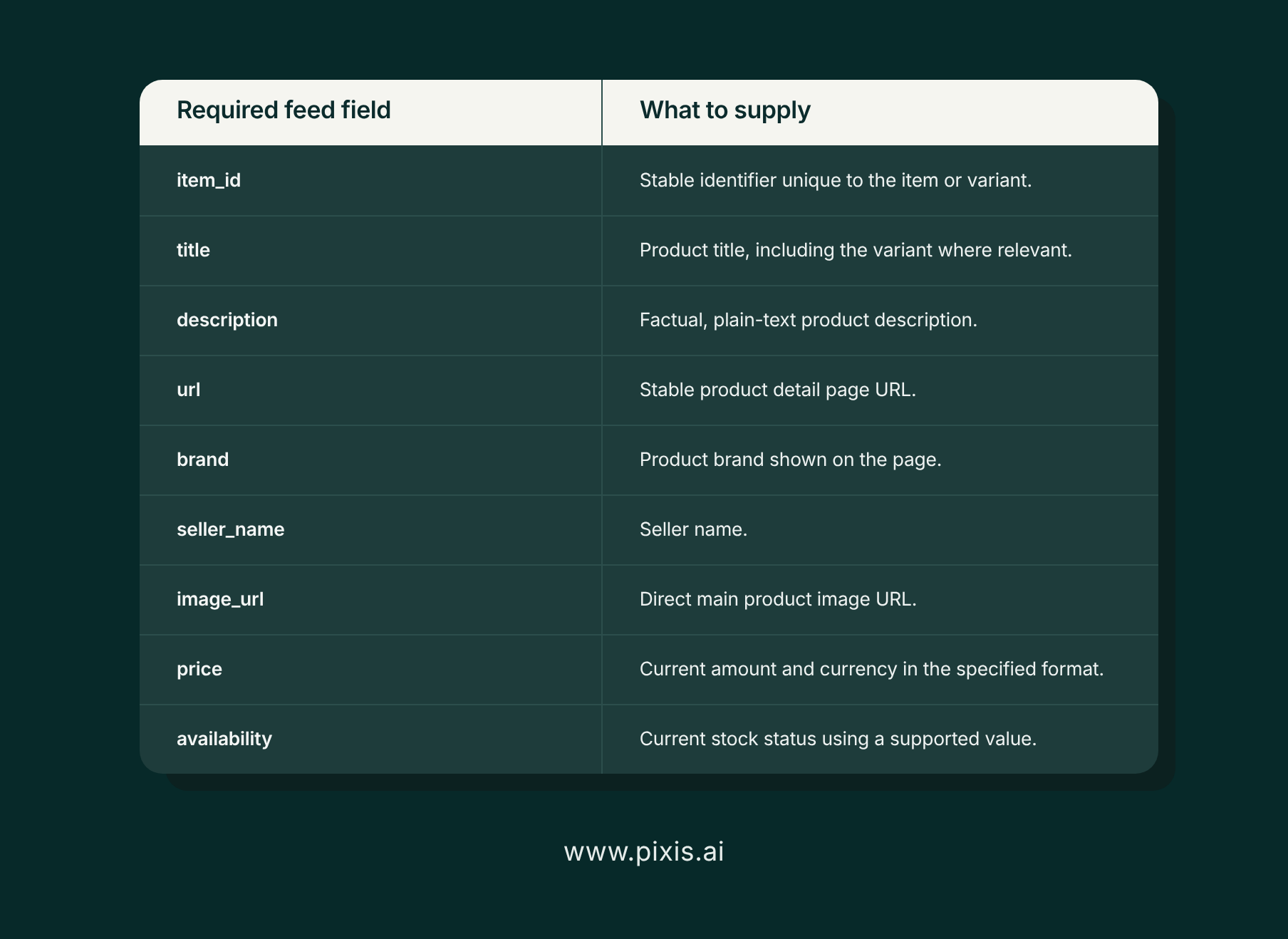
Follow OpenAI’s current product feed specification for the upload path you use. Required information includes a unique item identifier, title, description, product URL, brand, seller name, main image URL, price, and availability. Optional fields and accepted formats can evolve, so a fixed total field count is not a useful implementation checklist.
Treat feed quality as an ongoing operational responsibility. Keep variant identifiers stable, use the correct product URLs, and update actual prices and stock when they change. Compare the feed with the product page before submission so customers do not encounter conflicting information.
A feed helps supply accurate product data. It does not guarantee a recommendation or automatically activate a Business Agent.
What Business Hub Insights Actually Measure
First-party engagement data is a reason to claim the business, provided the team understands what the metrics represent. OpenAI documents aggregate insights over the past 28 days.
Mentions Have Different Definitions for Online and Local Businesses
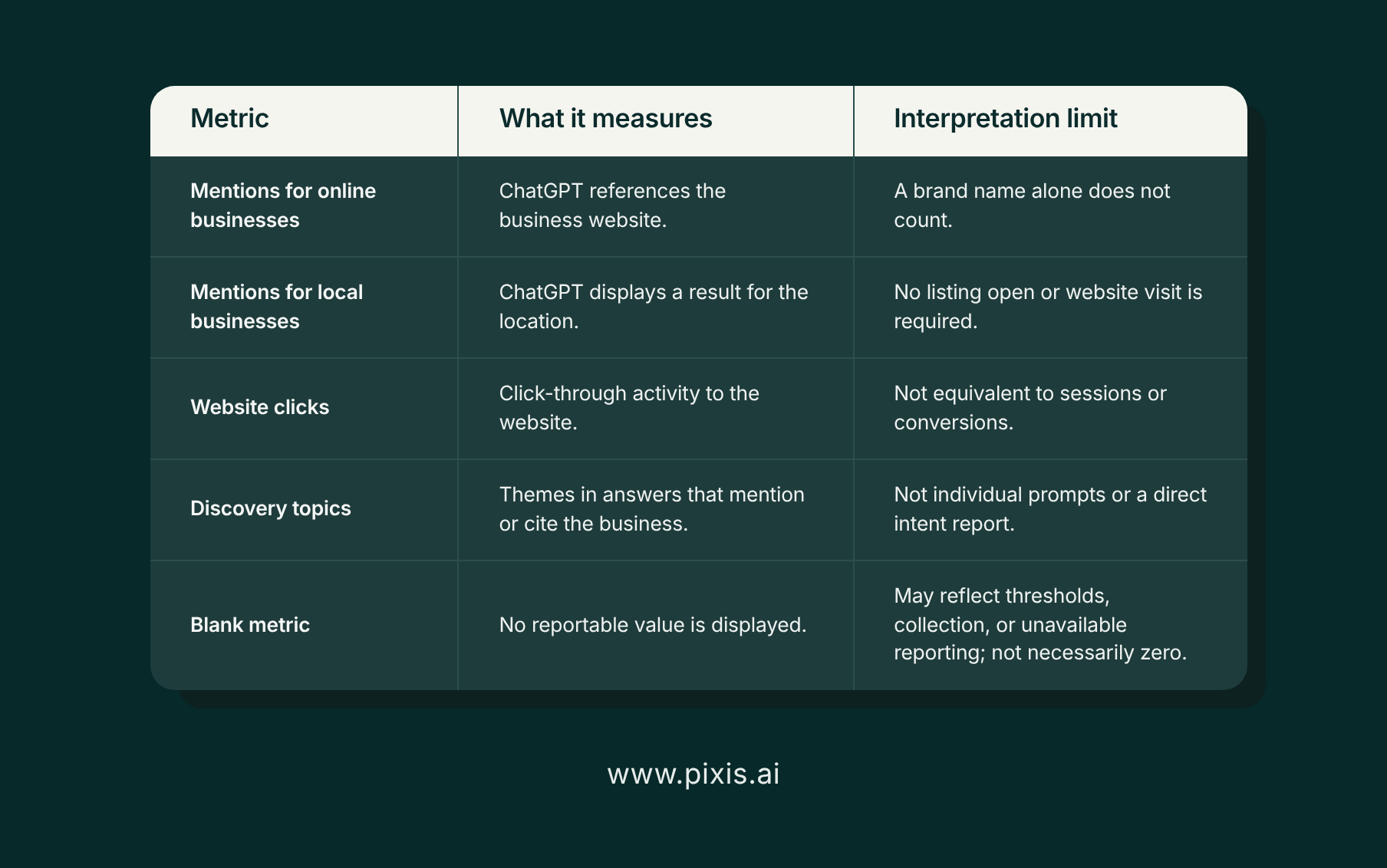
For an online business, a mention counts when ChatGPT references the business’s website. A response can name the brand without generating a recorded mention under that definition.
For a local business, a mention counts when ChatGPT shows a result for the location, even if the customer does not open it. These definitions measure different events. Avoid comparing the totals as though they represent identical exposure.
Website Clicks Measure an Action Before a Visit or Sale
Website clicks show click-through activity to the business’s site. They do not establish that a visitor arrived, completed a form, or made a purchase.
Compare click trends with ChatGPT referral sessions and conversions in your analytics. Differences can reflect measurement scope, attribution, consent settings, or technical issues. Investigate persistent gaps before selecting a cause.
Dividing clicks by mentions may produce a directional ratio, but it should not be presented as a standard click-through rate unless the reporting scopes align. A low ratio alone does not prove that ChatGPT answered the customer’s question completely or removed the need to visit.
Discovery Topics Suggest Areas to Investigate
Discovery topics group themes in answers that mentioned or cited the business. They do not expose the original prompts or directly measure customer intent.
Use them to guide research. If a relevant topic appears, examine whether the corresponding pages explain the offering accurately. If a priority topic is missing, investigate it through tracked prompts and content review. Absence from this dashboard alone does not prove a content gap.
Blank Metrics Need Context
A blank can reflect a reporting threshold, ongoing data collection, or unavailable reporting. It does not necessarily mean zero activity. The Business Hub setup and insights guidance explains these limits and the available support path.
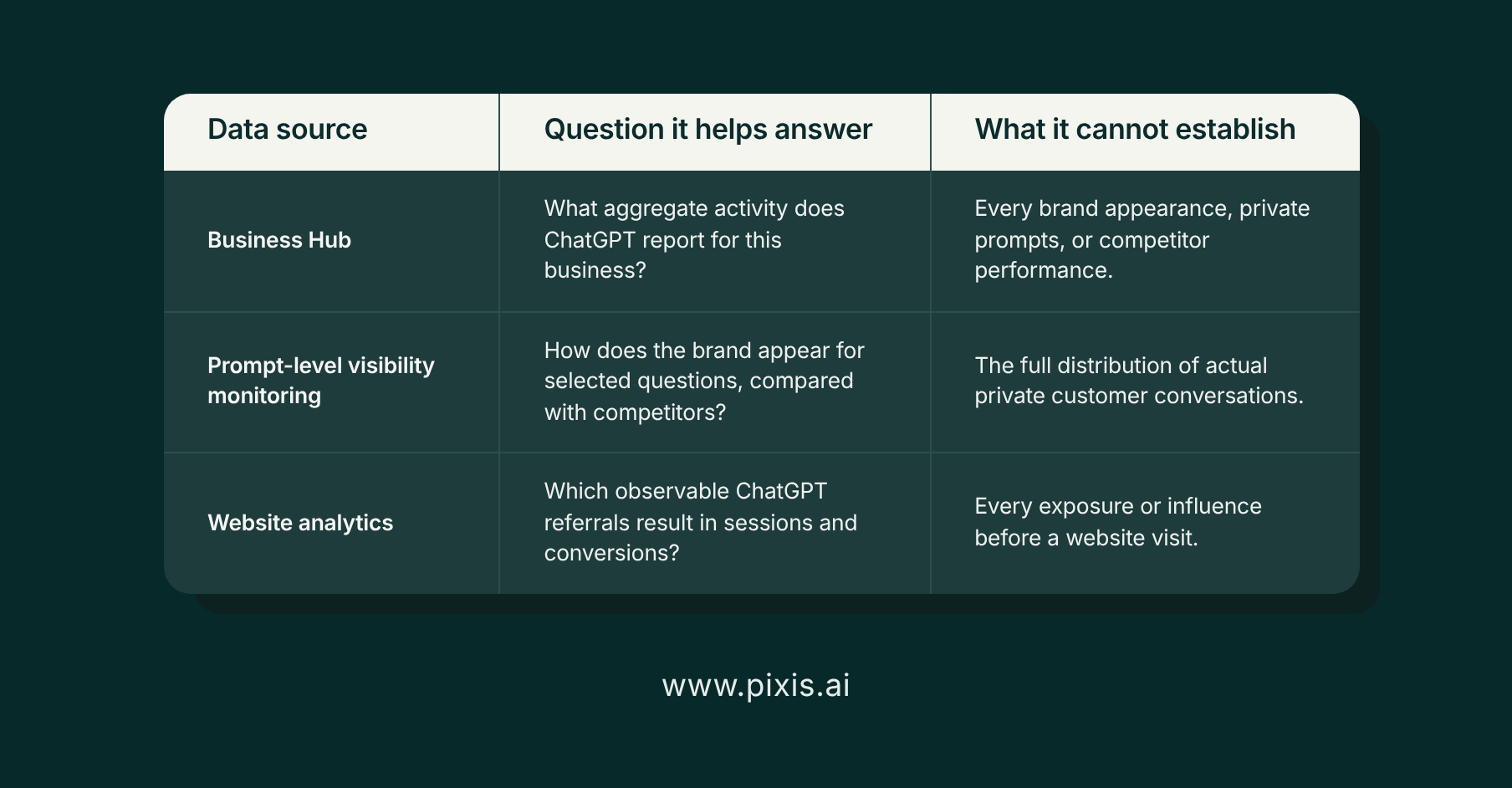
Business Hub does not give businesses access to individual prompts, customer conversations, or chats with their Business Agents. Its first-party figures are valuable within their defined scope, but they are not a complete record of every way a brand appears in ChatGPT.
What Business Agents Can Do
A Business Agent answers questions using information and instructions supplied by the business. A customer can open the business’s profile and choose to start a separate, clearly labeled conversation with it.
For an eligible business, setup involves reviewing the product and policy information, writing answer instructions, previewing responses, and publishing the agent. Test questions that could affect purchase decisions, including exclusions, return conditions, and differences between similar products.
At launch, the agent cannot complete purchases, make bookings, or check customer orders. It can explain the offering and direct customers to the business’s website for those actions. It also does not inherit the capabilities of an existing ChatGPT plugin.
The Business Agents Policy requires agents to identify themselves honestly and use accurate information. Instructions must not invent prices, credentials, or guarantees; conceal material conditions; or pressure customers after they decline. OpenAI reviews agents and can restrict access when policies are violated.
Businesses can sponsor an agent and use it as an ad destination. Sponsored placements are labeled and separate from independent ChatGPT answers. Profile management, agent publishing, and paid promotion should each have their own objective and measurement plan.
How to Use Business Hub in Your AI Visibility Strategy
Start by recording the available metrics, their definitions, and the reporting period. Save regular snapshots and keep a dated record of profile, feed, and website changes. When figures move, that record provides context, although timing alone does not establish that a particular edit caused the change.
Business Hub can show aggregate activity on ChatGPT. Marketing teams also need to investigate which buyer questions produce a recommendation, how competitors appear, and which sources support the answer. Prompt-level monitoring provides a way to examine those questions across a defined sample.
Keep those datasets distinct. A tracked prompt set is an observation of selected questions, not an estimate of all private customer conversations. Business Hub’s aggregate activity and a third-party AI visibility score should not be expected to match because their coverage and definitions differ.
Pixis Visibility helps teams inspect AI answers, compare competitor presence, and identify cited sources across tracked prompts. Its SEO audits and content planning capabilities help turn findings into work on the pages that need attention.
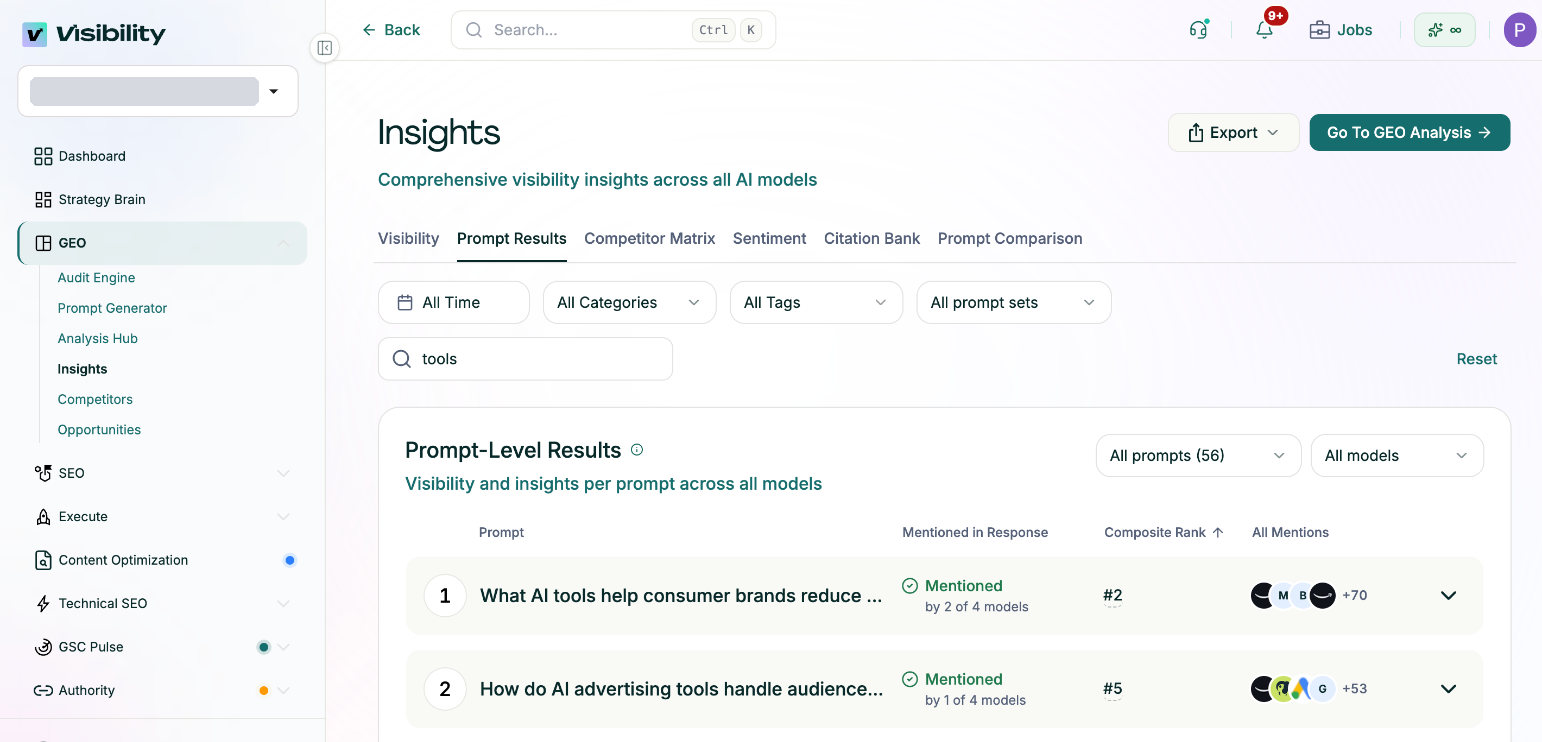
For example, an ecommerce team might see a relevant discovery topic in Business Hub, then inspect tracked comparison prompts to understand how its products are described. If those answers repeatedly expose an unclear policy or missing product detail, the team can correct the source pages and monitor subsequent responses. Website analytics then measures the visits and conversions attributable to observable referral traffic.
Claim the profile to improve the information you provide. Use that baseline to inform a broader visibility program, and explore Pixis Visibility to investigate the questions and competitive gaps that aggregate reporting cannot explain.