

You open Ads Manager on Monday morning. The spend is there. The impressions are there. The conversions aren’t. This is the most common version of Facebook ads not converting — and it’s rarely obvious why.
So you do what most people do. You check the creative. You check the audience. You wonder if the algorithm is just 'in a learning phase.' You make a small change and wait another few days.
The problem with this approach isn't that you're wrong about what could be broken. It's that you're guessing at the sequence. You're checking things in the order they occur to you — not in the order the data would actually point you.
A funnel breaks at one point. CTR drops, or cost goes up, or clicks arrive and then disappear. Each signal points somewhere specific. When you know what to look at first, the diagnosis takes minutes, not days.
This piece walks through a 15-minute AI-assisted diagnosis process for Facebook ads not converting — one that works the same way a paid media analyst would approach an underperforming account. Starting with the metrics that isolate the problem fast, then drilling into root cause.
Before You Troubleshoot: Get the Right Mindset
The instinct when ads underperform is to change something. Change the creative. Change the audience. Duplicate the campaign. That instinct is expensive.
Every change you make during a live campaign resets Meta's learning phase. More changes mean more volatility, more wasted spend in relearning cycles, and — crucially — less clarity on what actually caused the original problem.
The right move before you touch anything is to read the data. Not all of it. The right slice of it, in the right order.
Here’s the framework. Facebook ads not converting almost always traces back to one of three funnel stages — and the signal tells you which one.
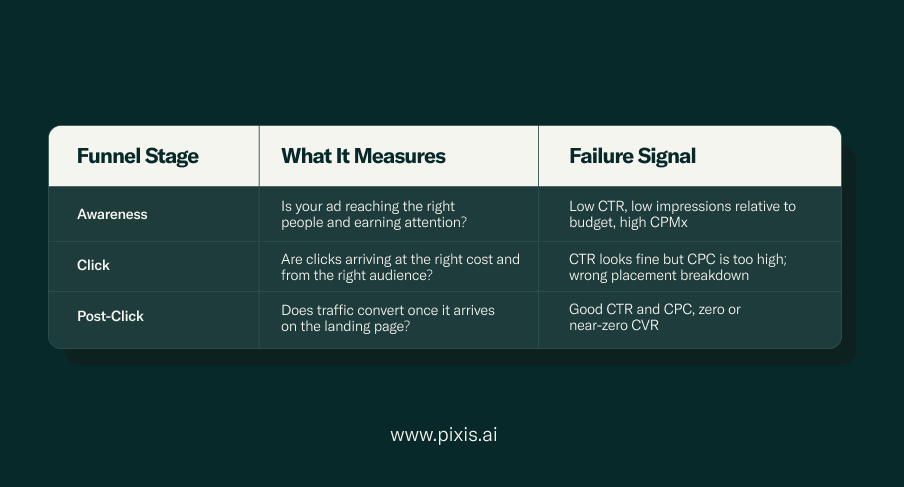
The diagnosis below moves through these three layers in order. You don't need to check everything. You need to know where the funnel breaks — and work backward from that point.
The 15-Minute AI Diagnosis: Step by Step
What makes AI-assisted diagnosis different from manual troubleshooting isn't that it's faster at pulling numbers — it's that it surfaces the pattern across all those numbers simultaneously. A manual audit checks one metric at a time. An AI analysis reads CTR, CPC, CVR, placement breakdown, audience efficiency, and creative fatigue signals together, then tells you what the combination means.
Here's the sequence.
Step 1: Check Your Spend Delivery First (2 minutes)
Before anything else, confirm the campaign is actually spending as intended. A Meta ad campaign not spending its full budget is one of the most common and least-diagnosed issues in underperforming accounts — and it looks identical to a conversion problem until you check delivery separately.
Ask your AI analyst: how is daily spend tracking against the campaign budget? Are there any ad sets with zero or near-zero delivery?
What to look for:
- Underspend usually means an audience that's too narrow, a bid that's too low, or creative that's been flagged for limited distribution. It's not a conversion problem — it's a delivery problem with a completely different fix.
- Overspend or erratic pacing may indicate budget exhaustion on certain days, which artificially suppresses delivery on others.
- If spend is healthy and on-pace, move to Step 2. If it isn't, stop here — a delivery problem needs to be fixed before conversion optimisation makes any sense.
What Prism's Meta Agent surfaces here
Spend, impressions, and pacing across all campaign levels continuously — with automatic detection of underspend and overspend across campaigns, ad sets, and individual ads. It flags issues before you even think to check.
Step 2: Isolate Where Your Facebook Ads Are Not Converting (3 minutes)
Pull CTR, CPC, and CVR together. This combination tells you exactly where in the funnel the problem lives.
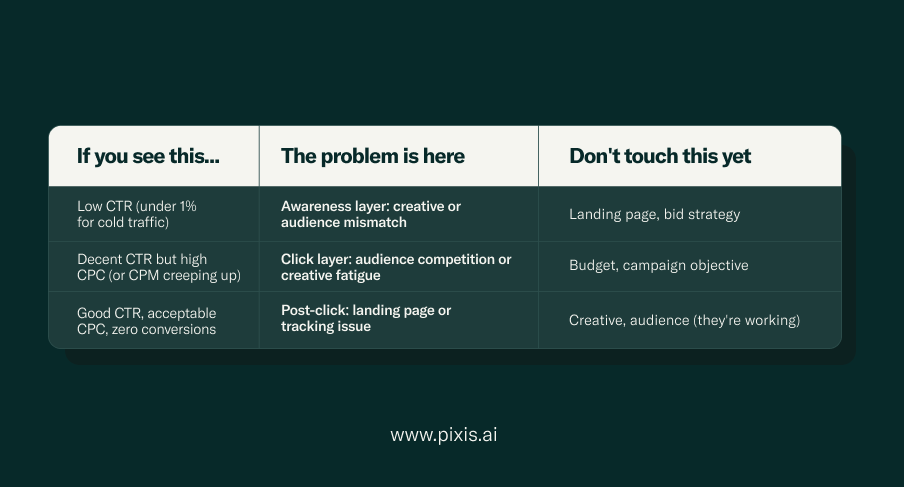
This step alone eliminates most of the guesswork. Once you know which layer is broken, every subsequent fix is targeted — not speculative.
Step 3: Run the Breakdown Analysis (5 minutes)
Now that you know which funnel layer to investigate, go one level deeper. When Facebook ads not converting traces back to the click or post-click layer, placement and device breakdowns are where the real answer hides. Meta’s own reporting lets you slice performance by placement, device, and audience segment. Most people never look at this data. It’s where the most actionable insights live.
Ask your AI analyst to break down performance across:
- Placement — Feed vs. Stories vs. Reels vs. Audience Network. A campaign dragged down by Audience Network placements doesn't have a creative problem — it has a placement allocation problem.
- Device — Mobile vs. Desktop. If CVR is fine on desktop but non-existent on mobile, you have a landing page friction issue on the device that most of your traffic uses.
- Audience segment — Are your lookalike audiences outperforming saved audiences? Are certain age brackets or genders burning through budget at dramatically higher CPCs without converting? The breakdown tells you.
What Prism's Meta Agent surfaces here
Campaign, ad set, and ad performance sliced by placement, device, and audience segment — all in one conversation. You ask, it reads the cross-section of your account data, and it tells you what the combination means. No manual pivot tables.
Step 4: Check for Creative Fatigue (3 minutes)
If your campaign has been running for more than three to four weeks without creative rotation, creative fatigue is a leading reason Facebook ads not converting — even if CTR hasn’t collapsed yet. The decline is often gradual. Frequency creeps up. CTR dips slightly. CVR drops. Individually, each metric still looks ‘okay’. Together, they signal a creative that’s been seen too many times by too many of the same people.
The signals to ask your AI analyst to surface:
- Frequency above 3–4 for cold audiences — this means the same people are seeing the same ad repeatedly, and novelty has worn off.
- A declining CTR trend over the past 7 days, even if the absolute number is still acceptable.
- CVR declining in step with CTR — which distinguishes creative fatigue from a post-click problem.
Creative fatigue is one of the least-checked causes of Facebook ads not converting at scale, because the drop is gradual rather than sudden. It rarely triggers a panic. But left unaddressed, it compounds. For a full breakdown of the signals to watch — including the CTR and frequency thresholds that matter most — read Pixis’s guide on spotting creative fatigue before it tanks your ROAS.
3–4 weeks: The typical lifecycle of a creative before fatigue begins to affect CTR and CVR — especially in small, well-defined audiences.
Step 5: Check Audience Efficiency (2 minutes)
The last step in the 15-minute diagnosis addresses one of the most overlooked causes of Facebook ads not converting: audience and objective mismatch. Are your ad sets reaching people who have the intent to convert — or just people who are statistically likely to click?
Meta's algorithm optimises for the objective you set. If you're running a Traffic objective, it will find you clicks. If those clicks don't convert, the problem isn't Meta's — it's the objective mismatch.
Check:
- Campaign objective — Traffic and Engagement objectives drive behaviour that looks like engagement but isn't purchase intent. If you want conversions, you need a Sales or Leads objective.
- Saved vs. lookalike audience performance — if your saved audiences are burning spend without conversions but your lookalikes are converting, the targeting architecture needs restructuring.
- Audience overlap — running multiple ad sets to overlapping audiences means you're competing against yourself in Meta's auction, inflating your own CPC.
The Full Diagnostic Map
Here’s the full 15-minute framework in one place — every step mapped to what it surfaces and why Facebook ads not converting almost always resolves to one of these five signals:
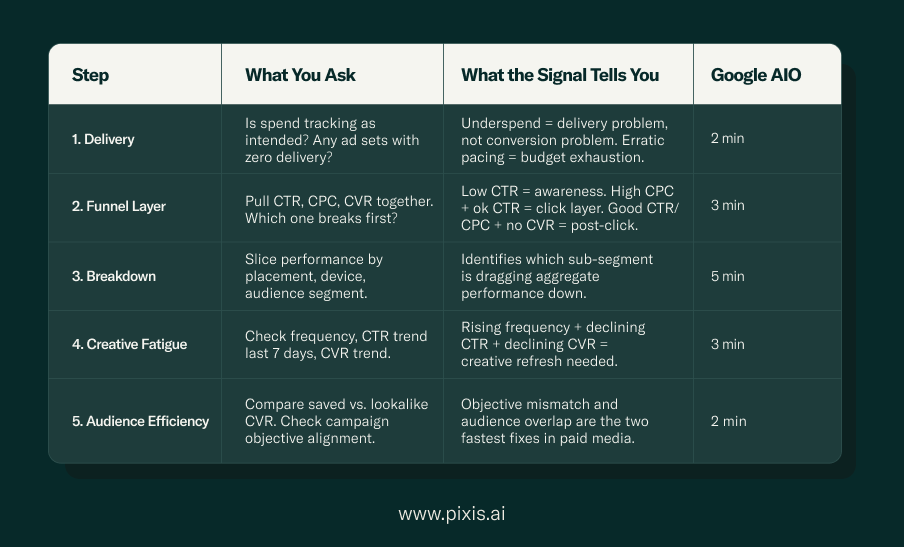
At the end of this sequence, you have a specific answer to why your Facebook ads not converting — not a list of things to check. Every outcome is one of three findings: a delivery issue, a funnel-layer issue with a specific location, or a post-click issue that lives outside Ads Manager entirely. Each has a distinct fix — and none of them require you to change everything at once.
Why Most Troubleshooting Guides Don't Actually Help
Search “Facebook ads not converting” and you’ll find the same Meta ads diagnosis approach repeated everywhere: a list. Check your pixel. Refresh your creative. Narrow your audience. Test new copy. All of these might be right. None of them tells you which one to do first.
The checklist approach to Facebook ads not converting fails for one specific reason: it treats all possible causes as equally likely. They’re not. Spend delivery failures are far more common than campaign objective errors. Creative fatigue in week six looks almost identical to an audience problem in week two — unless you read the frequency data alongside the CTR trend.
An AI analyst doesn't give you a list. It reads your specific account data — your metrics, your history, your patterns — and surfaces what the combination of signals actually means. The output isn't 'here are seven things to check'. It's 'your CTR by placement shows Audience Network is absorbing 38% of spend at a CPM 2.4x higher than your Feed placements, with zero conversion events from that segment in the last 14 days. Exclude it.'
That’s the difference between a checklist and a diagnosis. If you want to see what that looks like against a real account, read how Pixis diagnosed why Facebook ads stopped performing for a live account.
After the Diagnosis: Making Changes Without Resetting the Learning Phase
Once you've identified the problem, how you fix it matters as much as finding it. Meta's algorithm needs data continuity to optimise. The more you disrupt the campaign structure, the more you reset the learning cycle — and the more spend you waste relearning what the campaign already knew.
Some changes are safer than others:
Low-disruption fixes (do these first)
- Excluding a placement — this doesn't reset learning for other ad sets.
- Pausing a single underperforming ad — the ad set continues learning.
- Adjusting the daily budget by less than 20% — Meta’s learning phase is sensitive to budget changes above this threshold.
- Refreshing creative within an existing ad set — add a new ad rather than editing an existing one.
High-disruption fixes (only if low-disruption doesn't resolve it)
- Changing the campaign objective — requires a new campaign, full restart of learning.
- Restructuring audience targeting significantly — resets learning at ad set level.
- Increasing budget by more than 20% at once — triggers a new learning phase.
The sequence matters: always try the lowest-disruption fix that addresses the diagnosed problem. The most common case of Facebook ads not converting due to creative fatigue is solved by adding new creative — not duplicating the campaign. If a placement is burning spend, exclude it before restructuring the ad set.
Prism action execution
Prism's Meta Agent surfaces the fatigue signal, identifies the specific creative, and recommends the exact fix — so you go into Ads Manager knowing precisely what to change.You get the diagnosis and the action in the same conversation, without jumping between tools.
FAQs
Why are my Facebook ads getting clicks but no conversions?
This is a post-click problem — the ad is working, the landing page isn’t. Check three things in order: first, that your campaign objective is set to Sales or Leads (not Traffic); second, that your
Meta Pixel or Conversions API is firing correctly on the conversion event; third, that the landing page message matches the ad offer. A mismatch between ad copy and landing page headline is the single most common cause of high-CTR, zero-CVR campaigns.
How do I know if my Meta ads have creative fatigue?
Look at three signals together: frequency above 3–4 for cold audiences, a declining CTR trend over the past 7 days, and CVR declining in step with CTR. If all three are moving in the same direction, the creative needs refreshing. If only CTR is declining but CVR is stable, the issue may be audience saturation rather than creative fatigue specifically.
What's the fastest fix for Facebook ads not converting?
Run the funnel diagnosis first — the fastest fix for Facebook ads not converting is always the one that addresses the actual break point, not a random change. If the diagnosis points to creative fatigue, add new creative to existing ad sets rather than duplicating campaigns. If it points to placement inefficiency, exclude underperforming placements. Both of these can be implemented in under 10 minutes without resetting Meta’s learning phase.
Why do my Facebook ads have a high CTR but low conversion rate?
High CTR with low CVR almost always indicates a post-click disconnect: people click because the ad is relevant, but the landing page doesn't deliver on the expectation the ad set. Check message match (does the landing page headline reflect the ad offer?), page load speed (every additional second costs conversions, especially on mobile), and conversion tracking (is Meta actually seeing the conversion events when they fire?).
Can AI actually diagnose why Facebook ads not converting is happening in your account?
Yes — not by guessing, but by reading the pattern across your specific account metrics simultaneously. Where manual troubleshooting checks metrics one at a time, an AI analyst reads CTR, CPC, CVR, placement breakdown, frequency, and audience efficiency together. The combination of signals points to a specific cause. Prism's Meta Agent does exactly this — you describe the problem, it reads your account data, and it tells you where the funnel broke and why.
How often should I check if my Facebook ads are converting?
For campaigns spending more than $50/day, a daily performance check is worthwhile — not to make changes every day, but to catch delivery problems and creative fatigue signals early. Campaigns spending less than $30/day need at least 48–72 hours of data before drawing conclusions about conversion performance.
The Point
Facebook ads not converting is a solvable problem. Whether you’re trying to fix low ROAS on Facebook ads or simply can’t work out why clicks aren’t turning into customers, the answer is almost never a mysterious algorithm issue or niche targeting failure. It’s almost always a specific, identifiable break in a three-stage funnel — and once you know which stage, the fix is usually straightforward.
The fifteen minutes aren't spent checking things at random. They're spent reading the data in the right sequence: delivery first, funnel layer second, breakdown analysis third, creative fatigue fourth, audience efficiency fifth. Each step eliminates a category of cause. By the end, you know exactly what to fix.
The difference between an AI-assisted diagnosis and a manual checklist isn't speed — it's that AI reads your specific account data rather than applying generic logic. Your CTR trend. Your placement breakdown. Your frequency against your audience size. That specificity is what turns a fifteen-minute conversation into a clear answer.
Run the 15-minute diagnosis on Prism
Prism's Meta Agent reads your account data, surfaces the funnel-layer breakdown, and tells you exactly what to fix — before you touch anything in Ads Manager. No pivot tables, no manual cross-referencing, no second-guessing the sequence.