

You're spending more on Google Ads than you have to. Every time a competitor bids aggressively on your best keywords, your costs climb while your results stay flat—or worse, decline.
The fix isn't a bigger budget. The fix is knowing what competitors are doing and where they're vulnerable. You can outmaneuver them without getting pulled into expensive bidding wars that drain your ROI.
This guide walks you through free and paid tools for competitor analysis. We cover the metrics that reveal overspending and practical ways to use AI to cut costs.
Why competitor analysis cuts Google Ads waste
Google Ads competitor analysis means researching other advertisers in your space. This helps you improve your own campaigns.
You look at their ad copy, keywords, bidding patterns, and landing pages. This helps you find gaps in their approach and avoid expensive mistakes.
The biggest payoff is you stop throwing money at bidding wars you can't win.
Quick ways to find search ads of competitors
You don't need expensive tools to start. Three free methods give you a clear view of what competitors are running right now.
1. Manual Google searches
Open an incognito browser and search your target keywords. You'll see which competitors appear in the ad slots above organic results.
Take screenshots of their headlines, descriptions, and any extensions they're using. Pay attention to the language they use and the offers they highlight. If multiple competitors emphasize the same benefit, that's a signal the market responds to that message.
2. Google Ads Transparency Center
Visit adstransparency.google.com and enter a competitor's domain. You'll see every ad they're currently running across Google's network, including Search, Display, and YouTube.
Filter by date range, region, and ad format to narrow your view. If they're running ads in regions you haven't considered, that indicates an untapped opportunity.
3. Ad Preview and Diagnosis Tool
Inside your Google Ads account, use the Ad Preview and Diagnosis Tool. It lets you see search results without triggering impressions.
You can check different locations, languages, and devices to understand how competitors show up across contexts.
Free Google AdWords competitor analysis toolkit
Google provides three built-in tools that deliver competitive intelligence without a subscription fee. Each one answers a different question about your competitive position.
Keyword Planner
Keyword Planner shows you search volume, competition levels, and suggested bid ranges for any keyword. When you enter competitor domains, it suggests keywords they are targeting based on their website content.
Use this to find keyword gaps where competitors aren't bidding or where competition is rated as low. Those gaps often represent cheaper clicks with less auction pressure.
Auction Insights report
The Auction Insights report lives inside your Google Ads campaigns. It compares your performance against other advertisers competing for the same keywords.
Here's what the key metrics tell you:
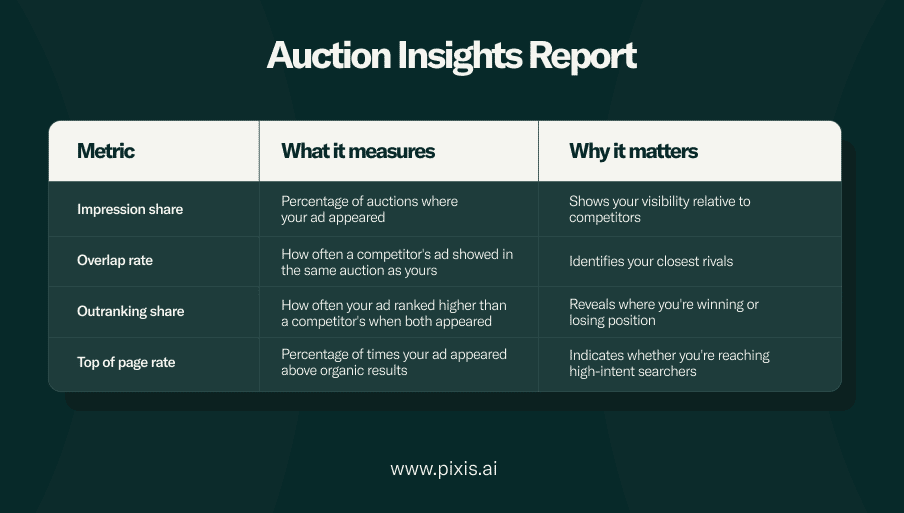
Run this report monthly to track shifts in competitive intensity. If a competitor's impression share suddenly jumps, they have increased their budget or bids.
Google Trends
Google Trends reveals seasonal patterns and rising search interest in your industry. Compare multiple keywords to see which terms are gaining momentum and which are declining.
When you spot an upward trend that competitors haven't caught yet, you can bid early while costs are still low. This gives you a window to capture market share before everyone else piles in.
Paid Google Ads competitor research tools compared
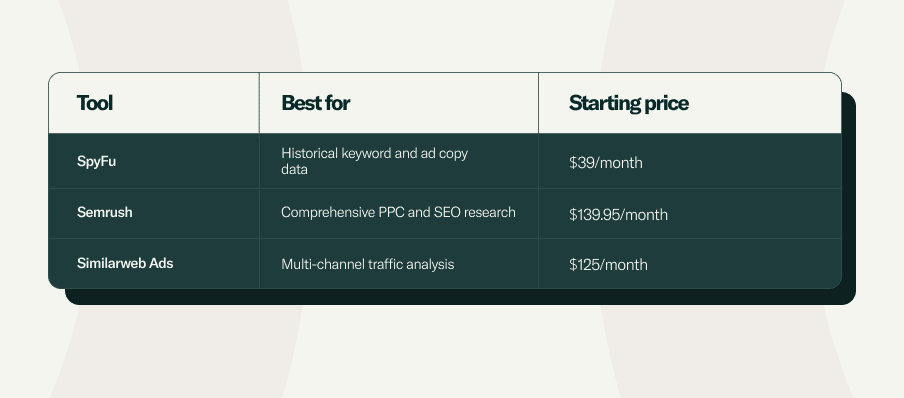
Free tools give you a foundation. Paid platforms provide historical data and deeper keyword intelligence that free tools can't match.
SpyFu
SpyFu specializes in PPC history. You can see every keyword a competitor has bought on Google Ads over the past 16 years. This includes their ad variations and estimated monthly spend.
The value here is pattern recognition. If a competitor has been bidding on the same keywords for years, those terms convert. If they stopped bidding on something recently, it was not profitable.
Semrush
Semrush offers the Advertising Research tool, which shows competitors' top-performing keywords, ad copy examples, and their position in search results. The Ads History report tracks when competitors start and stop campaigns, helping you identify seasonal pushes or always-on campaigns.
Use this to time your own budget increases around periods when competitors pull back.
Similarweb Ads
Similarweb goes beyond Google to show you competitors' traffic sources across all channels. You'll see their mix of paid search, display, social, and referral traffic.
This broader view helps you understand whether competitors are winning through Google Ads alone or if they're driving traffic through other channels you're ignoring.
4 steps to check competitors' Google ads and protect your budget
1. Identify direct and indirect rivals
Start with the obvious competitors who sell the same products or services. Then expand to indirect competitors who solve the same customer problem in a different way.
For example, if you sell project management software, your direct competitors are other SaaS tools like Asana or Monday. Your indirect competitors are consulting firms that help companies manage projects without software. Both groups bid on keywords related to project efficiency, so both affect your costs.
2. Collect ad copy, keywords, and landing pages
Document everything you find in a spreadsheet. For each competitor, record:
- Headlines and descriptions from their ads.
- Keywords they appear to be targeting based on your searches.
- Landing page URLs and the offers featured on those pages.
- Ad extensions they use (sitelinks, callouts, structured snippets).
Look for patterns across competitors. If three rivals all emphasize free trials in their headlines, that messaging resonates with your shared audience.
3. Benchmark spend and impression share
Use Auction Insights to see your impression share compared to competitors. If you're capturing 15% impression share and a competitor has 40%, they're either bidding more aggressively or have better Quality Scores.
Low impression share means you're missing auctions, either because your bids are too low or your daily budget caps out early. High overlap rate with a specific competitor means you're fighting the same battles repeatedly.
4. Set bid ceilings and negative keyword fences
Once you know where competitors dominate, set maximum bid limits on those keywords to avoid overspending. If a competitor consistently outranks you and the keyword costs $15 per click, cap your bid at $8 and reallocate that budget to terms where you can win.
Build negative keyword lists to exclude searches where competitors have locked up the market. If branded searches for a competitor's product trigger your ads, add those as negatives to stop wasting impressions on users who aren't looking for you.
Metrics that tell you when competitors are outbidding you
Impression share lost to rank
This metric shows the percentage of auctions you lost because your bid or Quality Score was too low. When impression share lost to rank climbs above 20%, competitors are consistently outbidding you.
You have two options: increase bids to reclaim position, or accept the lower share and focus budget elsewhere. The right choice depends on whether those lost impressions would have converted.
Top of page rate
Top of page rate measures how often your ads appear above organic search results. Ads below organic listings get far fewer clicks, especially on mobile devices where users rarely scroll.
If your top of page rate drops below 50%, you're losing visibility to competitors who rank higher. This often happens when rivals increase bids or improve their ad relevance.
Search absolute top impression share
Absolute top impression share tracks appearances in the very first ad position. This position captures the most attention and delivers the highest click-through rates.
Here's how to interpret your percentage:
- You're dominating this keyword space.
- You're competitive but sharing visibility with rivals.
- Competitors control this keyword and you're fighting for scraps.
Turning insights into lower CPC and higher ROAS
Create challenger ad copy angles
Review the ad copy competitors use most frequently. Then write ads that directly counter their positioning or highlight what they don't mention.
If competitors emphasize price, talk about quality or support. If they focus on features, emphasize ease of use. Differentiation reduces direct comparison and improves your Quality Score by making your ads more relevant to specific user intents.
Mine underserved long-tail keywords
Long-tail keywords (three or more words) often have lower competition because they're too specific for competitors to bid on at scale. Use Keyword Planner to find variations of your core terms that still indicate purchase intent.
For example, instead of bidding on "CRM software" where CPCs hit $30, target "CRM software for real estate teams" at $8 per click. You'll reach fewer people, but the ones you reach will convert.
Shift spend to high-margin times and devices
Auction Insights and your own performance data reveal when competitors are most and least active. If competitors reduce bids on weekends, that's when your budget goes further.
If your data shows mobile users convert at lower rates, reduce your mobile bid adjustments. Reallocate that spend to desktop where you have an advantage.
Smarter bid and budget moves with AI automation
Predictive budget reallocation
AI systems analyze competitor activity patterns and predict when auction costs will spike. They automatically shift budget away from expensive periods and toward windows where you'll get more efficient results.
This happens in real time, not after you've already burned through your daily budget. The system learns which competitors drive up costs and adjusts before those patterns repeat.
Dynamic bid multipliers
Instead of setting static bids, AI applies multipliers based on real-time signals including competitor presence, time of day, device type, and audience behavior. When a high-value competitor enters an auction, the system reduces your bid to avoid an unprofitable bidding war. When that competitor exits or reduces activity, bids automatically increase to capture available impression share. This balances competitiveness with cost control.
Always-on creative testing
AI-powered platforms continuously test ad variations and analyze which messages perform best against specific competitors. When a competitor changes their positioning, the system identifies which of your ad angles counters that shift most effectively.
We at Pixis built these capabilities into our platform. We saw marketers spending hours each week manually adjusting bids and budgets in response to competitor moves.
Our AI monitors competitive signals across all your campaigns. It makes micro-adjustments thousands of times per day to keep your CPCs down while maintaining your target impression share.
Beat overspend and see competitors' ads in real time with Pixis Prism
Pixis Prism combines competitor monitoring with AI-powered budget optimization so you stop overspending before it happens.
The platform tracks competitor ad changes, bid patterns, and impression share shifts across all your campaigns. It then automatically adjusts your approach to maintain performance without inflating costs.
You get alerts when competitors launch new campaigns or change their messaging, giving you time to respond strategically rather than reactively. Prism connects directly to your Google Ads account. It makes bid and budget changes in real time based on competitive pressure and your performance goals.
Try Prism today and see how AI-driven competitor analysis reduces your Google Ads costs while protecting your market position.
FAQs about Google Ads competitor analysis
How often should I run Google Ads competitor analysis?
Monitor competitors weekly for active campaigns and monthly for strategic shifts. Set up automated alerts for major changes in top competitors' ad spend or messaging so you catch shifts early.
Weekly checks keep you aware of tactical moves like new ad copy or landing pages. Monthly reviews help you spot broader trends like budget increases or new market segments they're targeting.
Can I do AdWords competitor analysis free without third-party tools?
Yes, Google provides Auction Insights, Transparency Center, and manual search methods at no cost. These cover basic competitor research needs for most advertisers, especially if you're just starting out.
Free tools won't give you historical data or spend estimates. They show you what's running right now and how you're performing relative to competitors in the same auctions.
Is it legal to use competitor brand names in my Google ads?
You can bid on competitor keywords, but you can't use their trademarks in ad copy without permission. Google allows keyword bidding but restricts trademark usage in headlines and descriptions.
If a competitor files a trademark complaint, Google will disapprove your ads. Stick to bidding on competitor terms and using generic language in your ad copy to stay compliant.
How do I see how much competitors spend on Google ads?
Use tools like SpyFu or Semrush for spend estimates, or analyze Auction Insights impression share data to infer relative budget sizes. Exact spend amounts aren't publicly available, but impression share gives you a directional sense of who's investing more.
If a competitor has 60% impression share and you have 15%, they're spending four times what you are on those keywords, assuming similar Quality Scores.
What is the best way to automate competitor monitoring?
Set up Google Alerts for competitor company names, use tool notifications for ad changes, and implement AI-powered platforms that track competitive shifts automatically. Automation prevents you from missing important changes and frees up time for strategy instead of manual checking.
Platforms like Pixis Prism monitor competitors continuously and alert you only when something significant changes, reducing noise while keeping you informed.