
The AI draft reads well. The body is on topic, the headings make sense and the examples hold up. Then you open the SEO panel and find a title tag with your domain pasted into it, a meta description that says "[Insert description]", a slug of "post-4829" and eleven tags, eight of which do not exist in your taxonomy.
This is common. Models put most of their effort into the body text, and the fields around it get less attention. Yet those fields decide how the page appears in search results, in link previews and in your own site structure.
Fixing them is quick once you know where to look. Most of the work is a consistent order of checks and a short list of failure patterns.
This guide covers where AI metadata usually goes wrong, how to fix each field, an illustrative before-and-after, the checks to run before publishing, and a 10-point checklist your team can reuse.
Key takeaways
- Treat every AI-generated title, description, slug and tag as a first draft; Google's guidance on AI content says review applies to metadata as well as body text.
- The most common errors are placeholders, brand or domain strings in titles, lengths far outside normal ranges, invented tags and empty fields.
- Write the meta description for the click, keep it unique across the site, and write the title tag for the query rather than copying the H1.
- Prune tags to the few that exist in your taxonomy, set one canonical, and confirm Open Graph fields and the preview image.
- Run the same 10-point checklist on every draft so the review takes minutes rather than a full rewrite.
- Pixis Visibility lets you edit a draft's SEO fields before pushing it to WordPress as a draft; the final judgment on wording stays with your editor.
Where AI metadata usually goes wrong
Google's guidance on generative AI content asks publishers to review AI-generated content for accuracy before it goes live, and the guidance extends that review to metadata such as title elements, meta descriptions, structured data and image alt text, as Search Engine Journal reported.
In practice, the same failure patterns show up again and again:
- Placeholders: bracketed text such as "[Insert Title Here]" or "Lorem ipsum" that the model never replaced.
- Brand or domain strings in the title: the site name or URL pasted into the title tag, often duplicating what your CMS adds automatically.
- Length problems: titles and descriptions far longer or shorter than the space search results usually show.
- Invented taxonomy: tags and categories that do not exist on your site.
- Empty fields: no meta description, no Open Graph image, or a slug left as a numeric ID.
- Repetition across drafts: the same title pattern or description reused on several pages.
That last one matters more than it looks. Google's snippet guidance asks for unique descriptions for each page, and identical descriptions across a batch of AI drafts give searchers no reason to pick one result over another.
Fix the title tag, meta description and slug
These three fields shape how the page appears in search results, so fix them first.
Title tag
The title tag is what searchers usually see as the clickable link in results. Check that it:
- Names the topic and the primary keyword in natural language.
- Matches the search intent: a how-to query needs a how-to title.
- Stays short enough to display in full. A common working range is roughly 50 to 60 characters, but Google truncates by display width, so check the preview rather than relying on a count alone.
- Contains no domain or duplicated brand string.
Do not copy the H1 into the title tag by default. They do different jobs, as the guide on how to write H1s for SEO and AI search explains.
Meta description
Rewrite the description as a short pitch for the click: what the page covers, who it is for, and what the reader will be able to do. Include the primary keyword where it fits naturally. Keep it unique across the site.
Google may rewrite descriptions it considers a poor match for the query, so a specific, accurate description has the best chance of being shown. For how titles and descriptions affect rankings and clicks, see do title tags and meta descriptions drive rankings.
Slug
Use lowercase words separated by hyphens. Remove dates, template variables and filler words. "/blog/seo-tips-small-businesses" tells readers and crawlers what the page is about; "/blog/post-4829" does not.
Clean up tags, categories, canonical, alt text and Open Graph
- Tags and categories. AI drafts often suggest many tags, several of them new. Keep the few that already exist in your taxonomy and match the page, and remove any the model invented. In most CMS setups, tags organize content for readers rather than acting as a ranking signal.
- Canonical URL. For original content, the canonical points to the page itself. For syndicated or cross-posted content, it points to the preferred source. Check that the page outputs only one canonical tag; two usually means two plugins are both adding one.
- Image alt text. Replace any alt text that describes something the image does not show. Use an accurate description, or leave alt empty for purely decorative images.
- Open Graph fields. These control how the page looks when shared. Set the OG title and description, often matching the title tag and meta description, and confirm an OG image is set so shared links get a preview.
- Structured data. If your template adds Article or Organization schema, confirm the fields it pulls from, such as the headline and author, are correct after your edits.
An illustrative before-and-after
Suppose an AI draft targets "SEO tips for small businesses". The figures below are invented to show the kind of changes a typical review makes.
- Title tag: AI draft: 63 characters, domain at the start. After review: 50 characters, domain removed.
- Meta description: AI draft: empty. After review: 153 characters, written for the click.
- Slug: AI draft: /blog/post-4829. After review: /blog/seo-tips-small-businesses.
- Tags: AI draft: 11 suggested. After review: 3 kept, all existing categories.
- OG image: AI draft: not set. After review: featured image assigned.
None of these edits took long. Together, they change how the page appears in results, in the site's structure and in every shared link.
Check the fields against the page before publishing
Field-by-field fixes can still leave a mismatch between the metadata and the page. Before you publish:
- Preview the result. Use your SEO plugin's search preview to see whether the title and description display in full.
- Read title, description and H1 together. They should describe the same page and the same promise, without repeating each other word for word.
- Search the site for the description. If another page already uses it, rewrite one of them.
- Run a page audit if you have one. A content and technical check catches problems the metadata review misses, such as missing schema or broken internal links.
For deciding which of these checks to automate and which to keep with an editor, see what to automate versus keep human in SEO.
A 10-point pre-publish checklist
Run this on every AI draft before it goes live.
- The title tag names the topic and primary keyword, matches intent and displays in full in the preview.
- The meta description summarizes the page, gives a reason to click and is unique across the site.
- The slug is lowercase, hyphenated and free of dates, IDs and template variables.
- Tags are pruned to a few existing, relevant labels.
- The category matches the right section, with no new or duplicate categories.
- There is exactly one canonical tag, pointing to the correct URL.
- Every image's alt text describes what the image actually shows.
- The OG title, description and image are set.
- No placeholder text remains; search every field for square brackets and "lorem".
- Title, description and H1 describe the same page without repeating each other.
If any check fails, fix the field and run the list again.
Where Pixis Visibility fits
When drafts are produced in Pixis Visibility, the SEO fields sit next to the draft body. You can edit the meta title, meta description and tags before the draft goes anywhere, and drafts are written in your brand voice from a brief or a content plan, which reduces generic metadata to begin with.
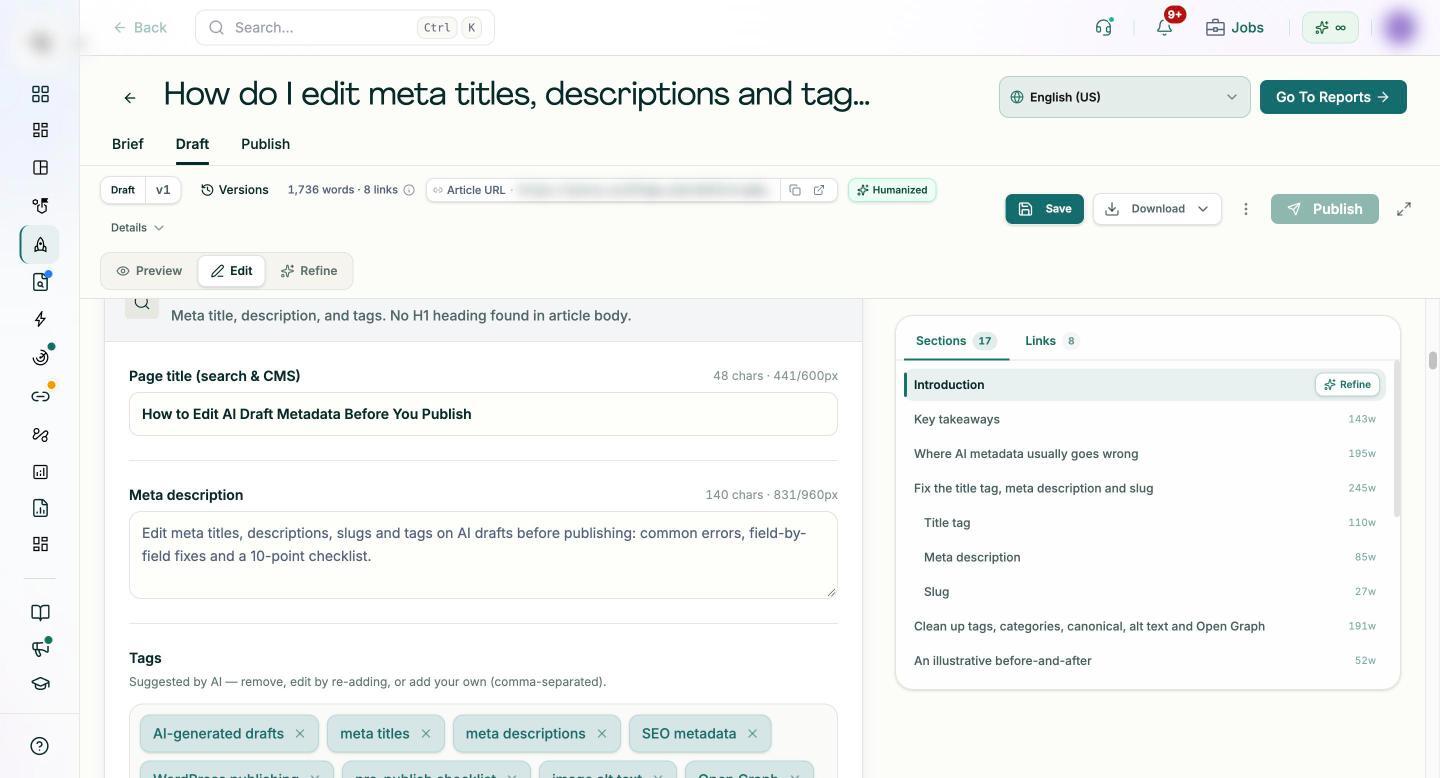
When the fields are clean, one-click WordPress publishing pushes the post to WordPress as a draft first. Going live still needs approval, so your editor's sign-off remains the final gate.
Page audits add a technical score and a content score for a page, list gaps by severity and show a projected traffic opportunity, which helps decide which published pages to revisit first. The technical SEO audit can also generate metadata and schema suggestions; these are suggestions only and are not pushed to the live site automatically.
What stays with your editor is the wording itself: the click pitch in the description, the intent behind the title and the decision about which tags belong.
Make the checklist part of every review
Start with your next AI draft. Run the 10-point checklist, note which checks failed, and fix them. After a week of drafts, look at the failures again: the same errors repeating usually point to a prompt or template that needs changing.
Then make the checklist a fixed step between editing and publishing, with one named owner. It takes minutes per draft and prevents the errors that are hardest to spot once a page is live.
Get started with Pixis Visibility to edit SEO fields on AI drafts and push them to WordPress as drafts, ready for review and approval.
FAQs
How long should meta titles and descriptions be?
Common working ranges are roughly 50 to 60 characters for titles and 150 to 160 for descriptions, but Google truncates by display width, not character count. A Backlinko study cited in Keyword.com's metadata mistakes guide found that titles of 40 to 60 characters had higher click-through rates. Check the preview rather than relying on a count.
Do tags on AI-generated content affect SEO?
Usually not directly. In most CMS platforms, tags organize content for readers and site navigation. Keep them few and consistent with your taxonomy, since dozens of thin tag archive pages can clutter the site.
What should I do if the AI keeps producing the same title pattern?
Change the instruction, not just the output. Add the target query and intent to the brief, ask for several title options, and pick or edit one by hand.