

A sales rep forwards a screenshot from a prospect. They asked ChatGPT for the best tools in your category, and a competitor you barely track was the first name in the answer. Your team checks a few other prompts and finds the same rival climbing in Perplexity too. Nobody knows when it started.
Most teams find out this way, after the shift has already reached buyers. An alert system is meant to close that gap, so a competitor's rise reaches the right person while there is still time to respond.
The hard part is that AI answers vary from run to run. The same prompt can name different brands in a different order each time. Alert on every change and the channel fills with noise; alert too loosely and a real shift goes unnoticed for weeks.
This guide explains which prompts to watch, how to set a baseline and thresholds, where to send alerts, and what to do when one fires.
Key takeaways
- Watch a fixed set of 20 to 30 bottom-of-funnel and comparison prompts. A competitor gaining on "best tool for a specific use case" matters far more than on "what is the category."
- Build a baseline before you set any alert. Run each prompt several times per engine and record which brands appear, where, and which sources are cited.
- Alert on sustained change, not single runs. A competitor that appears more often across two consecutive weeks is a shift; one good run is noise.
- Send each alert to someone who can act on it, with a short playbook for diagnosing and responding.
- Pixis Visibility tracks brand mentions, average position, citation rate, share of voice and top-3 presence for you and up to 20 competitors, and can alert you when a competitor gains ground; the response stays with your team.
Step 1: Choose the prompts that matter
Start with the questions buyers ask when they are close to a decision. Two formats cover most of them:
- Category with a use case: "best [category] tool for [use case]," "top [category] platforms for [company type]."
- Direct comparison: "[your brand] vs [competitor]," "alternatives to [competitor]."
Aim for 20 to 30 prompts in total. Fewer and you miss shifts on important questions; many more and the baseline takes too long to build and review. Broad definitional prompts can stay in your wider tracking, but they rarely deserve an alert.
The best source of prompts is your own buyers. Sales call notes, support tickets and Search Console queries all show how people phrase the question. For a full method, see how to find buyer questions worth answering.
Then list the competitors to watch. Three to five direct competitors is a manageable start. Add others once the alert rhythm is working.
Step 2: Build a baseline
Before any alert can mean something, you need to know what normal looks like. Run each prompt several times on each engine your buyers use, usually ChatGPT, Perplexity, Gemini and Claude, and record:
- Which brands appear
- In what order
- Which sources the answer cites
- Whether your brand is mentioned, and where
Repeat this weekly for at least two to four weeks. From those runs, work out for each competitor and each prompt how often they appear, their average position, and their share of mentions. Put it in a matrix with prompts as rows and brands as columns, so you can read presence question by question and engine by engine.
The reason for repeated runs is variance. Because answers change between runs, a single reading tells you little. Several readings per week show the range a competitor normally sits in. For why category averages can hide this, see prompt-level visibility.
Step 3: Set thresholds that ignore noise
A threshold should sit just outside a competitor's normal range. Below it, the alert fires on ordinary variation. Far above it, a real shift has to be large before anyone hears about it.
Two rules keep most alerts meaningful:
- Require persistence. Alert only when the change holds across two or more tracking sessions. A competitor appearing in 5 of 5 runs for two consecutive weeks, up from 2 of 5, is a shift. Moving from 4 of 5 to 3 of 5 and back is not.
- Size the threshold from your baseline. If a competitor's mention rate normally moves by a few points week to week, set the alert above that range. One practical approach is to take 30 days of baseline readings and alert when a value moves more than two standard deviations from its average.
An illustrative example
Suppose a competitor appears in 32% of runs across 25 tracked prompts on one engine during the baseline, normally moving within 3 points either way. In the next two weekly sessions it appears in 40% and then 41% of runs. That holds above a 5-point threshold in both sessions, so the alert fires.
These numbers are made up to show the method. Your thresholds should come from your own baseline.
Step 4: Route alerts to someone who will act
An alert that lands in an unread inbox is the same as no alert. Decide who owns competitor movement, usually the SEO or content lead, and send alerts where that person already works.
Keep two streams apart. Competitor-gain alerts go to the owner as they happen. A weekly or monthly summary, with trends across all prompts, goes to the wider team and leadership. Mixing them buries the urgent signal in routine reporting.
Then test delivery. Trigger a test alert and confirm it reaches the right person or channel, with enough detail to act on: the prompt, the engine, the competitor and the change.
When an alert fires: a response playbook
The alert tells you something changed. The playbook tells you what to do about it.
- Read the actual answers. Open the AI answers for the affected prompts and see what the competitor is now being credited with, and which sources are cited. New citations from specific publications or review sites are often the cause.
- Check whether it is broad or narrow. Look across your matrix. Is the competitor rising on one prompt, one engine, or everywhere? A narrow gain often points to one new piece of content or one new citation. A broad gain suggests a sustained campaign.
- Find what changed on their side. Look for new pages targeting the prompt, fresh comparison content, new reviews, or coverage in publications the engines cite.
- Respond where the gap is. That may mean updating your page for the prompt, earning coverage from the same sources, or publishing a comparison the answer currently lacks. The GEO tactics guide covers the main options.
- Measure the response. Keep the same prompts in tracking and compare your presence before and after the change over the following weeks.
Monitoring without a response plan is expensive awareness. Each alert should end with an owner and a next step.
Check that the alerts catch real shifts
After two weeks of live alerts, review the system:
- False positives. How many alerts turned out to be noise? If it is more than about half, raise the threshold or require one more session of persistence.
- Missed shifts. Did anyone spot a competitor gain manually that the alerts missed? If so, the threshold is too loose or the prompt was not tracked.
- Coverage. Does the matrix include every competitor you care about, with current data for each engine?
- Timing. How long after the change did the alert arrive? Weekly tracking can mean up to a week's delay; daily tracking narrows it.
For a broader view of tracking across engines, see how to track your brand's visibility across ChatGPT, Perplexity and Gemini.
Where Pixis Visibility fits
The repetitive part of this process is running the same prompts across four engines, recording the results, comparing them with last week and noticing when a competitor moves. That is what a tracking platform should do.
Pixis Visibility runs prompt sets you build or auto-generate across ChatGPT, Perplexity, Gemini and Claude. For each prompt it shows the actual AI answer and tracks brand mentions, average position, citation rate, share of voice and top-3 presence. The competitor matrix covers up to 20 tracked competitors, so you can read each rival's presence prompt by prompt.
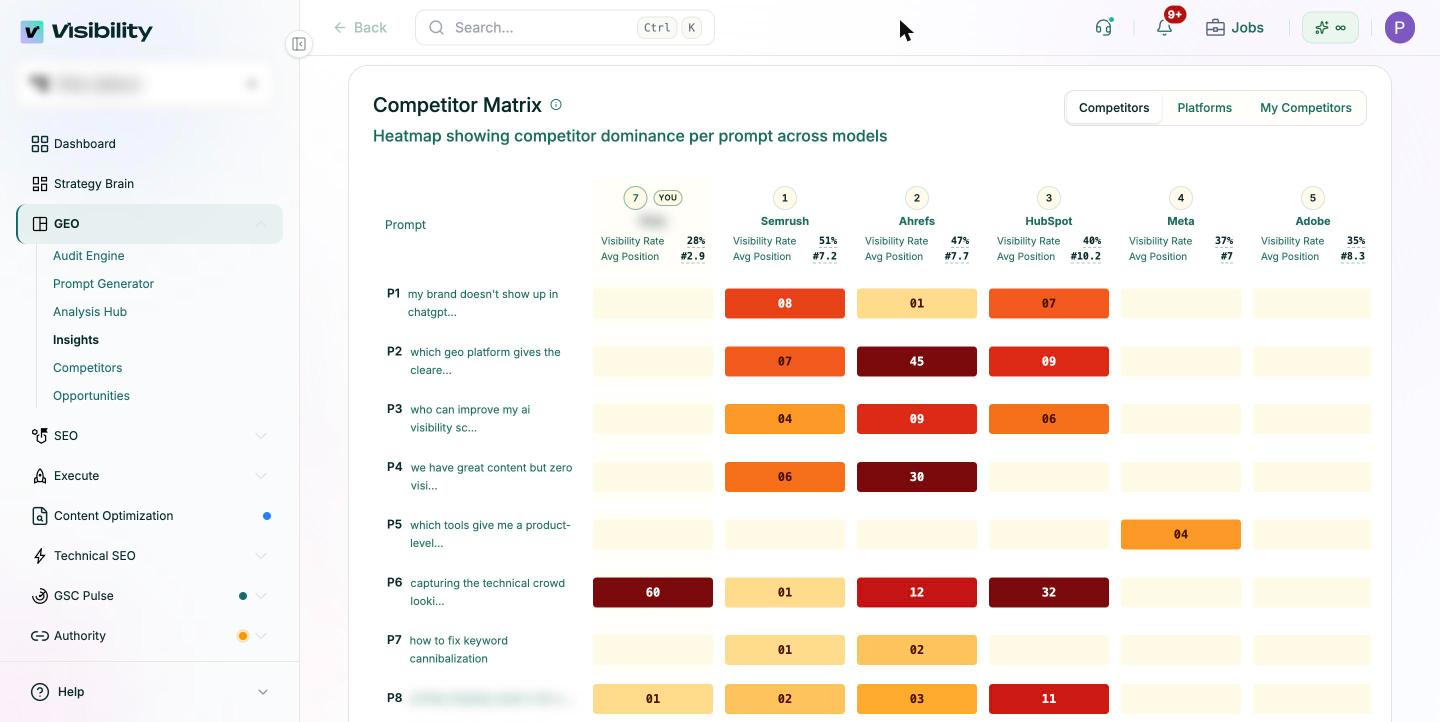
Its automations can send alerts when a competitor gains ground, alongside scheduled custom reports for the wider team, and deliver them by email or to a Slack channel. For a periodic deep dive, the GEO audit shows share of voice by funnel stage and can be exported as a PDF or PowerPoint report.
What stays with your team is choosing the prompts that matter, setting thresholds from your own baseline, and deciding how to respond when a rival moves.
Start with the prompts your buyers ask
Write down the 20 to 30 bottom-of-funnel and comparison prompts closest to a buying decision in your category. Run them across the engines your buyers use for two to four weeks to build a baseline.
Then set one threshold per competitor, route alerts to a named owner, and write the five-step playbook next to the alert settings, so the first alert that fires leads straight to action.
Get started with Pixis Visibility to track competitors across AI answers and get alerted when one starts gaining ground on the prompts that matter.
FAQs
How quickly will I know a competitor has gained ground?
It depends on how often you track. With weekly tracking, you can learn about a change up to a week after it happens. Daily tracking narrows that, but requiring persistence across sessions, which you should, adds at least one more cycle before an alert fires.
How many competitors should I track?
Start with three to five direct competitors and expand once the alert rhythm is working. Tracking too many at once makes the baseline slow to build and the alerts harder to triage.
Why do AI answers change between runs?
AI engines generate each answer fresh, and the sources they draw on can change. The same prompt can name different brands in a different order from one run to the next, which is why single readings are unreliable and baselines matter.