

ROAS rarely collapses all at once.
It slips.
A few ad sets start over-spending. A creative that once worked quietly loses steam. CPC inches up, conversions flatten, and nothing looks alarming enough to pause. By the time the weekly report lands, the damage is already done — and the conversation shifts from optimization to explanation.
High-performing performance teams don’t wait for weekly aggregates to tell them what went wrong. They operate in shorter feedback loops, with systems that surface early signals and make budget decisions visible while there’s still time to act.
This is where real-time budget optimization stops being a buzzword and starts becoming an operating habit.
Why ROAS Drift Is a Reporting Problem Before It’s a Performance Problem
Most teams don’t miss ROAS drops because they’re inattentive. They miss them because of how information arrives.
Weekly reports compress seven days of behavior into a single number. That hides sequencing. It masks which campaigns spiked early, which creatives fatigued mid-week, and where spend drifted off-plan before anyone noticed.
Real-time optimization flips that equation. Instead of asking “What happened last week?”, teams ask:
- What changed in the last 24–72 hours?
- What is spending right now versus what we planned?
- Which assets are quietly absorbing budget without returning value?
Prism is designed around answering those questions continuously, not retroactively.
Real-Time Visibility That Matches How Budgets Actually Move
Daily performance tracking that reflects reality, not status
Prism monitors spend, impressions, clicks, CTR, CPC, CPM, conversions, CPA, and ROAS across account, campaign, ad set, and ad levels in real time.
More importantly, it distinguishes between assets that are technically “on” and those that are actively spending and delivering. That difference matters when you’re trying to understand where budget is actually flowing.
A typical daily check looks like:
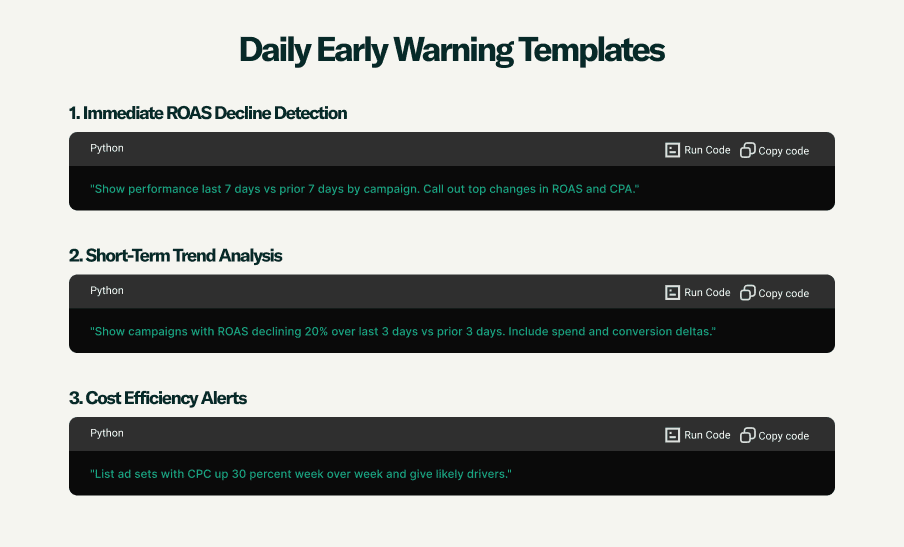
Show performance for the last 7 days vs the prior 7 days by campaign. Call out the biggest changes in ROAS and CPA.
This immediately surfaces directional movement — not just totals.
Budget Pacing Before Overspend Becomes a Post-Mortem
Catching pacing issues while they’re still correctable
ROAS drift often starts with pacing drift.
Prism tracks budget pacing at the campaign and ad set level, flagging both underspend and overspend against month-to-date plans. It also checks account-level spending limits so surprises don’t come from the platform side.
Instead of discovering a blown budget at the end of the month, teams can ask:
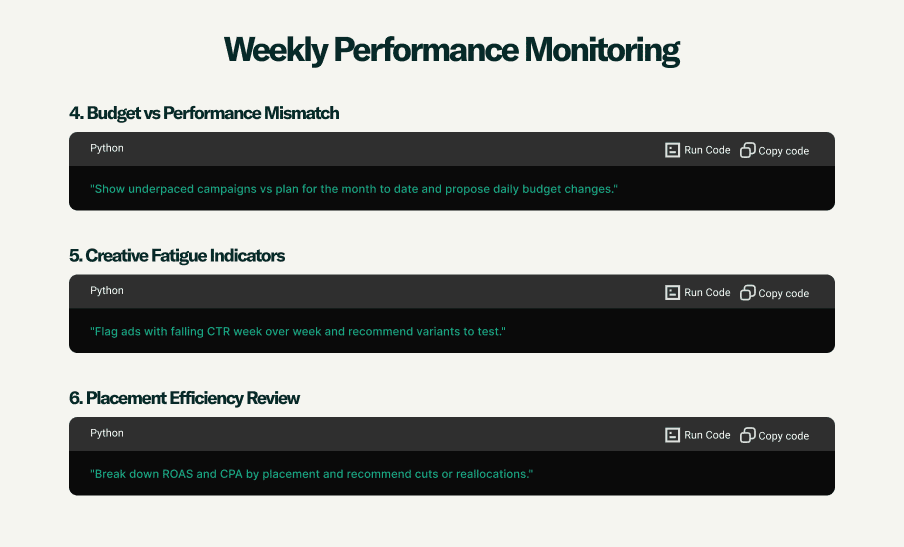
Show under-paced campaigns vs plan for month-to-date and propose daily budget changes.
That turns pacing into a daily decision instead of a monthly apology.
Cost Efficiency Signals That Point to Where Money Should Go
Pairing efficiency with spend, not treating them separately
A campaign with strong ROAS but minimal spend is an opportunity. One with rising CPC and heavy spend is a warning.
Prism’s cost efficiency views intentionally pair efficiency metrics with spend, so teams can see where money is working hardest — and where it isn’t.
For example:
List ad sets where CPC is up more than 30% week over week and identify likely drivers.
This kind of view helps teams reallocate budgets while performance is shifting, not after it has settled into a worse baseline.
Creative Fatigue Detection Before Performance Falls Off a Cliff
Identifying decay while it’s still reversible
Creative fatigue doesn’t announce itself with a dramatic crash. CTR softens. Engagement thins. CPA starts creeping up a few days later.
Prism monitors creative performance trends to flag early signs of fatigue before ROAS takes a visible hit.
A simple prompt:
Flag ads with declining CTR week over week and recommend variants to test.
That’s often the difference between swapping creatives early and burning spend trying to “wait it out.”
Reporting That Updates as Decisions Change
Dashboards that don’t freeze time
Prism dashboards are built to mix metrics, timeframes, and deltas in a single view — and they update in real time. Teams don’t have to export, stitch, or reconcile versions of the truth.
For example:
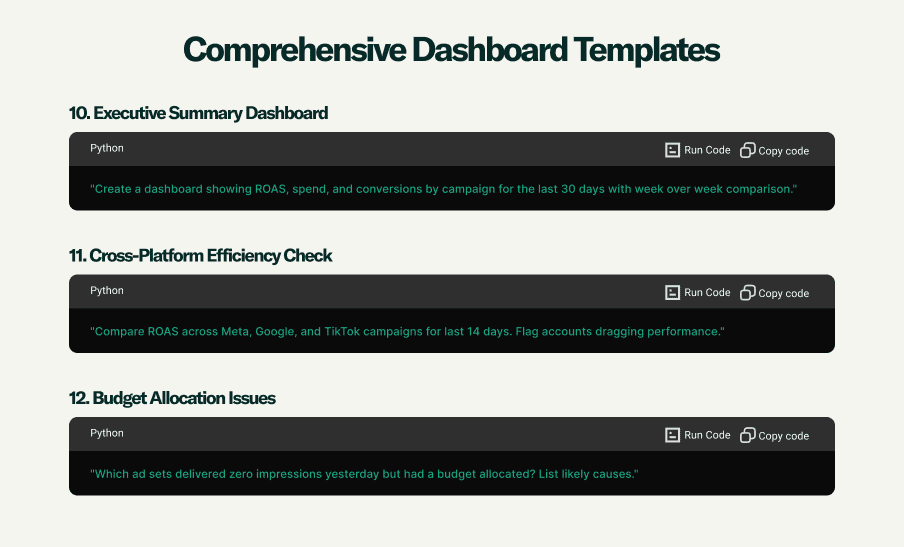
Create a dashboard showing ROAS, spend, and conversions by campaign over the last 30 days with week-over-week deltas.
Reports can be scheduled daily, weekly, or monthly and delivered via email or Slack. Shareable web links mean stakeholders always see current data, not a static snapshot from yesterday.
Turning Monitoring Into a Daily Optimization Workflow
The teams that prevent ROAS drift don’t rely on one dashboard. They run a repeatable daily workflow.
A common pattern looks like this:
- Morning check:
Show campaigns with declining ROAS over the last 3 days compared to the previous 3 days. - Budget review:
List ad sets that are over-pacing budget but delivering below target ROAS. - Creative scan:
Flag creatives with falling performance in the last 48 hours.
These checks surface decisions that need to be made today — not insights to file away.
Prism also tracks automated rule actions taken inside ad platforms and ties them back to performance impact, so teams can see whether automation helped or hurt over the last few days.
Early Warning Triggers That Stop Drift at the Source
Teams that mature their real-time optimization set explicit thresholds, not vague instincts.
Examples include:
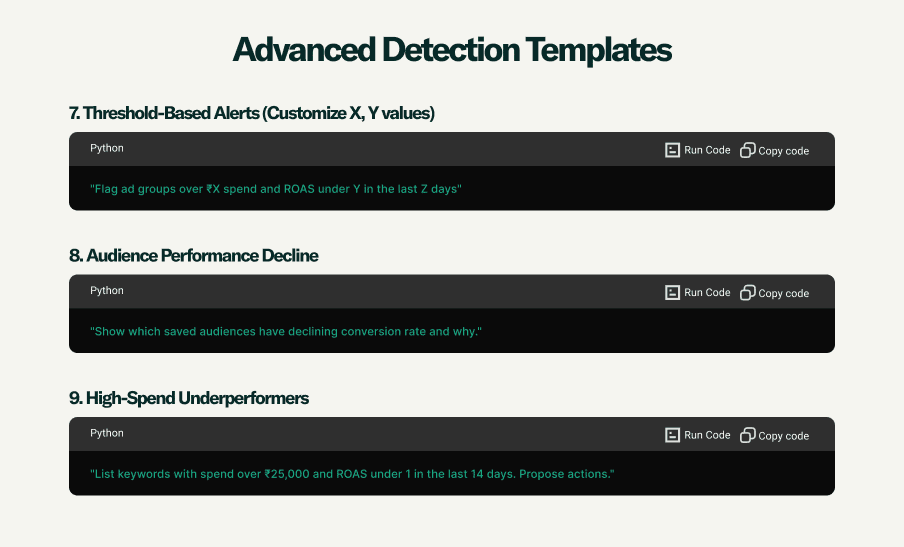
- Ad sets with ROAS below a defined target and spend above a daily threshold in the last 24 hours
- Campaigns with day-over-day CPC increases beyond an acceptable range
- Audiences showing declining conversion rates across the last 48 hours
These triggers don’t replace judgment. They make sure judgment is applied before money is wasted.
A Practical Note on Execution
Prism surfaces real-time data and optimization insights, but budget changes are still executed inside ad platforms or via platform-native automated rules. The value lies in seeing what to change early, clearly, and with context.
Many teams pair Prism insights with shared Google Sheets to track budget decisions and create a simple audit trail of why changes were made. That discipline compounds over time.
If you ask us :” What are the best query templates for catching ROAS drift early?’ Prism would show the following results
Preventing ROAS Drift Is a System, Not a Sprint
Weekly reports aren’t the enemy. They’re just too late to be the first line of defense.
Teams that consistently protect ROAS operate with shorter feedback loops, clearer signals, and fewer blind spots. Real-time budget optimization isn’t about reacting faster — it’s about noticing earlier.
Prism is built to support that way of working.
For performance leads and growth teams looking to prevent ROAS drift before it shows up in a report: