

AI-powered Facebook ad automation handles repetitive campaign management tasks. This includes audience targeting, bid adjustments, and creative testing, freeing you to focus on strategy.
The technology processes millions of signals in real time, moving faster than any human team could while maintaining the guardrails you set.
Most marketers know about AI but are unsure which tools deliver results. They also don't know how to set them up without losing control.
This guide covers the top AI platforms for Facebook ads. We explain how Meta's native automation works. We also provide a step-by-step process for launching high-performing campaigns.
Why Facebook ad automation with AI matters
Facebook ad automation uses AI to manage key tasks. It handles audience targeting, bid adjustments, and creative optimization. You won't have to touch Ads Manager every hour.
The technology watches performance data in real time. It shifts budgets toward what's working. It also personalizes ad delivery to improve results and reduce manual work.
Manual campaign management doesn't scale. You can't check performance every hour when running 30 ad sets. It's not realistic across different audiences, creatives, and placements.
AI processes signals from millions of user interactions at once and moves budgets before you even notice the trend.
The point isn't to replace your judgment. It's to free you from repetitive tasks so you can focus on strategy, creative direction, and the decisions that actually move revenue.
How AI works inside Meta Ads Manager
Meta's algorithm uses machine learning to predict which users will complete your desired action—purchase, app install, lead form submission. The system ingests conversion signals, demographic data, engagement patterns, and contextual information to build predictive models that get smarter as they gather more data.
The system ingests signals like conversions, demographics, and engagement patterns. It uses this data to build smarter predictive models over time.
Signal inputs Meta uses
Meta's AI learns from several key signals. It tracks conversion events, user behavior, and demographics. It also analyzes engagement signals like video watch time.
The quality of inputs directly affects performance. If your pixel fires inconsistently or you're not passing value data with conversions, the AI has less information to work with.
What the learning phase really means
Meta enters a learning phase when you launch or edit a campaign. The algorithm tests different delivery approaches to find what works.
The platform aims for about 50 conversions per ad set. This should happen within seven days to exit the learning phase.
During learning, costs can swing and efficiency may dip. The algorithm is exploring, not yet optimizing. Patience here pays off—campaigns that complete learning typically perform better than campaigns constantly reset by edits.
Limits of built-in Facebook advertising automation
Meta's native automation excels at delivery optimization but has gaps. The platform can't create new ad concepts, refresh creative when performance declines, or coordinate strategy across channels like Google or TikTok. It also lacks advanced reporting features that connect ad performance to downstream metrics like customer lifetime value.
Third-party tools layer additional intelligence on top of Meta's foundation. They handle creative production, cross-platform budget allocation, and deeper analytics that native tools don't provide.
Top AI tools for Facebook ads automation
The market for AI-powered Facebook ad tools has expanded, with platforms addressing different parts of the workflow. Some focus on creative production, others on bid optimization or reporting.
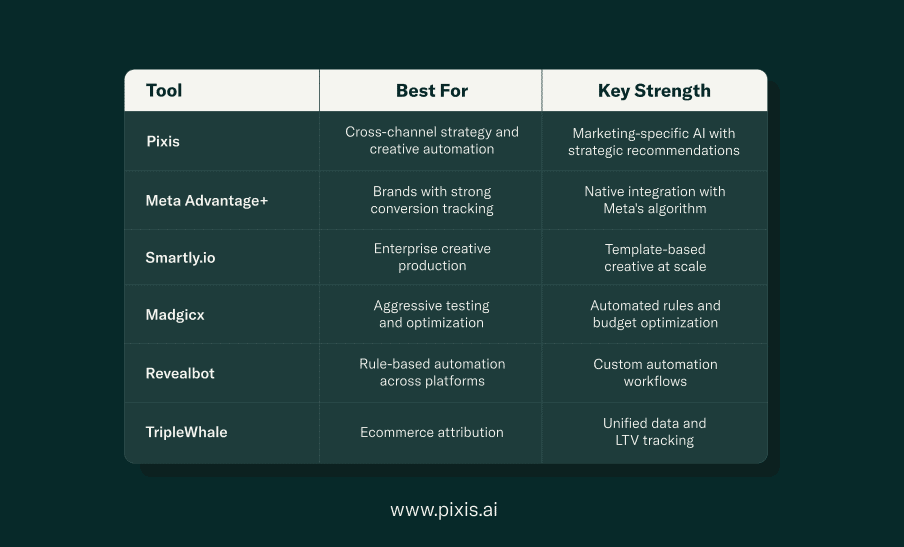
Pixis AI-enabled ad manager
We at Pixis built our platform to act as a strategic partner for marketing teams, not just an optimization engine.
Pixis automates audience discovery, creative generation, and cross-channel budget allocation. It also provides recommendations you can review before they go live.
The creative automation piece is where Pixis stands apart. The platform analyzes your brand guidelines and performance data. It generates on-brand assets that align with what's converting. This avoids reliance on generic templates.
Pixis connects Facebook performance to your broader marketing ecosystem. This ensures budget decisions account for how channels work together. We don't optimize each channel in isolation.
Meta Advantage Plus
Advantage+ is Meta's suite of AI-powered campaign types, including Advantage+ shopping campaigns and Advantage+ app campaigns. These formats consolidate targeting, creative, and placement decisions into a single automated campaign structure.
Advantage+ works best for brands with strong conversion tracking and diverse creative assets. The system tests combinations of images, videos, headlines, and calls-to-action to find winning variations.
The trade-off is control. You can't segment audiences or placements as granularly as in manual campaigns.
Smartly.io
Smartly focuses on enterprise brands running high volumes of creative across Facebook, Instagram, and other platforms. Their automation handles creative production at scale, generating thousands of ad variations from modular templates.
The platform also offers predictive budget allocation, shifting spend between campaigns based on forecasted performance.
Madgicx
Madgicx is an AI media buyer. It offers automated rules to pause underperforming ads, scale winners, and adjust bids based on real-time data.
Madgicx also includes audience insights tools that identify hidden segments within your customer base and suggest new targeting angles.
Revealbot
Revealbot specializes in rule-based automation, letting you define conditions that trigger specific actions. For example, you can create a rule to pause ads if CPA exceeds a threshold. You can also create one to increase budgets when ROAS hits a target.
The platform supports Facebook, Instagram, Google Ads, and Snapchat.
TripleWhale
TripleWhale is built for ecommerce brands using Shopify. The platform consolidates attribution data from Facebook, Google, and email. It shows true customer acquisition costs and lifetime value in one dashboard.
Choosing the right Facebook ads AI tool for your brand
The best tool depends on what you're actually trying to fix. If creative production is your bottleneck, prioritize platforms with strong asset generation. If you're drowning in manual optimization, focus on bid and budget automation.
Feature coverage and integrations
Look for tools that handle your most time-consuming tasks first. Creative automation, audience optimization, automated rules, and reporting each solve different problems. Platforms that integrate with your existing stack—Shopify, Google Analytics, your CRM—reduce data silos and manual export work.
Don't pay for features you won't use.
Creative automation depth
Template-based systems let you plug product images and copy into predefined layouts. They're fast but limited in variety.
Generative AI tools create new concepts from scratch. They offer more diversity but require strong brand guidelines for consistency.
The best creative automation learns from your performance data. It identifies which visual styles, messaging angles, and formats resonate. Then it generates more variations in that direction.
Budget and pricing models
Some tools charge a percentage of ad spend, which scales with your budget but can get expensive quickly. Others use flat monthly fees, which are predictable but may not align with seasonal fluctuations in spend.
Calculate total cost including setup fees, training time, and ongoing management.
Data privacy and compliance
iOS privacy changes and cookie deprecation have shifted how targeting and attribution work. Tools that rely heavily on third-party data will face increasing limitations. Prioritize platforms that emphasize first-party data integration and privacy-compliant tracking methods like Conversions API.
Ask vendors how they handle data storage. Inquire if they share your campaign data with other clients. Also ask how they comply with GDPR and CCPA.
Setting up AI automation in Meta Ads Manager step by step
Step One: Define objective and budget thresholds
Choose a conversion objective that aligns with your business goal—purchases, leads, or app installs. Set daily or lifetime budgets that allow the algorithm to gather enough data to optimize.
Establish cost per acquisition or return on ad spend targets before you launch.
Step Two: Consolidate campaigns and audiences
Campaign Budget Optimization distributes spend across ad sets within a campaign to maximize results. Instead of setting budgets for each ad set, you give Meta a total budget and let the algorithm allocate it.
Use broader audiences rather than narrow targeting. Meta's AI performs better when it has room to explore and find converting users you might not have manually targeted.
Step Three: Enable Advantage Plus or rule-based automation
If you're running ecommerce campaigns, consider Advantage+ shopping campaigns. They simplify setup by consolidating targeting and creative decisions. For more control, stick with standard campaigns but enable Advantage+ placements and creative optimization.
Set up automated rules for basic guardrails. Pause ads if cost per acquisition exceeds your threshold. Increase budgets when return on ad spend hits a target.
Step Four: Layer first-party signals
Connect your customer email lists as Custom Audiences to improve targeting accuracy. Implement Conversions API alongside your pixel to capture events that browser-based tracking might miss, especially on iOS devices.
Pass value data with conversion events so Meta can optimize for high-value customers, not just conversion volume.
Step Five: Monitor learning and adjust
Check performance daily during the learning phase, but resist the urge to edit campaigns. Changes reset learning and delay optimization. After the learning phase completes, monitor weekly and make strategic adjustments rather than constant tweaks.
Watch for declining performance or rising costs, which might signal creative fatigue or audience saturation.
Best practices to keep Facebook AI ads performing
Launching automated campaigns is step one. Maintaining performance over weeks and months requires ongoing attention to data quality, creative freshness, and strategic oversight.
Train with quality conversion data
Value-based bidding tells Meta which conversions matter most. If a $500 purchase and a $20 purchase both count as one conversion, the algorithm treats them equally.
On iOS, conversion tracking is limited. Use Conversions API to capture server-side events that pixel tracking misses.
Refresh creative iterations weekly
Ad fatigue happens when your audience sees the same creative too often. Performance declines even if targeting and bidding remain optimal.
You don't need entirely new concepts every week. Variations on winning themes—different headlines, background colors, or product angles—can extend creative lifespan without starting from scratch.
Use broad audiences then refine
Narrow targeting often underperforms. Meta's algorithm can identify converting users within broad audiences more effectively than manual segmentation.
If you're testing a specific hypothesis—like whether one product appeals more to a particular age group—narrow targeting makes sense. Otherwise, let AI find your customers.
Monitor spend pacing daily
Set up alerts in Ads Manager or your third-party tool to notify you if campaigns are underspending or overspending relative to budget. Underspending means the algorithm can't gather enough data. Overspending can blow through budgets before you notice.
Daily checks catch issues early.
Common warning signs that AI automation needs human intervention:
- Cost per acquisition suddenly spikes without corresponding changes in spend or traffic.
- Conversion volume drops while impressions remain steady, suggesting tracking issues.
- Frequency climbs above three, indicating audience saturation or creative fatigue.
- Learning phase never completes, signaling insufficient budget or conversion volume.
Common pitfalls and how to avoid them
Over-automation without human guardrails
Fully automated campaigns without spending caps, audience exclusions, or brand safety filters can waste budgets quickly. Set maximum daily spends, exclude audiences who recently converted, and use placement exclusions if certain environments don't align with your brand.
Review automated decisions weekly.
Creative fatigue from static assets
Even the best ad eventually stops working. Declining click-through rates and rising cost per 1,000 impressions signal fatigue.
Rotate in fresh assets before performance tanks. Waiting until metrics crash means you're already losing money.
Budget caps that stall learning
Setting a $10 daily budget on a campaign optimizing for purchases rarely works. The algorithm can't generate enough conversions to learn effectively.
If budget constraints prevent this, consolidate your ad sets. You can also switch to a higher-funnel objective. Use traffic or engagement until you can afford conversion optimization.
Data gaps from pixel or CAPI issues
If your pixel isn't firing correctly or Conversions API isn't passing events, Meta's algorithm optimizes based on incomplete data. This leads to poor targeting and wasted spend.
Use Meta's Events Manager to verify that conversion events are tracking correctly.
Where Pixis fits in your AI ad stack
We at Pixis built our platform for marketers. We offer AI that understands marketing, not repurposed general-purpose tools.
Pixis combines creative automation with performance optimization, generating on-brand assets and managing campaigns across Facebook, Google, and other channels from a single interface.
The platform acts as a strategic partner, surfacing insights and recommendations you can review before implementation. You're not handing over control—you're augmenting your team's capabilities with AI that handles repetitive work while you focus on strategy and creative direction.
FAQs about Facebook ad automation AI
Maintaining manual control with Facebook ad AI tools
Most AI tools include override options and manual controls alongside automation features. You set the guardrails and can intervene when needed.
Optimization time for new Facebook AI campaigns
Meta's learning phase typically requires 50 conversions or one week, whichever comes first. Third-party AI tools may need additional time to gather performance data.
AI automation effectiveness after iOS privacy changes
Yes, but AI tools now rely more on first-party data. They use Conversions API and broader targeting to compensate for reduced tracking. Brands with strong first-party data and proper CAPI implementation see minimal impact.