

You're managing 500 products across your site and trying to map keywords to each one. By the time you finish, half your inventory has changed and you're starting over.
Dynamic Search Ads let Google handle the targeting by crawling your website and automatically matching searches to your pages. You write the ad description, Google generates headlines and picks landing pages based on what people search for.
This guide covers how DSAs work, when they make sense, setup steps, targeting options, and optimization tactics to get results without the keyword management overhead.
What are dynamic search ads
Dynamic Search Ads are Google's way of letting your website do the targeting work. Instead of building keyword lists, you give Google your domain and it crawls your site to figure out what you sell. When someone searches for something relevant to your pages, Google automatically generates a headline and picks the landing page that matches best.
You write the description. Google writes the headline and chooses where to send people.
This works when you have a lot of products or a well-organized site with clear page titles and decent content. Google reads your pages the same way it indexes them for organic search, then matches those pages to search queries. If someone searches for "leather laptop bag," and you have a page selling leather laptop bags, Google creates an ad with a headline pulled from that page's content.
DSAs fill gaps. They catch searches your keyword campaigns miss, especially long-tail queries you'd never think to add manually.
How dynamic search ads work
Here's what happens when someone searches. First, Google checks its index of your website for a matching page. If it finds one, it generates a headline from that page's text and shows your ad, sending clicks to the relevant page.
The process is automatic:
- Google crawls your site: It indexes your pages just like it does for organic search results.
- It matches searches to pages: When a query is relevant, Google picks your best matching page.
- It writes the headline: The headline comes from your page content and mirrors the search query.
You control the description and the budget. Google controls everything else. The landing page changes based on the search, so someone searching for "running shoes" lands on your running shoes page, not your homepage.
When dynamic search ads make sense
DSAs work best when you have hundreds of products or services spread across many pages. Ecommerce sites with large catalogs see strong results because the format scales without extra work. Add new products to your site and they're automatically included in your targeting within a few days.
Your site structure matters here more than it does for keyword campaigns. Google relies on clear page titles, organized content, and descriptive text to understand what each page offers. If your site has thin content or duplicate pages, DSAs will struggle to match searches correctly.
The format also works when your inventory changes frequently. If you're constantly adding or removing products, DSAs adapt automatically while keyword campaigns require manual updates.
You can also use DSAs to discover what people actually search for before you invest time in keyword research. Launch a DSA campaign, review the search terms report after a few weeks, then build dedicated keyword campaigns around the queries that convert.
Key benefits of dynamic search ads
The time savings are obvious. You skip keyword research, ad group setup, and the endless mapping of keywords to landing pages. Launch takes minutes instead of hours.
Beyond speed, DSAs capture traffic you'd otherwise miss:
- No keyword lists to maintain: Your site updates automatically flow into your targeting.
- Catches long-tail searches: DSAs match queries you'd never add manually because they're too specific or infrequent.
- Fills coverage gaps: Acts as a safety net for searches that don't trigger your keyword campaigns.
- Headlines match intent: Google pulls text from your pages, so headlines reflect both the search and your actual offerings.
The relevance piece matters more than you'd think. When Google generates headlines from your site content, they often match user intent better than static ad copy because they're dynamically created for each query.
Common drawbacks and pitfalls
You give up control when you run DSAs. Google decides which searches trigger your ads, what the headlines say, and where people land. That trade works for some advertisers but not everyone.
The format depends entirely on your website quality. Poor site structure, outdated pages, or thin content leads to irrelevant matches and wasted spend. If your site isn't well-organized, DSAs amplify problems instead of solving them.
You'll also see matches you don't want. Without careful setup, your ads might show for out-of-stock products, blog posts, or searches that don't convert. The first few weeks usually include waste as you identify and exclude poor performers.
Budget can disappear fast if Google finds converting searches, as DSAs scale quickly. That sounds great until your daily budget is gone by 10 a.m. You should start conservatively and expand as you validate performance.
Dynamic search ads vs responsive search ads
Dynamic Search Ads and Responsive Search Ads solve different problems. DSAs are a campaign type that uses your website for targeting instead of keywords. Responsive Search Ads are an ad format you use within regular keyword campaigns.
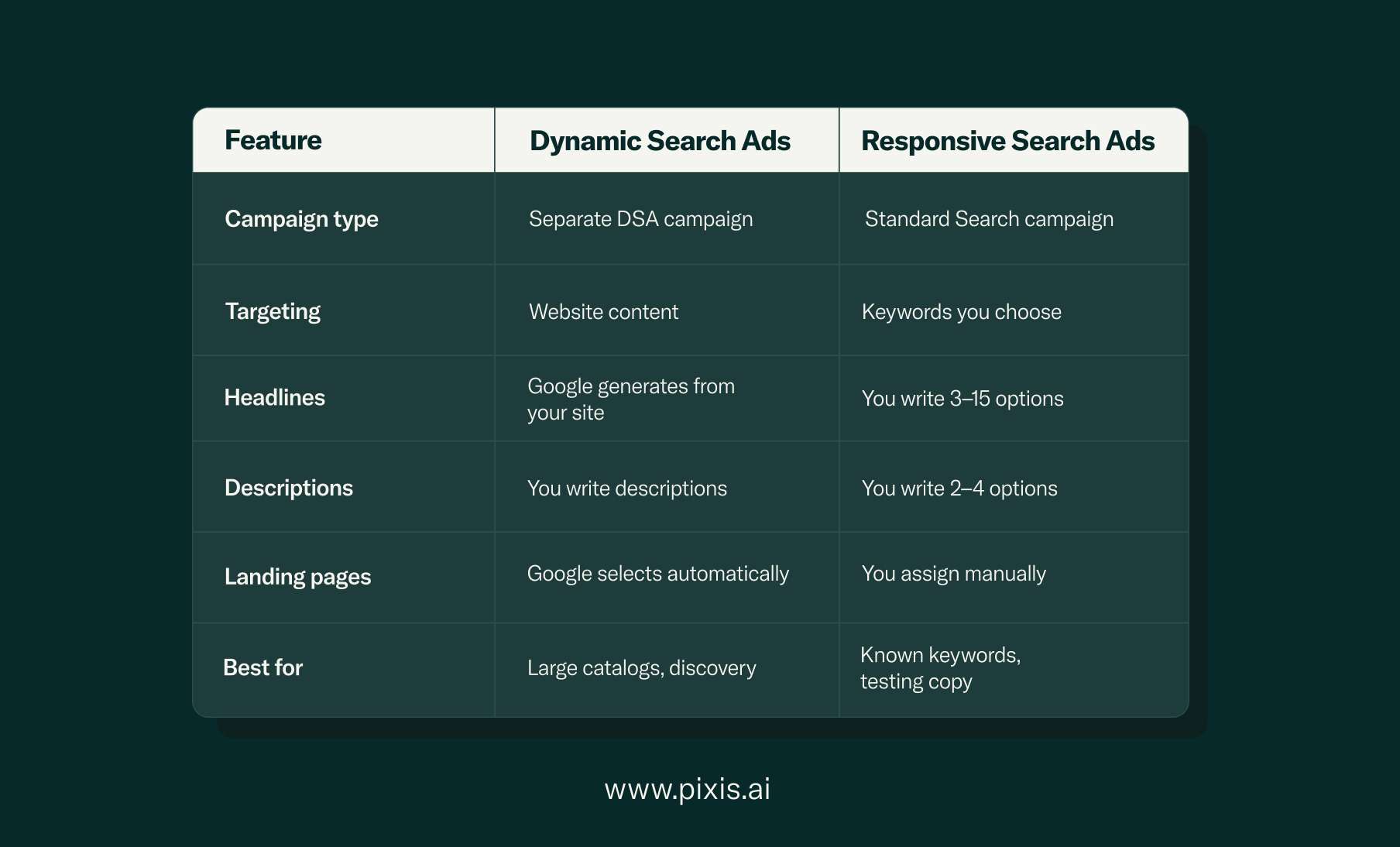
Use DSAs when you want to discover new search opportunities or when managing keywords manually doesn't scale. Use Responsive Search Ads when you know your target keywords and want to test messaging variations.
Many advertisers run both. DSAs handle long-tail discovery while keyword campaigns target high-intent searches with precise messaging.
Step-by-step setup in Google dynamic search ads
Setting up your first DSA campaign takes about 15 minutes. The process differs from standard Search campaigns in a few key ways.
1. Choose the right campaign goal
Create a new Search campaign in Google Ads. Select your conversion goals like you would for any campaign. Skip Performance Max initially because DSAs give you more visibility into what's working.
2. Create a dynamic ad group
After campaign setup, create an ad group and select "Dynamic" as the type. This tells Google you're using website content instead of keywords.
3. Supply your domain and language
Enter your website URL and select your target language. Google crawls your site to build its index. This takes a few days for new sites but happens faster if Google already indexes your pages.
4. Select targeting source
You have a few options. "Use Google's index of my website" is the simplest, as Google automatically categorizes your pages. "Use URLs from my website" lets you specify pages with URL rules, while "Use a page feed" gives you maximum control.
5. Set budgets and bidding strategy
Start with Maximize Clicks if you're new to DSAs. This gathers data quickly. Once you have conversions, switch to Target CPA or Target ROAS. Set a daily budget you're comfortable testing with, typically $50–100 for initial validation.
6. Draft ad copy and description
Write two to four descriptions. These are the only parts you control, so make them count. Focus on your value proposition or key benefits. Avoid mentioning specific products since your ads show for many different searches.
Good DSA descriptions are broad but compelling: "Free shipping on all orders. Shop now and save."
7. Add negative keywords and exclusions
Set up negative keywords to block irrelevant searches. Common negatives include "free," "jobs," or competitor names. Also exclude pages you don't want to advertise like out-of-stock items, blog posts, or policy pages.
8. Launch and monitor
Launch your campaign and check it daily for the first week. Review the search terms report to see what triggered your ads and add negatives aggressively. You should also check which pages get traffic and exclude any that don't convert.
Targeting options for Google DSA
Google offers six ways to control which pages trigger your ads. Each method gives you different levels of precision and scale.
URL equals
Target one specific page by entering its exact URL. Use this for a single product or landing page. It's precise but doesn't scale.
URL contains
Target all pages with a specific URL pattern. For example, "URL contains /shoes/" targets every page in your shoes category. This works well for category-level targeting in ecommerce.
Page title contains
Target pages with specific words in their title tags. "Page title contains wireless headphones" matches any page with those words in the title. This gives you thematic control without managing individual URLs.
Page content contains
Target pages that mention specific topics in their body content. This is broader than title targeting and catches relevant pages you might miss otherwise.
Category targeting
Let Google automatically categorize your site and target by category. Google groups pages into themes like "Running Shoes" or "Kitchen Appliances." This is the fastest setup but gives you less control.
Page feed targeting
Upload a spreadsheet with specific URLs and custom labels. This gives you maximum control and lets you organize pages however you want. It requires more setup but works well for complex sites.
Most advertisers start with category targeting or URL contains rules. As you learn which pages perform, you can get more specific with page feeds or exact URLs.
Best practices to improve DSA performance
DSAs require ongoing optimization just like keyword campaigns. The difference is you're optimizing targeting and exclusions instead of keywords and bids.
Use exclusions for out-of-stock pages
Exclude pages for products you can't fulfill. Nothing wastes budget faster than sending traffic to unavailable items. Set up URL rules to automatically exclude pages with "out-of-stock" in the URL, or maintain a page feed you update as inventory changes.
Layer audience signals
Add audience targeting to your DSA campaigns. You can layer remarketing lists, customer match lists, or in-market audiences. This doesn't restrict who sees your ads but tells Google to prioritize those audiences when optimizing bids.
Test multiple descriptions
Write three to four descriptions and let Google rotate them. Check performance after a few weeks and pause underperformers. Unlike headlines, you control descriptions, so test different value propositions.
Monitor search term reports weekly
Check your search terms report every week for the first month, then biweekly after that. Look for irrelevant queries to add as negatives and high-performing searches to move into dedicated keyword campaigns. The search terms report is your primary optimization tool.
Adjust bids by device and time
Review performance by device and daypart. If mobile converts poorly, reduce mobile bids by 20–30%. If evenings drive most revenue, increase bids during those hours. DSAs respond to bid adjustments like keyword campaigns.
Pause low-revenue URLs
After a month, review which URLs get clicks but don't convert. Exclude pages that consistently underperform. Focus budget on pages that drive results.
Try Prism to automate DSA optimization across all your campaigns
Measuring success and optimizing DSA campaigns
Track the same metrics you use for keyword campaigns, but add a few DSA-specific views.
Track CPA, ROAS, and revenue
Focus on conversion metrics, not clicks. DSAs often have lower click-through rates than branded campaigns because they target broader, less familiar searches. What matters is whether clicks convert at an acceptable cost.
Calculate your blended metrics across all Search campaigns, then compare DSA performance to that benchmark. If your DSAs deliver similar or better efficiency, they're working.
Compare against standard search campaigns
Run DSAs alongside keyword campaigns and compare performance by segment. Look at new customer acquisition cost, average order value, and customer lifetime value if you track it. DSAs often bring new customers at a higher initial cost but similar long-term value.
Automate budget shifts with rules
Set up automated rules to pause ad groups that exceed your target CPA or increase budgets for ad groups hitting ROAS goals. Google Ads' automated rules let you optimize without daily manual checks.
Where Microsoft and other engines fit
Microsoft Advertising also offers Dynamic Search Ads with similar functionality. The setup mirrors Google's approach with your domain, targeting options, and descriptions.
Performance typically lags Google because search volume is lower, but cost per click is often 30–40% cheaper.
If you're already running Microsoft Search campaigns, adding DSAs is a low-effort way to capture incremental traffic.
Other platforms don't offer true DSA equivalents. Meta's dynamic ads work differently because they pull from product catalogs rather than website content. Amazon's automatic targeting in Sponsored Products is conceptually similar but limited to Amazon's marketplace.
Ready to scale your dynamic search ads with Pixis
Managing DSAs across multiple campaigns and accounts gets complex fast. You're monitoring search terms, adjusting exclusions, and trying to identify which pages drive results while juggling everything else.
We at Pixis built our platform to handle this operational complexity. Prism automates DSA optimization by continuously analyzing search term performance, suggesting negative keywords, and reallocating budgets toward your best-performing page targets. It works across all your accounts so you're not manually checking each campaign.
Prism also helps you test multiple DSA strategies simultaneously with different targeting methods, bid strategies, and audience layers, then automatically scales what works. You get the discovery benefits without the manual overhead.
Try Prism today and see how AI-powered campaign management makes DSAs actually work at scale.
FAQs about dynamic search ads
How do I pause dynamic search ads without losing historical data?
You can pause DSA campaigns or ad groups in Google Ads while preserving all performance data. Click into the campaign or ad group, change the status to "Paused," and all historical metrics remain accessible in your reports. This lets you stop spending without losing the learning you've accumulated.
With dynamic search ads what does the advertiser provide?
Advertisers provide the ad description, negative keywords, targeting parameters, and budget while Google generates headlines and selects landing pages automatically. You write the two description lines that appear below the headline, set your bids, and define which pages or categories to target. Google handles everything else based on your website content and user searches.
What makes a good click-through rate for DSA ads?
DSA click-through rates vary by industry and targeting method, but focus on conversion metrics rather than CTR since DSAs prioritize relevance over broad appeal. A CTR of 2–4% is typical for well-optimized campaigns, though this matters less than whether clicks convert at an acceptable cost. Compare your DSA CTR to your branded keyword campaigns, not your generic keyword campaigns.
Can I run dynamic search ads for a single-page website?
Single-page sites aren't ideal for DSAs, as the format needs multiple pages to crawl and categorize. DSAs require distinct pages to match different search queries. If you only have one page, traditional keyword campaigns give you more control and better performance.