

Schema problems rarely announce themselves.
A page loads. The copy looks right. The product price is correct. Nothing appears broken. Yet the page may have no structured data, the wrong schema type, a missing property, or markup that describes something users cannot see.
That is why checking a single URL with a validator is not a sitewide schema strategy. It answers a narrow question about a single page at a single moment. It does not tell you how many important pages have no schema, whether a shared template has reproduced the same error across hundreds of URLs, or what should be fixed first.
The useful question is not simply, “Do we have a schema?” It is:
Which pages carry schema, which pages do not, what is invalid, what could be improved, and how do we create the missing markup without turning the audit into a spreadsheet marathon?
This guide explains how the main schema tools answer different parts of that question and where Pixis Visibility fits into the workflow.
Key Takeaways
- Schema presence and schema validity are different measurements.
- A valid result means the markup passes the validator being used. It does not guarantee a Google rich result, higher rankings, or an AI citation.
- Errors should be addressed first. Warnings usually identify recommended improvements, but their meaning depends on the schema type and validator.
- Sitewide coverage matters because a perfect homepage does not compensate for missing markup across product, service, location, or article pages.
- Pixis Visibility identifies schema already present on a site, finds pages without it, creates schema, checks errors and warnings, and reports whether the markup is valid.
- Google’s Rich Results Test and the Schema.org Validator remain useful final checks because they answer different questions.
What Schema Markup Actually Does
Schema markup is structured data added to a webpage. It labels information such as an organization, article, product, event, author, breadcrumb, price, availability, or review using a shared vocabulary from Schema.org.
Google explains that it uses structured data to understand page content and, for supported types, to make a page eligible for richer search appearances. Google recommends JSON-LD for most implementations, although Microdata and RDFa are also supported. The markup must describe the page on which it appears and should match information visible to users. You can review the underlying rules in Google’s structured data guidelines.
Two boundaries matter here.
First, valid structured data creates eligibility, not certainty. Google explicitly states that correct markup does not guarantee a rich result.
Second, schema should not be presented as a guaranteed AI-visibility lever. It makes information explicit for systems that consume the markup, but there is no sound basis for promising that adding schema will cause ChatGPT, Claude, Gemini, or Perplexity to cite a page. Content quality, accessibility, relevance, authority, and retrieval all remain separate issues.
Schema is therefore best treated as infrastructure: it reduces avoidable ambiguity and creates supported search opportunities, but it cannot manufacture demand or authority.
The Five Questions a Schema Audit Should Answer
I find schema reports most useful when they answer five questions in order.
1. What schema exists?
The audit should identify the schema types detected on each URL. A page may contain more than one relevant type, such as Article, Person, and BreadcrumbList.
2. Where is schema missing?
A validator cannot flag a missing page if that page was never tested. A sitewide tool should compare crawled URLs with the markup detected on them, exposing coverage gaps across templates and page groups.
3. Is the markup valid?
Syntax errors, unsupported values, misplaced properties, and missing required fields can prevent a structured data item from validating. The report should make the pass-or-fail state obvious.
4. What are the errors and warnings?
Errors and warnings are not interchangeable. Errors generally indicate that an item is invalid or ineligible for a particular supported feature. Warnings often identify recommended properties or quality improvements. A warning may not invalidate the item, but it can still signal incomplete information.
5. Can the missing or broken schema be created?
Detection without execution leaves someone to translate every issue into markup manually. A more complete workflow should help create the appropriate schema, then send it back through validation before publication.
Best Schema Markup Tools and What Each One Is For
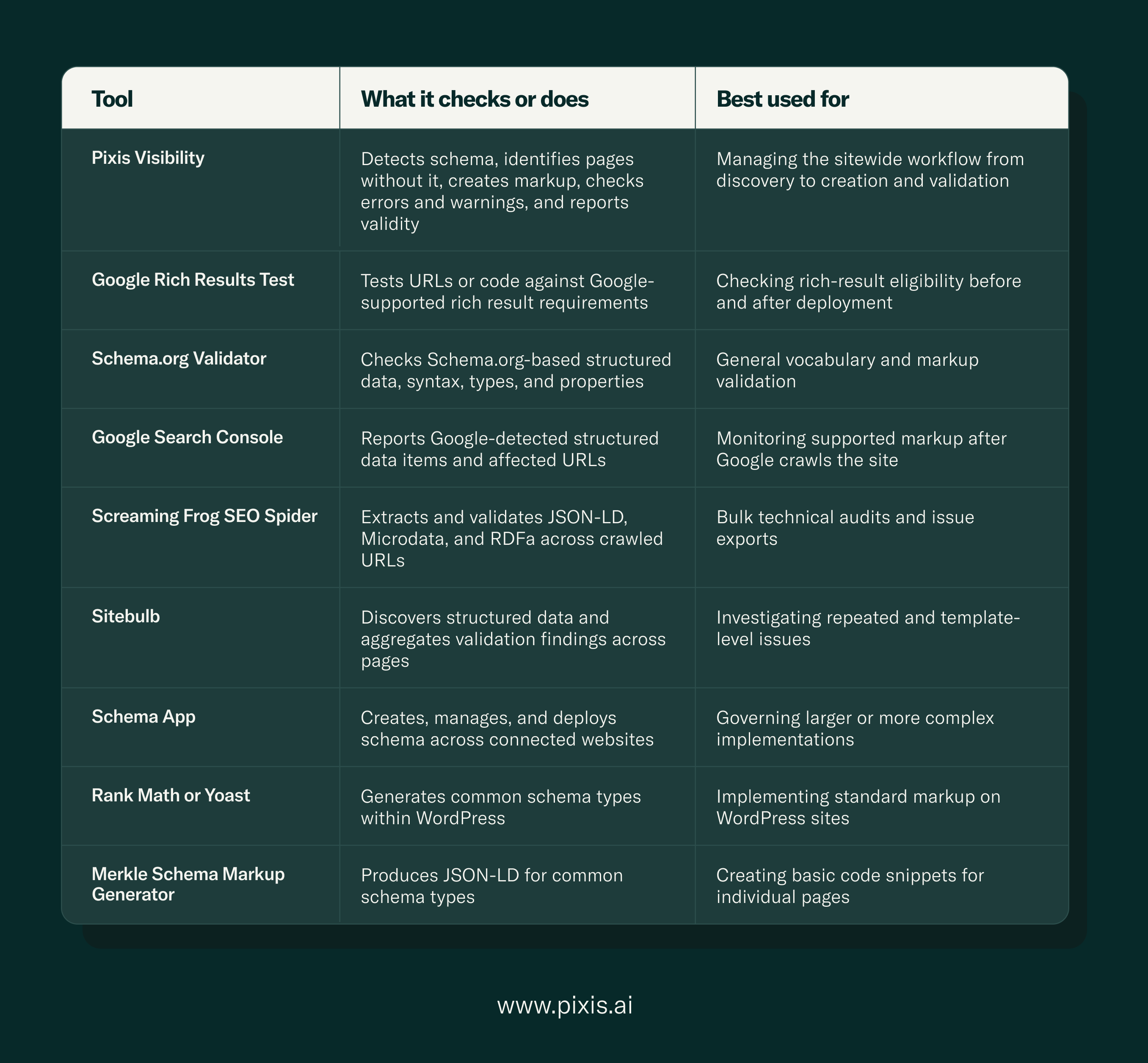
No single schema tool does everything, which is why most audits cycle through several. The useful way to read the landscape is by job: some tools validate a page you already have, some generate new markup, some crawl a whole site, some monitor what Google actually indexed, and some manage markup at scale. Here is what each of the main tools does and when to reach for it.
Validating a single page. Two free tools do this, and they answer different questions. The Schema.org Validator checks whether your structured data conforms to the Schema.org vocabulary, its syntax, types, and properties, across JSON-LD, Microdata, and RDFa, with no search-engine-specific rules. It is the neutral correctness check, useful because Bing, Apple, and other consumers of structured data read the full spec, not just Google's subset. Google's Rich Results Test asks the stricter question: can Google use this markup for one of the rich result types it currently supports, and how might that result look? It applies Google's required and recommended properties, which are tighter than the Schema.org baseline, so a page can pass the Schema.org Validator and still fail here for a missing Google-required field. Google recommends starting with the Rich Results Test for supported features and using the Schema.org Validator for generic validation, which is why they are companions rather than competitors. Both, though, test one URL at a time.
Generating markup. When you need to produce markup rather than check it, a generator gives you a first draft. Merkle's Schema Markup Generator is the common free starting point: a form-based tool that produces clean JSON-LD for 20-plus common types (Organization, LocalBusiness, Article, Product, FAQ, and so on), copy-paste ready for any CMS. It creates code but does not test it, so its output still has to pass through a validator before it ships, and it works one page at a time. On WordPress, Rank Math and Yoast do the equivalent job automatically, generating standard schema types from your post and page data without manual coding, which makes them the practical default for implementing common markup on WordPress sites.
Crawling a whole site. Single-URL tools cannot tell you how many pages lack schema or whether one template broke across hundreds of URLs, so bulk audits need a crawler. Screaming Frog SEO Spider extracts and validates JSON-LD, Microdata, and RDFa across every crawled URL and exports the issues, which makes it the workhorse for bulk technical audits and issue exports; its free tier covers up to 500 URLs. Sitebulb discovers structured data across pages and aggregates the validation findings, grouping and prioritizing them, which makes it especially good for investigating repeated, template-level issues rather than one-off errors.
Monitoring after Google crawls. Google Search Console reports the structured-data items Google actually detected on the live, indexed site and the URLs they affect. Because it reflects indexed reality rather than a test fetch, it is the tool for confirming that a template fix propagated and for catching regressions after deployment. Its scope is limited to verified sites and to what Google has recrawled, so it lags a change by days.
Managing markup at scale. For larger or more complex implementations, Schema App creates, manages, and deploys structured data across connected websites and integrates with common content management systems, which suits teams governing markup across many templates or sites rather than hand-editing pages.
Two things every one of these tools shares are worth stating plainly, because they are where schema strategies most often go wrong. First, a "valid" result never guarantees a Google rich result, a ranking change, or an AI citation; Google is explicit that valid markup creates eligibility only. Second, apart from the crawlers, most of these tools work one URL at a time, which is fine for launching a single page but cannot show you sitewide coverage gaps or a repeated template error.
Pixis Visibility brings the sitewide jobs into one view: it detects the schema already present on a site, identifies the pages that carry none, creates the missing markup, checks it for errors, surfaces warnings separately from errors, and reports whether each item is valid, so the workflow runs from discovery to creation to validation without stitching a crawler, a generator, and a validator together by hand. The single-URL validators remain the right final check before publishing, and Search Console remains the right post-deployment monitor; the sitewide view is what tells you which pages to check in the first place. The rest of this guide walks through how to use them together.
Google Rich Results Test versus Schema.org Validator
These tools are complementary.
The Rich Results Test answers: Can Google recognize this markup for one of the rich result types it currently supports? It can also preview some supported search appearances.
The Schema.org Validator answers: Does this page contain structured data that conforms to the Schema.org vocabulary? Google itself directs users to the Schema.org validator for generic schema validation and to the Rich Results Test for Google-specific features.
A page can therefore pass a general vocabulary check without being eligible for a Google rich result. It can also contain valid Schema.org markup for a type Google does not present as a rich search feature.
A Practical Schema Dashboard: Four Numbers Worth Tracking
A useful report should produce decisions, not a larger pile of URLs. I would track four numbers.
Schema coverage rate
Pages with detected schema ÷ eligible pages crawled × 100
Define “eligible pages” before calculating the rate. Exclude redirects, utility pages, parameter duplicates, and other URLs that are not intended to carry page-specific markup.
Validity rate
Pages with valid schema ÷ pages with detected schema × 100
This separates implementation from quality. A site can have high coverage and low validity.
Error-affected URL count
Count URLs with at least one validation error. Do not simply total every error instance, because one template mistake can generate several errors on each page and inflate the apparent scale.
Missing-schema URL count
Count the eligible pages on which Pixis Visibility detects no schema. This shows the size of the coverage gap, but the number needs context because not every page requires structured data. Review the affected URLs by page type, such as products, services, articles, locations, or events, and confirm which groups have an applicable schema type.
Read the four measurements together. High coverage with a low validity rate points to markup that needs correction. Low coverage with a high validity rate means the existing implementation is sound but incomplete. When the same error or absence appears repeatedly within one page group, investigate the shared template before fixing URLs individually. The purpose of the dashboard is not to produce more numbers; it is to show whether the next task is validation, coverage, or a template-level repair.
Errors, Warnings, and Valid Schema: How to Read the Result
The fastest way to waste a schema audit is to treat every flag as equally urgent.
Fix errors first
An error may indicate malformed JSON-LD, an invalid value, a property attached to the wrong type, or a required field missing from a Google-supported feature. Start with errors affecting shared templates or high-value page groups.
Review warnings in context
Warnings commonly refer to recommended properties. Google’s documentation notes that non-critical issues do not necessarily prevent eligibility, although resolving them can improve the quality and completeness of the structured data.
Do not add a field merely to silence a warning. If a recommended property has no truthful equivalent on the visible page, inventing a value creates a larger problem than leaving the warning unresolved.
Understand what “valid” does not mean
A valid item is not a promise that:
- Google will display a rich result
- The page will rank higher
- An AI answer engine will cite the page
- Every value in the schema is current or truthful
- The markup describes the page well
Automated validation can check structure and supported requirements. Human review is still needed to confirm accuracy, relevance, and alignment with visible content.
A Sitewide Schema Workflow That Teams Can Actually Use
Step 1: Define eligible page groups
List the indexable templates that could benefit from structured data. Typical groups include the homepage, products, services, articles, authors, events, jobs, videos, and physical locations.
Do not begin by adding schema everywhere. Begin by matching each page group to an applicable type.
Step 2: Crawl and establish coverage
Use Pixis Visibility to identify the schema detected on each page and isolate URLs without markup. Calculate coverage by template, not only across the whole domain. This is part of a wider technical SEO workflow for GEO, where crawl access, rendering, structured data, and content extraction need to be examined together.
A 90% domain-wide coverage rate can hide the fact that an important commercial section has almost no schema.
Step 3: Prioritize patterns, not individual URLs
If the same error appears across 800 product pages, the likely fix belongs in the product template. If only one article is affected, the issue may be in that page’s content or manual markup.
Prioritize in this order:
- Template-level errors affecting many indexable pages
- Missing schema on high-value page groups
- Errors on important individual pages
- Warnings that would add accurate, useful information
- Low-value or isolated warnings
Step 4: Create or correct the markup
Use Pixis Visibility to create the missing schema. Review the proposed type and properties against the actual page. Names, prices, dates, authors, ratings, addresses, availability, and URLs must agree with what users can see.
Step 5: Validate twice
Run a general Schema.org validation, then use Google’s Rich Results Test when the type corresponds to a supported Google feature. Fix critical errors and assess warnings rather than deleting useful fields or inventing data to produce a green screen.
Step 6: Deploy a representative sample
Publish the fix to a small set of pages from the affected template. Check the rendered page, the source or DOM as appropriate to the implementation, and Google’s URL Inspection tool before rolling the change across the site. URL Inspection can show structured data detected on Google’s indexed version and can run a live test against the current page, but neither result guarantees indexing.
Google can process structured data generated with JavaScript, including markup available in the rendered DOM. However, Google also warns that dynamically generated product markup can make shopping crawls less frequent and less reliable for fast-changing information. The implementation decision should therefore follow the requirements of the consumers you care about, not a blanket claim that JavaScript schema never works. Google documents its recommendations in its guide to generating structured data with JavaScript.
Step 7: Re-crawl and monitor
After deployment, run the sitewide check again. Record the change in coverage, validity, and error-affected URLs. Use Search Console’s rich-result reports to monitor supported markup that Google detects after recrawling. These reports group issues and affected pages, making them useful for confirming whether a template fix has propagated.
The before-and-after report should answer three questions:
- Did the missing-page count fall?
- Did the number of valid pages increase?
- Did the fix create new errors or warnings elsewhere?
Common Schema Mistakes
Markup that does not match the page
Google requires structured data to represent the main content and warns against marking up information that users cannot see. If the schema says a product is in stock at one price while the page shows something else, validation alone cannot make the implementation trustworthy.
Using the wrong type
Choose the most specific applicable Schema.org type. Do not use Product for a general service page simply because the commercial intent feels similar, or FAQPage for content that is not genuinely presented as questions and answers.
Treating recommended fields as facts to invent
A warning is not permission to fabricate an image, rating, author, price, or review count. Add recommended information only when it exists and can be supported.
Checking only the homepage
Schema is attached to pages, and websites are generated from multiple templates. A clean homepage tells you nothing about the coverage or validity of the product catalog.
Confusing validation with performance
Track schema health separately from search or AI visibility outcomes. If visibility changes after implementation, investigate the full release: content, internal links, crawlability, indexing, page quality, authority, and schema may all have changed together.
Where Schema Fits in AI Visibility
There is a sensible reason to include schema in an AI-search program: it makes entities and attributes explicit in a standardized format. There is also a sensible reason not to oversell it: AI products do not publish a universal promise that valid Schema.org markup will earn citations. A broader AI visibility audit should also examine crawler access, engine-level presence, competitors, prompts, and cited sources.
Pixis Visibility lets teams connect technical hygiene with broader visibility work without collapsing the two into one metric. Schema coverage, errors, warnings, and validity can be monitored as technical signals. Brand presence and citations across AI answer environments remain outcome signals. Keeping those measurements separate makes the analysis more useful, especially when prompt-level gaps reveal differences that a category score can hide.
If schema health improves but AI visibility does not, that is still information. The technical ambiguity may have been reduced, while the content still lacks relevance, evidence, differentiation, or authority for the prompts being tracked. An AI visibility checker can establish the brand, competitor, prompt, and engine baseline, while Pixis' GEO execution guide explains how those content and citation questions fit into the wider workflow.
What Pixis Visibility Adds to the Schema Workflow
Pixis Visibility brings those five questions into one sitewide view.
The platform can:
- Identify the schema already present on a website
- Show which crawled pages do not carry schema
- Create schema for pages that need it
- Check the markup for errors
- Surface warnings separately from errors
- Tell the user whether the schema is valid
That combination matters because schema work usually becomes fragmented. One tool crawls the site. Another generates JSON-LD. A third validates it. The findings are exported, assigned, edited, and checked again. Every handoff creates room for missed URLs and stale information.
With Pixis Visibility, I can begin with coverage rather than a single code block. If a template contains schema on 380 of 500 relevant pages, the immediate problem is not “schema quality” in the abstract. It is a 120-page coverage gap. Once those URLs are visible, the work can be grouped by page type and fixed systematically.
The product also keeps the language of the report useful:
- Valid: the tested markup passes the applicable validation checks.
- Error: a problem that must be corrected for the affected item to validate.
- Warning: a non-critical issue or a missing recommended field that deserves review.
- Missing: no schema was detected on the crawled page.
This does not mean every page needs every schema type. The correct question is whether the page has an applicable type that accurately describes its visible content. A contact page, product page, article, and location page should not be forced into the same template.