

A client has forty landing pages, a quarterly review in three weeks, and a sense that "the pages could rank better". Optimizing them one by one, by hand, would take the whole quarter. Rewriting all of them with AI in an afternoon would be fast and risky, because one careless edit to an offer can cost more than any ranking gain.
The answer is a repeatable pipeline: choose the pages worth fixing, audit them the same way every time, rewrite inside a fixed scope with a human checkpoint, then measure and report in a format the client already expects.
Automation helps at almost every stage, but not equally. Selection, auditing, draft rewrites and data collection automate well. Deciding what not to touch, approving claims and explaining results still need a person.
This guide walks through the six stages of the pipeline, where it tends to go wrong, and where Pixis Visibility can take on the repeat work.
Key takeaways
- Select pages by opportunity, not by gut feel. Pages with steady impressions, weak click-through and positions just off the top results usually repay the effort first.
- Audit every page on two tracks, technical and content, and score both so each rewrite has a baseline to beat.
- Keep the offer, CTA copy and pricing out of automated rewrites on commercial pages. Meta, headings, supporting sections and FAQs are fair game.
- Record the implementation date and compare equal windows before and after; without the date, before and after numbers are guesswork.
- Pixis Visibility runs page audits with technical and content scores, suggests metadata and schema, and tracks before/after impact through Search Console; approving changes stays with your team.
Set up the pipeline once
The pipeline only runs smoothly if the inputs are agreed before the first page is touched.
- Admin access to the CMS, with version history so you can roll back
- Google Search Console connected and verified for the property
- A crawl or audit tool with mobile reporting enabled
- A keyword-to-page map showing which page owns which intent
- A "do not touch" list of conversion elements for each page
- A report template the client has approved
Mobile checks deserve attention from the start. In Unbounce's 2024 Conversion Benchmark Report, based on about 41,000 landing pages, 83% of the visits analyzed happened on mobile devices.
For a handful of pages, one person can run the whole line. For a batch, split the roles: one person selects and audits, one rewrites, one reviews. The reviewer is a fixed role, not an afterthought.
1. Select pages by opportunity
Pull query and page data from Search Console and look for pages with consistent impressions but weak clicks, or average positions just outside the top results. A small ranking gain on those pages tends to produce the largest change in clicks.
Rank the candidates by projected traffic opportunity and take the top ten. Everything else waits for the next batch. Optimizing only pages where a move is worth the effort is what keeps the pipeline from turning into a site-wide rewrite.
2. Audit on two tracks
Run a technical audit and a content audit for each selected page, and score both.
- Technical track: Core Web Vitals, broken links, internal links, orphan status, images, schema and metadata. A slow or broken page will not hold a ranking gain.
- Content track: match between the page and the query intent, missing sections, missing FAQs and outdated claims. The rewrite needs to close a specific gap, not polish prose.
For Core Web Vitals, use Google's published thresholds: LCP within 2.5 seconds, INP under 200 milliseconds and CLS under 0.1. If you need a crawler, the free SEO audit tools we reviewed are a reasonable starting point.
The scores matter more than the issue count. They give each page a baseline, and they let you prioritize where the gap is widest and the projected traffic is highest.
3. Rewrite inside a fixed scope
Decide the scope before any AI drafting starts, and write it into the brief.
- In scope: meta titles and descriptions, H1 and H2 headings, supporting sections, FAQs, schema and image alt text.
- Out of scope on commercial pages: the offer, CTA copy and pricing framing. That copy is why the page converts, and a ranking win that breaks it is a net loss.
AI can draft every in-scope element in your brand voice. A person then checks claims, tone and intent match before anything is published. This checkpoint is where the pipeline earns the client's trust. For how much metadata changes actually move rankings, see do title tags and meta descriptions drive rankings.
4. Implement and record the date
Publish the approved changes, keep the previous version available for rollback, and record the date and what changed. Then confirm the basics: the new metadata renders, schema validates and speed metrics have not regressed.
The implementation date is the single most important field in the whole pipeline. Every before and after comparison depends on it. For a simple way to keep each version on record, see how to track before-and-after page versions for SEO fixes.
5. Measure equal windows
Compare the same number of days before and after implementation, for the same page and the same query set. Twenty-eight days on each side is a sensible default for most pages. Read clicks, impressions, average position and CTR together, since one metric alone can mislead.
An illustrative example: a page had 12 clicks from 480 impressions in the 28 days before the rewrite and 44 clicks from 1,100 impressions in the 28 days after. CTR moved from 2.5% to 4%, and average position improved from 11.6 to 7.8.
Check AI answers too. Run the target questions in ChatGPT, Perplexity, Gemini and Claude and note whether the page is cited. Rankings and citations do not always move together, so report them separately. For tools that help with this side, see the comparison of GEO audit tools.
If nothing moved, confirm the changes were fully implemented and re-run the audit. If the page is still flat after a second window, the intent match was probably wrong, and the page goes back to selection.
6. Package the client-ready report
A raw crawl export is not a report. The client-ready version answers four questions in plain language:
- What was the baseline? Audit scores and the 28-day metrics before the change.
- What changed? The specific edits, with the implementation date.
- What happened? The after metrics, including AI citations where relevant.
- What is next? The next page or the next fix, with its projected opportunity.
State the limits honestly. Seasonality, algorithm updates and other site changes can also move numbers, so present the result as evidence of impact rather than proof of sole cause.
For context on conversion rates, Unbounce reports a median landing page conversion rate of 6.6% across industries, based on about 57 million conversions. Compare against pages in the same industry and channel rather than the overall median.
Where automation goes wrong
- Rewriting conversion copy. Keep it out of scope, or a ranking gain becomes a revenue loss.
- Optimizing the wrong pages. Pages with little search demand rarely repay the effort, however good the rewrite.
- Skipping the checkpoint. Unreviewed AI drafts introduce claims the client never approved.
- No implementation date. Without it, the before and after comparison cannot be defended.
- Treating a broken site as a page problem. If the audit surfaces a migration issue, a penalty or broken architecture, that is a separate project, not a rewrite.
Where Pixis Visibility fits
Pixis Visibility covers most of the repeat work in this pipeline. Its page audits score each page on technical and content criteria, list the gaps by severity and estimate the projected traffic opportunity, which gives you both the selection list and the baseline. Score and version history let you compare a page before and after a change.
On the fix side, it suggests metadata and schema and can generate alt text, as suggestions you review rather than changes pushed live. Its content tools draft in your brand voice, and the Google Search Console connection shows before/after content impact for each page. AI visibility tracking adds whether the page is cited in ChatGPT, Perplexity, Gemini and Claude.
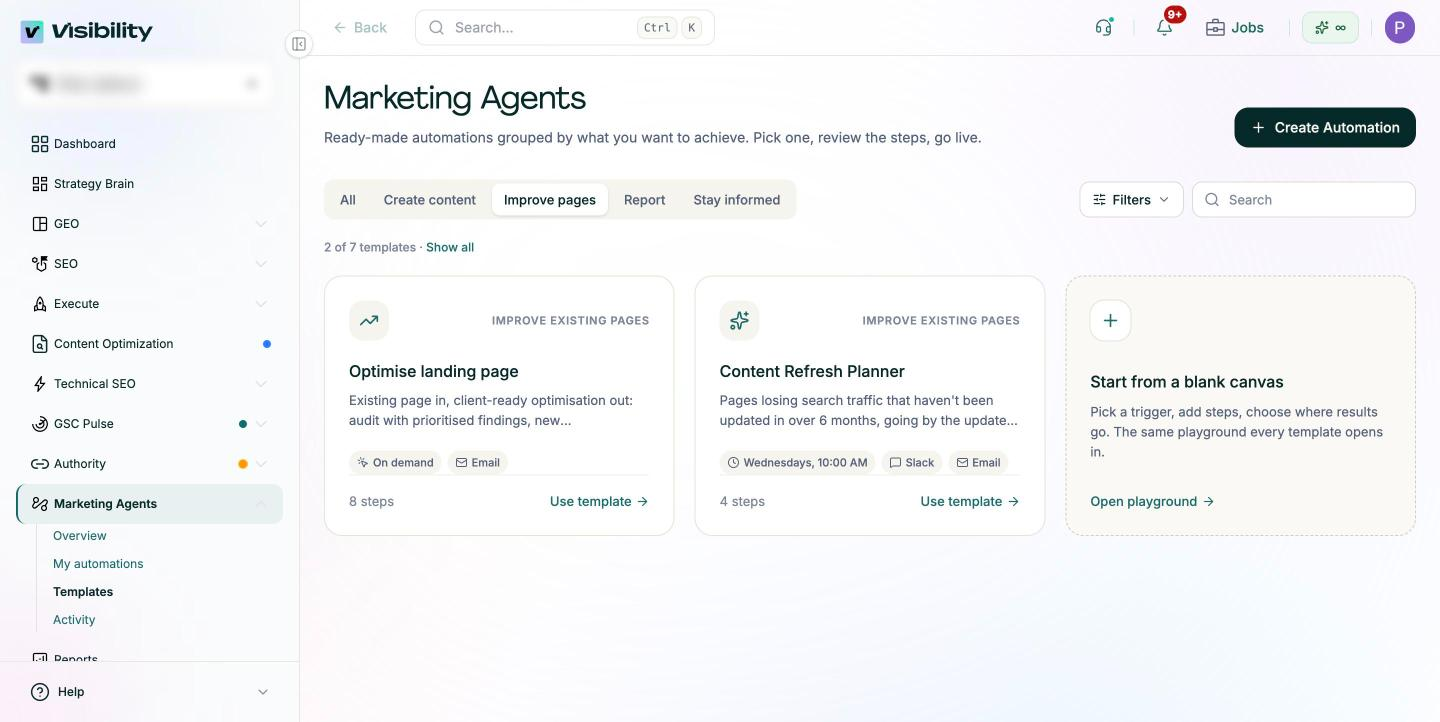
The Optimise landing page template in Marketing Agents runs much of this sequence on demand: it audits an existing page with prioritized findings, drafts metadata, H1 and section rewrites with the reasoning for each, and emails a client-ready report.
If your team works in an assistant such as Claude or Cursor, the Visibility MCP connection lets you run the audit, review the suggestions and pull the results in one conversation.
What stays manual: the do-not-touch list, the human approval, implementation decisions and the narrative in the client report.
Run your first batch of ten pages
Start with the ten pages that have the most projected opportunity. Audit them, agree the scope with the client, rewrite, review, implement and record the date.
At the 28-day mark, fill the report template and share it. Then run the next batch the same way.
Get started with Pixis Visibility to audit landing pages, prioritize them by opportunity and show the client what changed after each rewrite.
FAQs
What does an automated landing page audit check?
A useful audit produces two scores, technical and content, plus a list of gaps ranked by severity. The technical side covers speed, links, crawlability, images, schema and metadata; the content side covers intent match and missing sections. The output should tell you which page to fix first and what the rewrite needs to achieve, not just how many issues exist.
Should AI rewrite the conversion copy on my landing pages?
Not on commercial pages. Use AI for metadata, headings, supporting sections and FAQs, and leave the offer, CTA and pricing framing to the people who own conversion. If you want to test conversion copy, run a separate A/B test rather than folding it into an SEO rewrite.
How long should I wait before judging a rewrite?
Wait for a full comparison window, typically 28 days, after implementation. If the page has low traffic, use a longer window so the numbers are large enough to compare.