
An SEO audit in 2026 has to answer more than whether a page ranks for its target keyword. It should establish whether search engines can crawl and index the site, whether pages perform well for users, whether technical and on-page signals are implemented correctly, and whether the brand appears in the AI-generated answers its audience encounters.
No free tool covers all of that equally well. Google Search Console reports what Google sees, Screaming Frog crawls the site itself, Ahrefs Free adds backlink and site-audit data, and PageSpeed Insights measures page performance. AI-search visibility introduces another measurement layer because rankings alone do not show whether a brand is mentioned or cited inside a generated answer.
This guide compares ten useful free tools or free entry tiers, explains the limits of each, and shows how to combine them into a practical audit workflow.
Key takeaways
- No single free tool covers indexing, sitewide crawling, backlinks, performance, structured data, and AI-search visibility.
- Google Search Console is the best starting point for Google indexing and search-performance data, but it is not a general-purpose on-page crawler.
- Screaming Frog SEO Spider crawls up to 500 URLs in its free version. Several advanced capabilities require a paid license.
- Ahrefs Free provides 5,000 monthly crawl credits for each verified project, subject to free-account reporting limits.
- Google retired the Mobile-Friendly Test and Search Console Mobile Usability report in December 2023. Mobile evaluation now requires performance testing, rendering inspection, responsive-design checks, and manual review.
- Google discontinued FAQ rich results in May 2026. FAQPage remains a Schema.org type, but it should not be presented as a Google rich-result or AI-citation tactic.
- llms.txt is a community proposal, not a crawler-control file or confirmed ranking and citation signal. Access rules belong in robots.txt, and crawler purposes should be evaluated separately.
How to choose a free SEO audit tool
Choose tools according to the question the audit needs to answer:
- Indexing: Can Google or Bing discover, crawl, and index the pages?
- Technical SEO: Are status codes, redirects, canonicals, internal links, metadata, and directives implemented correctly?
- Performance: Do important pages meet Core Web Vitals thresholds, and what is slowing them down?
- Structured data: Is the markup valid and eligible for the search features it targets?
- Backlinks: Which domains link to the site, and how is its off-page profile changing?
- AI visibility: Does the brand appear in relevant generated answers, and which sources are cited instead?
Manual verification should remain part of the process. Crawlers identify patterns and potential problems, but not every warning requires a change. A canonical, redirect, blocked path, or missing field may be intentional within the context of the site.
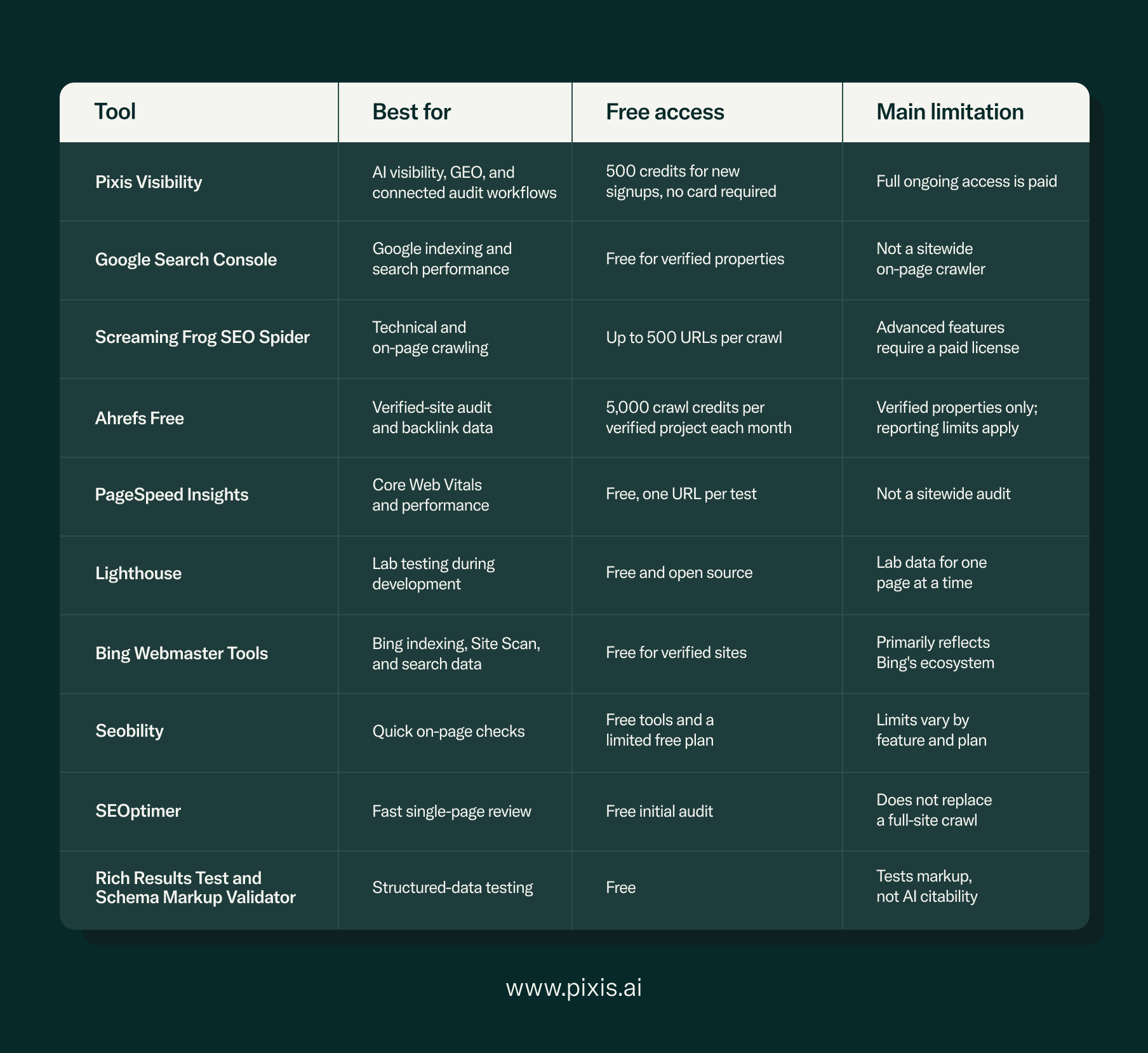
Best free SEO audit tools and the job each tool performs
1. Pixis Visibility
Traditional SEO tools can tell you how a page is crawled, indexed, linked, and ranked. Those signals remain essential, but they do not fully answer a newer question: does the brand appear inside the generated response for the prompts its buyers ask?
Pixis Visibility is built for that measurement and execution layer. It tracks brand presence and citations across generative engines, audits technical SEO and crawler access, identifies keyword and content gaps, and turns findings into content planning and production workflows. New signups receive 500 free credits with no card required; continued access to the full feature set is paid.
Pixis Visibility also checks llms.txt, but that check should be interpreted correctly. llms.txt is a community-proposed format, not a substitute for robots.txt, and no major provider has established it as a ranking or citation signal. Google advises site owners not to overinvest in unnecessary AI text files such as llms.txt. Its presence can be documented, but should not be treated as proof of accessibility or citation readiness.
Crawler access should instead be reviewed by purpose. Training bots, search and retrieval bots, and user-triggered browsing agents may use different user agents and controls. For ChatGPT search, for example, OpenAI distinguishes its search crawler from its training crawler. Audit current documentation for every platform that matters rather than applying one allow-or-block rule to every AI bot.
Pixis Visibility extends beyond diagnosis. Keyword gap analysis and clustering can feed a 30-, 60-, and 90-day content calendar, while generated briefs and CMS workflows help teams act on the findings without handing spreadsheets between disconnected tools. Backlink intelligence and natural-language data exploration sit within the same workflow.
For a deeper technical framework, read How to Do an SEO Audit and How to Use Technical SEO for GEO.
2. Google Search Console
Google Search Console should usually be the first stop for an established website. It provides first-party information about how Google crawls, indexes, and serves pages, alongside queries, clicks, impressions, click-through rate, and average position.
The Core Web Vitals report groups URLs using field data from the Chrome User Experience Report when enough data is available. Search Console can also surface indexing problems and let teams inspect individual URLs. What it does not provide is a comprehensive on-page crawl that systematically reports every missing title, duplicate meta description, broken internal link, or absent image alt attribute.
Google retired the Mobile Usability report, Mobile-Friendly Test, and related API in December 2023. That did not make mobile usability unimportant. It means teams now have to evaluate responsive behavior through PageSpeed Insights, Lighthouse, Chrome DevTools, and manual device testing. Google explains the retirement here.
Google has also introduced dedicated generative-AI performance reporting in Search Console. At launch, Google described it as a rollout to a subset of sites, so availability may differ by property. AI-feature data remains part of overall Search performance reporting. See Google's announcement for the reporting scope.
Use it for: Google indexing, search demand, URL inspection, query performance, and aggregate Core Web Vitals.
Pair it with: Screaming Frog for a sitewide technical crawl.
3. Screaming Frog SEO Spider
Screaming Frog SEO Spider is one of the most useful free technical crawlers for smaller sites. Its free version crawls up to 500 URLs and reports status codes, redirects, page titles, meta descriptions, headings, canonicals, internal links, and other on-page elements.
The 500-URL limit is not the only difference between the free and paid versions. JavaScript rendering, structured-data validation, crawl scheduling, and several advanced integrations require a paid license. A site with fewer than 500 URLs can still receive a strong foundational crawl for free, but that should not be described as a complete audit of every technical layer.
Use it for: Broken links, redirect chains, metadata, canonicals, response codes, and internal-link patterns.
4. Ahrefs Free
Ahrefs Free gives verified site owners access to Site Audit and selected Site Explorer data. Ahrefs documents 5,000 crawl credits per verified project each month, with only eligible internal HTML pages consuming those credits. Free-account row and export limits still apply, so “full backlink profile” would overstate what a free user can inspect at once.
The product is useful for reviewing referring domains, backlinks, organic keywords, and technical findings for websites you can verify. It is not the same as unrestricted competitor research in a paid Ahrefs subscription.
Use it for: A second technical crawl, verified-site backlink review, and organic visibility data.
5. PageSpeed Insights
PageSpeed Insights evaluates one URL at a time. When sufficient Chrome User Experience Report data exists, it shows field performance for real users. It also runs Lighthouse to provide lab diagnostics and improvement opportunities.
Its Core Web Vitals reporting covers Largest Contentful Paint, Interaction to Next Paint, and Cumulative Layout Shift. A mobile test in PageSpeed Insights is a mobile performance simulation, not a reinstated version of Google's retired Mobile-Friendly Test.
Use it for: Validating important landing pages and identifying likely causes of poor Core Web Vitals.
6. Google Lighthouse
Lighthouse is an open-source auditing tool available through Chrome DevTools and other workflows. It tests performance, accessibility, best practices, and selected SEO checks in a controlled lab environment.
Because it does not require public field data, Lighthouse is useful for pages being tested before launch or in development environments. Its scores can vary with device, network, and test conditions, and a single run should not be treated as a sitewide verdict.
7. Bing Webmaster Tools
Bing Webmaster Tools provides indexing and search-performance information from Bing, together with Site Scan, URL Inspection, backlink reporting, and keyword research.
It is valuable precisely because it is not another Google view of the same site. Differences between Bing and Google can expose engine-specific crawling, indexing, or visibility issues. Its reports should still be interpreted as Bing data rather than a universal view of search performance.
8. Seobility
Seobility provides quick checks and a limited free plan covering areas such as on-page SEO, rankings, and backlinks. Its instant SEO Checker is useful when a team needs a readable initial assessment without configuring a desktop crawler.
Limits and available capabilities vary between its individual tools and account plans. Verify the current allowance before presenting it as a replacement for a dedicated site crawler.
9. SEOptimer
SEOptimer produces a quick report for an entered URL, covering metadata, headings, links, usability, performance, and social signals.
Its value is speed. It can help a marketing team triage an individual page before a deeper review. Because it begins with a page-level snapshot, it should not be used as evidence that the entire site has been audited.
10. Google Rich Results Test and Schema Markup Validator
These tools answer different structured-data questions:
- Google's Rich Results Test checks whether a page contains valid markup for rich-result types supported by Google.
- Schema Markup Validator validates Schema.org markup more broadly, including types that do not produce a Google rich result.
Neither tool measures AI visibility or citation likelihood. Valid structured data can help search systems understand explicitly marked entities and make a page eligible for relevant search features, but Google states that its AI features require no special schema. Google's AI-feature documentation should be the reference point.
Google discontinued FAQ rich results in May 2026 and subsequently removed the related documentation. Existing FAQPage markup does not automatically make content more likely to receive an AI citation. Keep FAQ content when it is useful to readers, and use schema only when it accurately represents the page rather than as an unsupported GEO shortcut.
What GEO adds to a traditional SEO audit
Generative Engine Optimization focuses on how brands and sources appear within AI-generated answers. It does not replace technical SEO. A page still needs to be discoverable, accessible, useful, and supported by credible signals before an AI system can retrieve or cite it.
A responsible GEO audit can examine:
- Whether the brand appears for a controlled set of relevant prompts
- Which competitors and third-party sources appear instead
- Citation frequency and position across individual engines
- Whether retrieval crawlers are intentionally allowed or blocked
- Whether important content depends on rendering or access conditions that prevent retrieval
- Whether claims are clear, current, verifiable, and supported by named sources
- Whether the brand's off-site presence corroborates what it says on its own website
Do not treat llms.txt, FAQ schema, or any single content format as a guaranteed citation lever. Google states there are no additional technical or structured-data requirements for appearing in AI Overviews or AI Mode. Other platforms do not publish complete citation-ranking recipes either.
For a fuller explanation, see GEO vs. SEO: What Is Actually Different and What Still Applies. For a practical prompt-and-citation workflow, read How to Get Cited by ChatGPT.
How to integrate free tools into a comprehensive SEO workflow
Step 1: Establish the indexing baseline
Open Google Search Console and Bing Webmaster Tools. Review indexed and excluded pages, crawl issues, sitemap status, important query trends, and sudden visibility changes.
Step 2: Crawl the website
Run Screaming Frog across the site or a representative section. Export findings by issue type, then verify high-impact problems manually before changing templates or directives. If the property is verified, run Ahrefs Free as a second crawl and compare the results.
Step 3: Test priority pages for performance
Use PageSpeed Insights on the homepage, important product or service pages, high-traffic landing pages, and representative templates. Use Lighthouse when controlled lab testing is needed or the page has not launched.
Step 4: Validate structured data
Use the Rich Results Test for Google-supported search appearances and Schema Markup Validator for broader Schema.org syntax. Confirm that the markup describes content visibly present on the page.
Step 5: Review backlinks
Use Ahrefs Free and Bing Webmaster Tools to examine referring domains and changes in the link profile. Avoid treating an automatically flagged or unusual link as harmful without evaluating its context.
Step 6: Add AI-visibility measurement
Build a consistent prompt set around the questions customers ask when defining a problem, comparing solutions, and evaluating vendors. Test the same prompts across the engines that matter to the audience. Record brand presence, cited sources, competitors, and response variability.
Pixis Visibility brings that cross-engine measurement together with the technical audit and content workflow. A GEO tool is an input into the assessment, not a guarantee that a page will be cited.
Connecting visibility to campaign performance and creative production
An SEO or GEO audit establishes how easily a brand can be discovered and understood. For consumer brands, that is only one part of the marketing system. The next question is whether the campaigns and creative people encounter after discovery are performing effectively.
That is where the broader Pixis suite connects the work:
- Prism is Pixis's AI-powered command center for campaign performance, bringing campaign monitoring and optimization into one operating layer.
- Adroom is Pixis's generative creative studio for producing and adapting on-brand advertising assets across channels.
- Pixis Visibility measures and develops the brand's presence across traditional and AI-mediated discovery.
The connection should not be overstated: an SEO audit does not directly optimize an ad campaign, and creative production does not fix a crawl problem. The value is operational. Visibility insights, media decisions, and creative execution can be managed within a connected marketing workflow rather than remaining isolated across separate teams and exports.
The Storii, part of the Stellar agency network, uses Pixis Visibility alongside traditional SEO reporting to add prompt coverage, citation share of voice, and competitive AI visibility to its client work. Read how The Storii applies Pixis Visibility.
Conclusion: making the most of free SEO audit tools
The best free SEO audit stack depends on the size of the site and the problem being investigated. For many teams, Google Search Console, Screaming Frog, Ahrefs Free, and PageSpeed Insights provide a strong starting point across indexing, on-page technical issues, backlinks, and performance. Bing Webmaster Tools, Lighthouse, and structured-data validators add useful second views and specialized checks.
AI visibility requires separate observation because a traditional ranking report does not show whether a brand appears in a synthesized response. Pixis Visibility adds that measurement layer and connects it to technical auditing, content planning, briefs, backlink intelligence, and publishing workflows.
The tools can surface the problems. The quality of the audit still depends on how carefully the findings are verified, prioritized, and translated into action.
If your team wants to connect search and AI visibility with campaign performance and creative production, request a Pixis demo. The conversation can include a live GEO visibility audit of your domain and a view of how Visibility, Prism, and Adroom support different parts of the marketing workflow.