
Every Monday, someone on the SEO team opens Search Console, checks positions for the same 40 keywords, compares them with last week's spreadsheet, and messages the team if anything dropped. It takes an hour. It is also exactly the kind of task a simple automation could do while everyone is still on their first coffee.
Most SEO teams know this. What stops them is the assumption that automation means code, APIs and a developer's time. For a large share of repeat SEO work, it does not.
The difficult part is not the build. It is deciding what to automate and describing the job precisely enough that a tool can do it. Teams that skip that step end up with workflows that fire at the wrong time, send the wrong numbers, or quietly change something they should not.
This guide explains how to choose candidates, design an automation with a five-part template, build it without code, and test it before you rely on it.
Key takeaways
- Automate tasks that are repeated, rule-based and low-risk. If you cannot write the rule as one if-then sentence, the task is not ready.
- Design every automation on paper first with five fields: trigger, data, rule, output and owner. The build then becomes filling in the same five fields in a tool.
- Start with alerts and reports, not actions. An automation that flags a problem is safer than one that changes a live page.
- Keep a human approval step on anything that publishes content, changes metadata or touches redirects.
- Test with last week's data, then compare the first three live runs with what you would have produced by hand.
- Pixis Visibility can run scheduled reports and alerts and connect to compatible AI assistants through its MCP connection; deciding what is worth automating stays with your team.
Step 1: List and score your candidates
Write down five to ten SEO tasks your team does by hand every week. Put them in a shared doc so the team can score them together.
Score each task yes or no on three criteria:
- Repeated: it happens on a schedule, weekly or daily.
- Rule-based: the decision follows a clear condition, such as a threshold.
- Low-risk: a wrong output is easy to spot and cheap to fix.
A rank-drop alert scores yes on all three: you check positions every week, the rule is a threshold, and a wrong alert is obvious. Content prioritization fails the second test, because it needs judgment about business fit and audience.
Tasks with three yeses go to the top of the build list. Among those, start with the one whose output someone can act on without interpretation. An alert that says "these five URLs now return 404" is a better first build than a report that needs analysis.
For a wider view of which SEO work suits automation, see what to automate versus keep human in SEO.
Step 2: Fill in the five-part template
For each candidate, write one line for each field:
- Trigger: the schedule or event that starts the automation.
- Data: the source the rule checks.
- Rule: the condition, written as an if-then sentence.
- Output: what the automation produces, such as a message, a row or a ticket.
- Owner: the person who receives the output and acts on it.
Here is the rank-drop alert written out:
- Trigger: every Monday at 8:00.
- Data: average position for 40 priority queries from Google Search Console, this week and last week.
- Rule: if any query's position worsens by more than three places week over week, flag it.
- Output: a Slack message listing the affected queries, old and new positions, and the ranking page.
- Owner: the SEO lead.
Other good first candidates follow the same pattern: new broken URLs found in a crawl, pages that lose impressions sharply, or a competitor gaining ground in AI answers for your tracked prompts.
Writing the template first matters because most no-code tools ask for the same five things in different interfaces. With the template done, the build is a matter of filling in blanks.
If your team still pulls positions by hand, this guide to checking Google keyword rankings covers where the ranking data for the rule can come from.
Step 3: Pick the right place to build
The template works on any tool. The question is where your data already lives.
- An SEO platform with built-in workflows. If your platform already holds the data and can schedule reports and alerts, build there first. There is nothing to connect.
- A visual workflow builder. These tools let you drag steps onto a canvas and connect them in order: a scheduled trigger, a data step, a filter, and a message or spreadsheet step. Most connect to Google Search Console, Google Sheets and Slack with a few clicks.
- An AI assistant connected to your data. For tasks that need a little reasoning, such as summarizing why a set of pages dropped, you can connect an assistant to your SEO platform and describe the task in plain English.
If your rule needs raw Search Console data, the Search Console API is free, and you can test queries in your browser with the "Try it!" button in the API reference, without writing code. You only need a developer if you want a custom connection or self-hosted infrastructure, and usually only for the initial setup.
For how one connected pipeline compares with a set of separate tools, see the SEO tool stack audit.
Where automations go wrong
Most failures come from three habits.
Building before designing. Teams open a workflow tool, start connecting steps, and lose track of what the automation is for. If you cannot describe it in one sentence using the template, you are not ready to build it.
No guardrails on high-stakes actions. Publishing content, changing metadata, editing redirects or disavowing links should always need human approval, even when an automation detects the problem. A redirect rule that looks correct in isolation can break a whole category of pages. Have the automation create a draft or a ticket, and let a person approve it.
Automating too much at once. Ten workflows built in a week become a web nobody understands or can debug. Build one, let it run for three weeks, then add the next.
Step 4: Test before you trust it
A quiet automation is only reassuring once you know it works. Before you put it on a schedule, run through these checks:
- Dry run with last week's data. Trigger it manually, starting with a single keyword or URL so any error is easy to trace.
- Check the data. Compare the numbers it pulled with what you see in Search Console directly.
- Check the rule. If the threshold is a three-position drop, confirm it fires at four and stays silent at two.
- Check the output. The Slack message should reach the right channel, or the row should land in the right sheet tab.
- Watch the first three live runs. Compare each one with what you would have produced by hand. If they match, the automation is ready. If not, adjust the rule or data source and test again.
Keep alerts worth reading
Alert only on conditions that need action. A two-position wobble on a low-volume query rarely matters; a sharp drop on a high-traffic page does. Send urgent alerts, such as mass 404s or crawl failures, to a real-time channel, and put routine reporting into a weekly digest. For what that digest should cover, see how to build a consolidated SEO and AI visibility report. If people start ignoring an alert, raise the threshold or remove it.
Where Pixis Visibility fits
The repeat work in this guide is pulling the same data on a schedule, applying a rule and sending the result to the right person. That is what the automations in Pixis Visibility's Marketing Agents area are for.
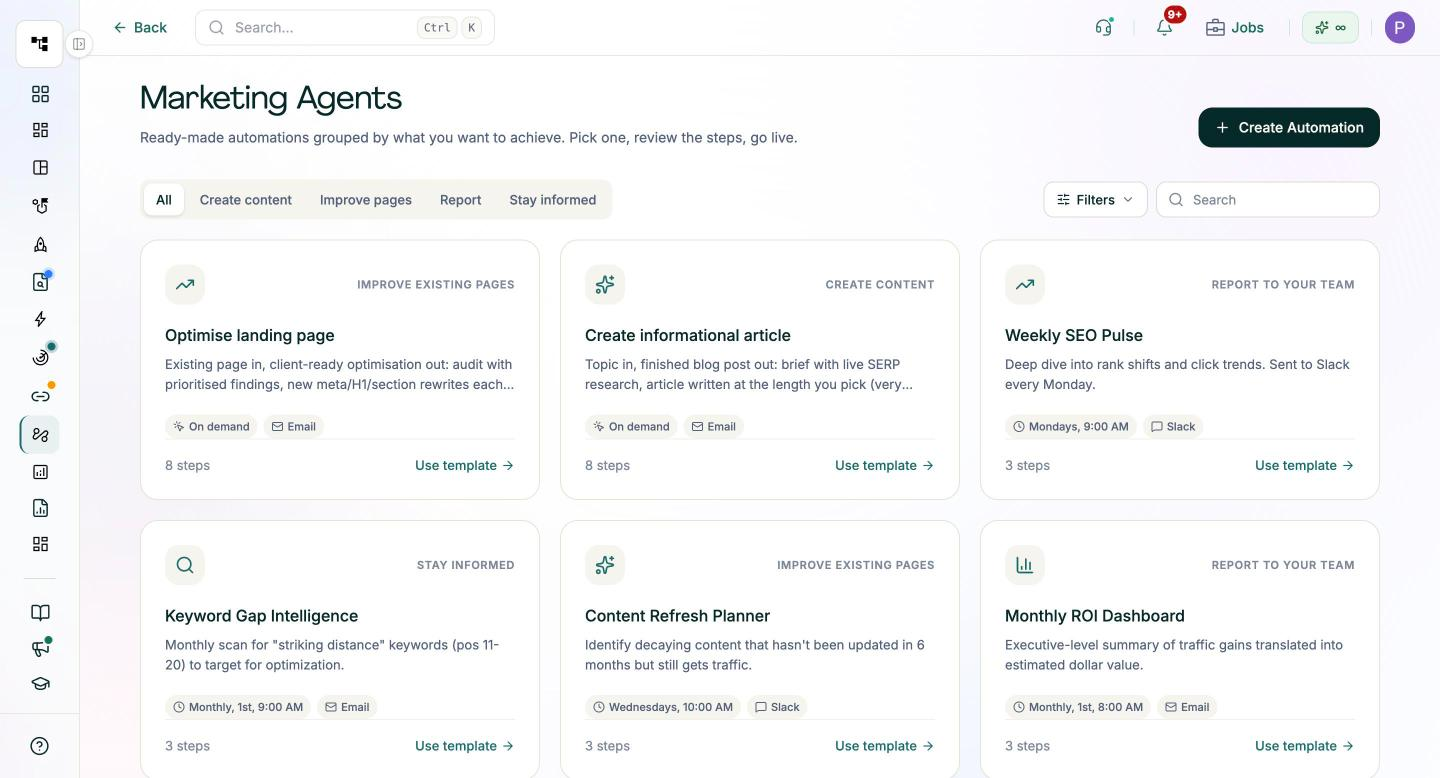
You can set up scheduled custom reports and alerts, including alerts when a competitor gains ground in AI search answers, and send them to email or a Slack channel. Ready-made templates cover common jobs, such as a Weekly SEO Pulse that posts rank shifts and click trends to Slack every Monday, and a blank canvas lets you pick your own trigger, steps and destination. Keyword position tracking supplies the ranking data for rank-drop rules, and the scheduled technical SEO audit can send email alerts when thresholds such as broken URLs are breached. Chat With Your Data lets you ask plain-English questions of the same data, and the Visibility MCP connection lets compatible assistants such as Claude and Cursor work with it directly. ChatGPT can connect too through its custom connectors, where your ChatGPT plan supports them.
What stays with your team is the design: choosing which tasks deserve automation, writing the rules, setting thresholds, and approving anything that changes a live page.
Start with one alert this week
Pick the most repetitive check on your list, usually a rank-drop or broken-URL alert. Fill in the five-part template, build it in whichever tool already holds the data, and run the dry test with last week's numbers.
Let it run for three weeks and compare each output with a manual check. Once it holds up, move to the next task on the list.
Get started with Pixis Visibility to schedule SEO reports and alerts where your ranking and audit data already lives.
FAQs
What SEO tasks should I automate first?
Start with tasks that are repeated, rule-based and low-risk, such as rank-drop alerts, new broken URL alerts and weekly position reports. If two candidates tie, pick the one whose output someone can act on without interpretation.
Do I need coding experience to build SEO automations?
No. Visual workflow builders and SEO platforms with built-in workflows handle the connections for you. The skill that matters is writing a clear rule. A developer only helps if you need a custom API connection or self-hosting.
Which no-code platform is best for SEO automation?
The one that already holds your data, or connects to it most easily. The five-part template is the same in every tool, so start where your Search Console and reporting data already sit, and move only if you hit a real limit.
How much does SEO automation cost?
It depends on the tool and how many runs or steps you need. Many workflow builders offer a free tier that covers a few simple weekly automations, with paid plans priced by volume. Check current pricing on each vendor's site, and count the hours saved against it.