

Your next AI tracking prompt may already be in Google Search Console. It could be a detailed question about your product category, a request to compare two providers, or a fragment such as “any other options” that makes little sense outside a conversation.
These queries give you a practical starting point for understanding the questions your content needs to answer. They come from your property's recorded Google search activity, rather than a list of questions invented for a monitoring dashboard.
The work is finding them. A useful question can sit among thousands of branded searches, broad keywords, irrelevant requests, and conversational fragments. Extracting it manually means filtering queries, exporting results, removing duplicates, and connecting questions to pages.
Pixis Visibility now automates that discovery workflow. Connect Google Search Console, scan for AI-shaped queries, and move relevant questions into your prompt library for scheduled testing across AI engines. You can also inspect the pages associated with those queries and flag overlapping coverage.
This guide explains the manual method, how to interpret each query type, and how to turn the results into a prioritized AI visibility plan.
Key Takeaways
- GSC contains Google search queries, including AI Mode follow-up queries. It does not provide private conversation logs from ChatGPT, Claude, or other assistants.
- Five regex filters help uncover assistant names and search operators, prompt commands and follow-ups, numbered queries, questions and comparisons, and long conversational searches.
- Preserve the original query, connect it to the relevant pages, and remove duplicates before calculating totals.
- Test relevant questions across AI engines to find gaps between your existing Google visibility and your brand's presence in AI answers.
- Pixis Visibility automates query discovery and classification, supports prompt-library monitoring, and flags page overlaps for review.
What AI Query Data Can You Find in GSC?
Google documents that an AI Mode follow-up is treated as a new query. That makes Search Console useful for investigating conversational search behavior, including questions asked after an initial answer.
Your query data can also contain detailed requests, comparison questions, assistant names, search operators, and unusual numbered prefixes. These are useful discovery signals. They help you identify questions to test and search behavior to investigate.
The distinction is between the recorded query and its inferred origin. The query is observed Google search data. Calling it a ChatGPT prompt, an agent-generated search, or an AI Mode interaction requires evidence beyond its wording.
Google also explains that AI Mode and AI Overviews can use query fan-out: multiple related searches used to develop an answer. This does not establish that every operator query in your export is a fan-out query, or that GSC reveals the complete chain behind an AI answer.
Use the filters below to build a relevant candidate set. Then use AI testing to establish which questions surface your brand, your competitors, and your content.
Set Up Your GSC Query Analysis
Start with one property and a consistent reporting period:
- Open Google Search Console and select your property.
- Go to Performance → Search results.
- Choose the last three months for an initial review. Use a longer available period when investigating recurring patterns.
- Click Add filter → Query → Custom (regex).
- Select Matches regex, paste one pattern below, and click Apply.
- Open Queries to review the matching search terms.
- Export the results to Google Sheets or CSV.
- Replace the query filter with the next pattern and repeat.
Keep the date range, search type, country, and device settings consistent across exports. Label each export with its filter name so you can retain the classification after combining the results.
GSC uses RE2 syntax and case-insensitive regex matching by default. The patterns below use that syntax. Avoid lookahead expressions when adapting them, and copy the pattern without the surrounding code fences.
Filter 1: AI Assistant Names and Search Operators
site:|\b(chatgpt|perplexity|claude|copilot|gemini|searchgpt|deepseek|grok|meta ai)\b
This filter collects two different groups: queries containing an AI assistant's name, and queries containing a site: operator.
Assistant-name queries
An illustrative query such as “is gemini better than chatgpt for seo” reveals a comparison your audience may want answered. A query asking whether your product integrates with ChatGPT may expose a product question worth answering directly.
Keep the actual intent in view. Naming an assistant establishes the subject of the query; it does not establish that the searcher used that assistant to submit it.
Review ambiguous matches. “Claude” can refer to Claude Monet, and “Gemini” can refer to astrology. Remove irrelevant rows after export and add assistant names relevant to your market.
Operator queries
A query such as site:yourdomain.com pricing may reveal someone looking for information on your website. Operator queries can also appear in automated research workflows.
Check whether the operator targets your domain or another site before interpreting the row. A site:reddit.com example is not a reliable illustration of how your own website should receive an impression: the operator explicitly restricts the requested results to Reddit.
Treat operator matches as candidates for investigation. They do not identify the original prompt or prove that an AI agent submitted the search.
Filter 2: Prompt Commands and Conversational Follow-Ups
^(?:(?:please|write|draft|generate|summarize|rewrite|translate|explain|compare|act as|you are a|list|organize|pretend you are|suggest|estimate|optimize|find|can you)\s+.+|(?:give|show|tell|plan)\s+(?:a|me)\s+.+|make it\s+(?:shorter|funnier)(?:\s+.*)?|(?:hi|hello|hey|hiya)(?: there)?|good (?:morning|afternoon|evening)|how are you|yo|(?:thanks|thank you)(?: (?:so much|a lot|very much))?|thx|cheers|(?:awesome|great|cool) thanks|ty|thankyou|sorry|yes|yep|yeah|yea|sure|ok|okay|correct|fine|sounds good|perfect|great|yes i do|yes that would be great|yes go on|yes,? pricing|(?:yes|yeah|sure|ok|okay) (?:please|thanks|thank you|pls|thx|plz)|(?:please|thanks|thank you) (?:yes|yeah|sure|ok|okay)|(?:no|nope|nah)(?: (?:thanks|thank you|thx))?|cancel|stop|wrong|incorrect|anywhere|all|any|yes please recommend|please recommend|bye|goodbye|bye bye|see ya|end|quit|done|help|options|what can you do|start over|restart|more|next|continue|go on|show on map|show me|any other options|others|please do|show map|try again|again|shorter|longer|fix it|is that all|(?:where|when|anything) else|(?:are there|any|show|show me) (?:more|others)|more (?:recommendations|ideas|options|results|places|hotels|restaurants|things to do|attractions)|(?:show|tell|add) (?:me )?(?:more|others|next))$
The anchors limit the match to the full query. The first alternatives find instructions followed by a task. The remaining alternatives find short conversational responses.
Turn complete commands into task-based prompts
“Compare AI advertising platforms for a small ecommerce team” contains a task, a category, and an audience constraint. Preserve all three when adding it to your monitoring library.
Read the page already associated with the query. Does it help a small team compare implementation effort, creative requirements, and reporting? If it only lists features, improving that page may be more useful than publishing another broad comparison article.
Commands such as “find a plumber” also occur in conventional searches. Review relevance before classifying them as priority prompts.
Use fragments to investigate pages
“Continue,” “yes please,” and “any other options” are worth inspecting because AI Mode supports follow-up queries. Select the query and inspect its associated pages.
A fragment cannot reconstruct the conversation that preceded it. Do not expand “any other options” into a specific product question without context. Keep it in a page-investigation list until you have enough information to interpret it.
Adapt the category-specific alternatives. For software research, you could add more (tools|platforms|alternatives|pricing options) rather than relying only on travel and local-search language.
Filter 3: Queries With Numbered Prefixes
^[0-9]+:\s*
This finds queries beginning with digits followed by a colon, such as “26111: seo for bing and yahoo.”
A recurring numbered prefix may suggest an automated research or testing workflow. It is an unusual formatting signal, not a verified bot identifier.
Inspect the text after the prefix and the associated page. If the underlying question is relevant, retain the raw query and create a separate cleaned version for testing. Record that you removed the prefix so the tested prompt remains traceable to its source.
Keep numbered queries separate when reviewing trends. A sudden burst may reflect a research batch rather than a sustained change in customer demand.
Filter 4: Questions and Comparisons
^(how|what|why|which|who|when|where|is|are|can|does|do|should)\b|\b(best|vs|versus|alternatives?|compared? to)\b
This finds queries beginning with question words and queries containing evaluation language.
Illustrative matches include “how does ai ad optimization work,” “which advertising platform works without a designer,” and “hubspot vs salesforce for startups.”
This will usually be a broad discovery group because conventional searches share the same wording. Its value is the decision it reveals.
A “can” question may need a clear capability explanation. A “versus” query may need a comparison that explains tradeoffs. An “alternative” query may require evidence about switching, compatibility, or cost.
Review overlap with the long-query filter to find comparisons containing additional buying constraints. Prioritize questions your business can answer credibly and whose answers affect a relevant customer decision.
Filter 5: Long, Conversational Queries
^\s*(?:\S+\s+){9,}\S+\s*$
This matches ten or more whitespace-separated tokens, allowing surrounding whitespace. Nine repeated token-and-space groups plus the final token create the minimum of ten.
An illustrative match is “what is the best ai advertising platform for a small team without a designer.” The useful information is the constraint: the searcher needs a platform that works without dedicated design support.
Retain that condition when testing the prompt. Reducing it to “best AI advertising platform” changes the question and may produce a different shortlist.
Change {9,} to {7,} for eight or more tokens when results are sparse. Change it to {11,} for twelve or more when the export needs narrowing.
Length is a discovery threshold. It does not establish that the query originated in an AI interface or that it deserves its own article.
Combine the Exports Without Double-Counting
A long comparison query mentioning ChatGPT can match several filters. Stacking exports and summing impressions would count the same record repeatedly.
Build a master research sheet with the original query, matching filter labels, reporting period, impressions, clicks, CTR, average position, relevant URLs, proposed test prompt, intent, and next action.
For query-only exports with identical reporting settings, retain one record per query and combine its filter labels. Do not add duplicate metrics together. For query-page data, retain distinct query-page combinations; the same question appearing against two URLs is useful evidence of overlap.
Preserve the raw query in its own field. Keep any cleaned or expanded prompt beside it, with a note explaining the change. This is particularly important for numbered strings and conversational fragments.
Remove irrelevant assistant-name matches, unrelated tasks, and fragments you cannot interpret. The result should be a reviewable prompt candidate set, with a separate list of queries needing investigation.
Connect Each Query to the Pages Google Shows
To inspect one query manually, click it in the Queries tab and switch to Pages. Review the URLs associated with that query under the selected reporting conditions.
Switching to Pages with the broad regex filter still applied shows pages for the whole group. It does not tell you which individual query belongs to each URL.
For repeated analysis at scale, the Search Analytics API supports grouping by both query and page. It also supports regex filtering. Google cautions that the API returns top rows rather than guaranteeing every row, so treat the output as a discovery dataset rather than a complete demand census.
Use the page mapping to answer three questions:
Is the right page appearing? A pricing question associated with a general blog post may warrant a clearer pricing explanation and stronger internal links to the relevant page.
Does the page answer the full question? A category page may address the product but omit the searcher's budget, industry, or implementation constraint.
Are multiple pages covering the same intent? Compare their purposes before making changes. A product page and a detailed implementation guide can both be useful. Two interchangeable guides may need consolidation or clearer differentiation.
Read Impressions, Clicks, and CTR Together
Use GSC metrics to prioritize review, then validate the cause of the pattern.
High impressions with low clicks can justify inspecting relevance, snippets, competition, and the information offered on the page. It does not, by itself, establish that an AI answer satisfied the searcher.
High impressions and high clicks identify pages worth maintaining. Check whether the visits support relevant business outcomes in your analytics.
Low impressions with a relatively high CTR may reveal a useful niche question. Inspect related queries before expanding coverage, particularly when the sample is small.
Rising impressions mean your site appeared more often under the selected reporting conditions. Changes in demand, rankings, and query mix can all contribute. Keep comparisons consistent and investigate those factors before describing an increase as demand growth.
Use average position as a diagnostic trend. Do not treat it as your brand's rank inside a ChatGPT or Claude answer.
Build a Prompt Library From Relevant Queries
Complete, relevant questions can move directly into AI testing. Fragments and suspicious formatting need review first.
For each selected prompt, keep the original GSC query, any adapted wording, the associated page, and the reason it matters. Group prompts by the decisions they support: evaluating alternatives, checking capabilities, understanding implementation, or resolving purchase objections.
Run the prompts across the AI engines you want to monitor. Record brand mentions, competitor mentions, website links, third-party sources, and factual accuracy separately. A brand mention and a citation to your website answer different questions.
Repeat checks with consistent wording and collection settings where possible. One response is a useful observation; repeat monitoring helps establish whether the result persists.
Supplement GSC with sales questions and customer research. Its queries are shaped by where your website already appears, so it can miss important questions outside your existing coverage.
Find the Gap Between Google Visibility and AI Answers
The useful gap list contains relevant questions for which your site earns Google impressions but your brand is absent from the AI answers you test.
Prioritize each gap using its observed GSC impressions, relevance to a purchase decision, repeated monitoring results, and the quality of your existing coverage. Impressions help order the work within your dataset; they are not a measurement of how frequently the prompt is asked across AI platforms.
Consider a hypothetical question about advertising software for a team without a designer. Your page earns Google impressions, but repeated AI tests recommend competitors. Inspect the cited sources and the page's explanation of creative production, review requirements, and onboarding.
If the page omits verified information, update it. If an external source contains an outdated description, investigate that source. If your product does not fit the stated need, a missing mention may be appropriate.
Where answers misrepresent the product, our guide to the AI narrative gap explains how to compare the narrative with verified facts.
Review Page Overlaps Before Creating More Content
Pixis Visibility flags queries associated with multiple pages so you can inspect potential cannibalization.
An overlap is a review signal. It does not automatically mean pages are splitting an AI citation or weakening each other.
Consolidate pages when they serve substantially the same purpose and one stronger resource would help the reader. Differentiate them when they should answer distinct questions. Keep both when their roles are complementary and clear.
Before commissioning an article from the gap list, check whether an existing page can answer the question with a substantive update. This keeps prompt discovery from producing a second version of content you already have.
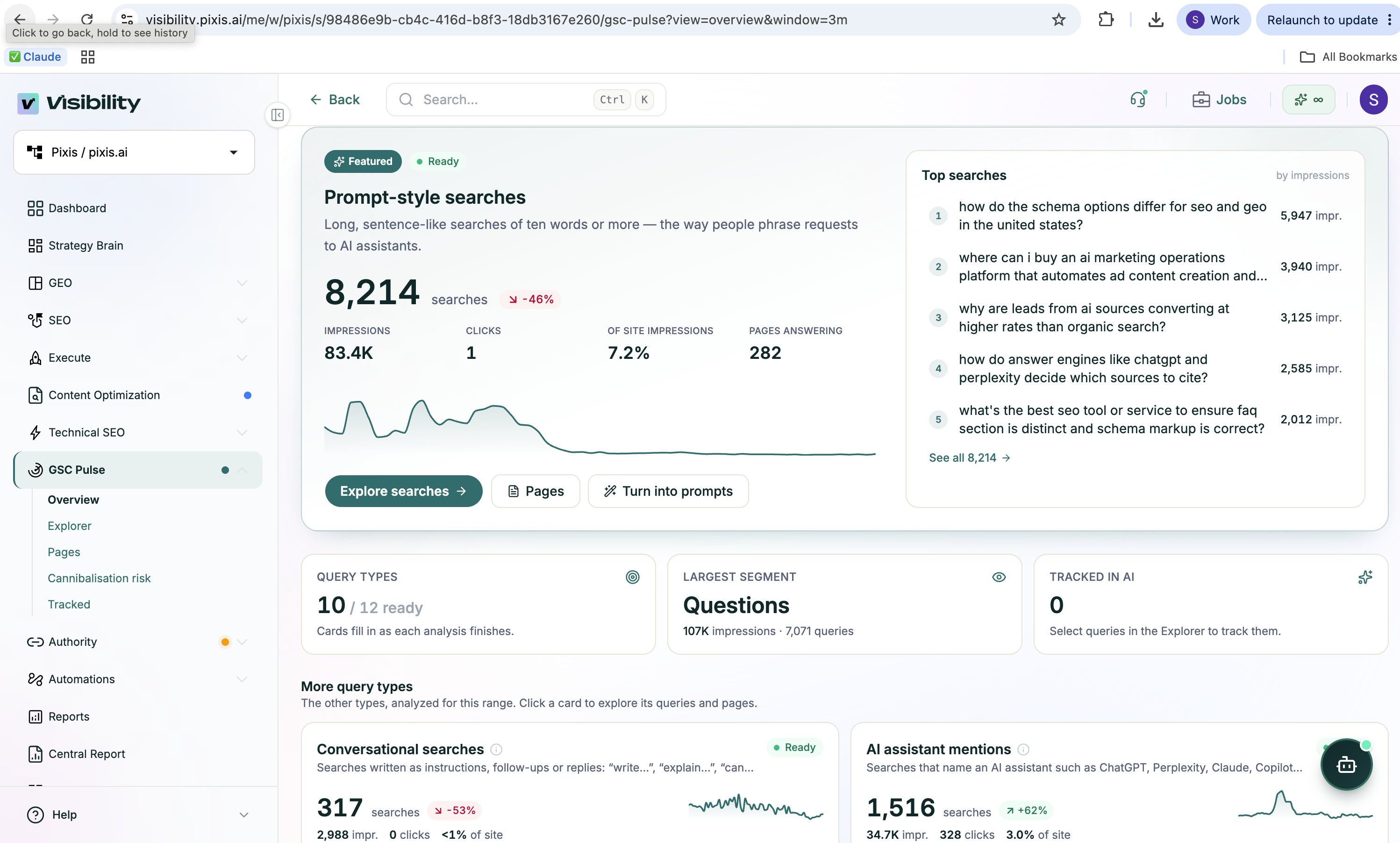
Automate the Workflow With Pixis Visibility
The manual method requires recurring exports, classification, deduplication, page inspection, and separate AI testing. Pixis Visibility brings those steps into a connected workflow.
After connecting Search Console, scan your query data for AI-shaped searches. Visibility classifies queries into categories such as prompt-style searches, AI assistant mentions, AI research mentions, conversational queries, questions, and how-tos, alongside impressions, clicks, and associated pages.
Move relevant queries into your prompt library and run them across AI engines on your schedule. Review which answers include your brand, where competitors appear, and which pages are associated with your Google query visibility.
Use the overlap flags to review competing coverage, then prioritize the questions where existing Google exposure does not translate into brand presence in the monitored AI answers.
The benefit is a shorter path from a recorded query to an evidence-based content decision. You retain the searcher's language while reducing the repeated work needed to discover, organize, and monitor it.
Explore Pixis Visibility to connect your Search Console data and build a prompt library grounded in your property's observed queries.