

Search Console reports 63 URLs as "Not found (404)". That tells you something is broken, but not where. To fix a broken link you need the page it sits on, the anchor text, and whether it lives in one article or in a footer that appears on every page.
That gap is why broken link audits stall. The list of dead URLs is easy to get. The list of source pages, the thing you actually edit, needs a crawler that records every link it follows.
Link rot is also the normal state of the web, not a sign that something went wrong. Pew Research Center found that 38% of webpages that existed in 2013 were no longer available a decade later. Any site that links out, or has been redesigned, will collect broken links over time.
This guide explains what Search Console can and cannot show, how to trace each broken link to its source page with a crawler, how to prioritize fixes, and how to keep new breaks from piling up.
Key takeaways
- Search Console's Page indexing report lists URLs that returned 404 in the past month, but it is not built to show every page that links to them.
- A crawler such as Screaming Frog gives you the broken target, the source page, the anchor text and the link type in one export.
- Fix links in site-wide templates first, then broken links on your highest-traffic pages, then the rest.
- Update the link, add a 301 redirect, or restore the page, depending on why the target broke. A 404 is fine for pages that should not exist.
- Pixis Visibility can run its technical audit, including broken URLs and internal links, on a daily, weekly or monthly schedule with email alerts when counts cross a threshold.
Know which kind of broken link you are dealing with
Internal broken links point from one page on your site to another page on your site that returns an error. You control both ends, so these are the first to fix.
External broken links point from your pages to other sites that moved or removed the content. They are common: Pew's study of disappearing online content found that 23% of news webpages contained at least one broken link.
The error type tells you the fix:
- 404 (Not found): the target does not exist. Update the link, redirect it, or restore the page.
- Soft 404: the page shows a "not found" message but returns a 200 status. Make it return a real 404 or 410, or restore real content.
- 5XX (server errors): the target exists but the server failed to deliver it. Check whether the error is persistent before changing any links.
What Search Console shows, and where it stops
Search Console has no dedicated broken links report. The closest is the Page indexing report: open Pages, scroll to the reasons pages are not indexed, and select "Not found (404)". Google notes that the report shows only URLs that have returned 404 errors in the past month. A separate "Soft 404" reason lists pages that look empty or missing but do not return a 404 status.
What it does not give you is a reliable list of source pages. Google may have discovered a missing URL through a link on another page, through a sitemap, or from an old external link, and the report is built to explain indexing, not to map your links. Use the URL Inspection tool on a sample URL to see how Google discovered it, which is useful for spotting stale sitemaps.
Google also says 404 responses are not necessarily a problem if the page was removed without any replacement. The issue is broken links you control: internal links and sitemap entries that send users and crawlers to dead pages.
Trace every broken link to its source page with a crawler
A crawler starts at your homepage, follows every link it can reach, and records the status code of each URL along with every page that links to it. The steps below use Screaming Frog SEO Spider, a widely used desktop crawler whose free version crawls up to 500 URLs. Other crawlers that report inlinks follow the same pattern.
Step 1: Crawl the site
- Enter your homepage URL and start the crawl.
- If parts of the site sit behind a login, set up authenticated crawling first, or those links will be missed.
- Let the crawl finish completely. Partial crawls produce partial lists.
A small site usually finishes in minutes. Large sites can take hours, so schedule big crawls outside working hours if the tool runs on your machine.
Step 2: Filter for errors and open the inlinks
- Open the Response Codes tab and filter for Client Error (4xx). Repeat later for Server Error (5xx).
- Select a broken URL and open the Inlinks tab in the lower panel.
- Read the From column (the source page), the To column (the broken target), the anchor text, the alt text for image links, and whether the link is followed.
The From column is the answer to the original question: it is the page you open in your CMS to make the fix.
Step 3: Trace redirect chains
If a broken target is reached through a redirect, the inlink may show the last URL in the chain rather than the page that started it. Use Reports, then Redirects, then All Redirects, and filter the final status to 404 to see the original source.
Step 4: Export source and target pairs
Use Bulk Export, then Response Codes, then Internal & External, then Client Error (4xx) Inlinks. The export lists every source page and broken target pair, with anchor text and link type, ready to sort in a spreadsheet.
For a broader audit that covers more than links, see the step-by-step SEO audit guide.
Fix by impact, starting with templates
Sort the export by broken target and count how many source pages link to each one. A target that appears on hundreds of pages almost always comes from a template: the navigation, footer, sidebar or a shared content block.
Fix those first. One template change can remove hundreds of broken link instances at once.
Then work through the remaining one-off links in order of page traffic, using Search Console or your analytics to rank source pages. A broken link on a page with thousands of monthly visits costs more than ten on pages nobody reads.
Choose the right fix
- Update the link when the content moved to a new URL. This is the cleanest fix, since it removes the redirect hop entirely.
- Add a 301 redirect when the old URL has a clear replacement and other sites or old content may still link to it.
- Restore the page when it was removed by mistake and still has value or incoming links.
- Remove the link when the target is gone and has no replacement, especially for external links.
After a fix, check the target with the URL Inspection tool to confirm it returns the status you expect.
Where broken link audits go wrong
- Fixing in list order. Working down the export alphabetically wastes the first hours on low-impact pages while the footer link stays broken.
- Redirecting everything to the homepage. A redirect should point to the closest relevant page. Mass redirects to the homepage can be treated as soft 404s.
- Ignoring images and scripts. Broken image and resource links do not show up as obvious text links but still break pages.
- Checking once. New content, removed products and migrations create fresh breaks every month.
Verify the fixes
After your changes go live, recrawl the site and confirm the broken targets no longer appear in the Client Error filter. Check the Page indexing report over the following weeks: since it covers the past month, fixed URLs should drop out as Google recrawls them.
Then review internal linking for the pages you touched, so links you removed are replaced with useful ones. For that process, see how to use internal linking to improve your SEO rankings.
Where Pixis Visibility fits
The manual audit fixes today's broken links. Keeping new ones from piling up is a scheduling problem.
Pixis Visibility runs a technical SEO audit that covers broken URLs, crawl errors, internal links, orphan pages and sitemaps, alongside images, schema and metadata. Its Broken URLs report lists each affected URL with the source pages it was found on, so you can go straight to the page you need to edit. You can run the audit daily, weekly or monthly and set email alerts for when a count crosses a threshold, so a template change that breaks links is flagged after the next audit rather than months later. Results export as a health check report for stakeholders. It also connects to Google Search Console, so you can review queries and pages for the URLs you fixed.
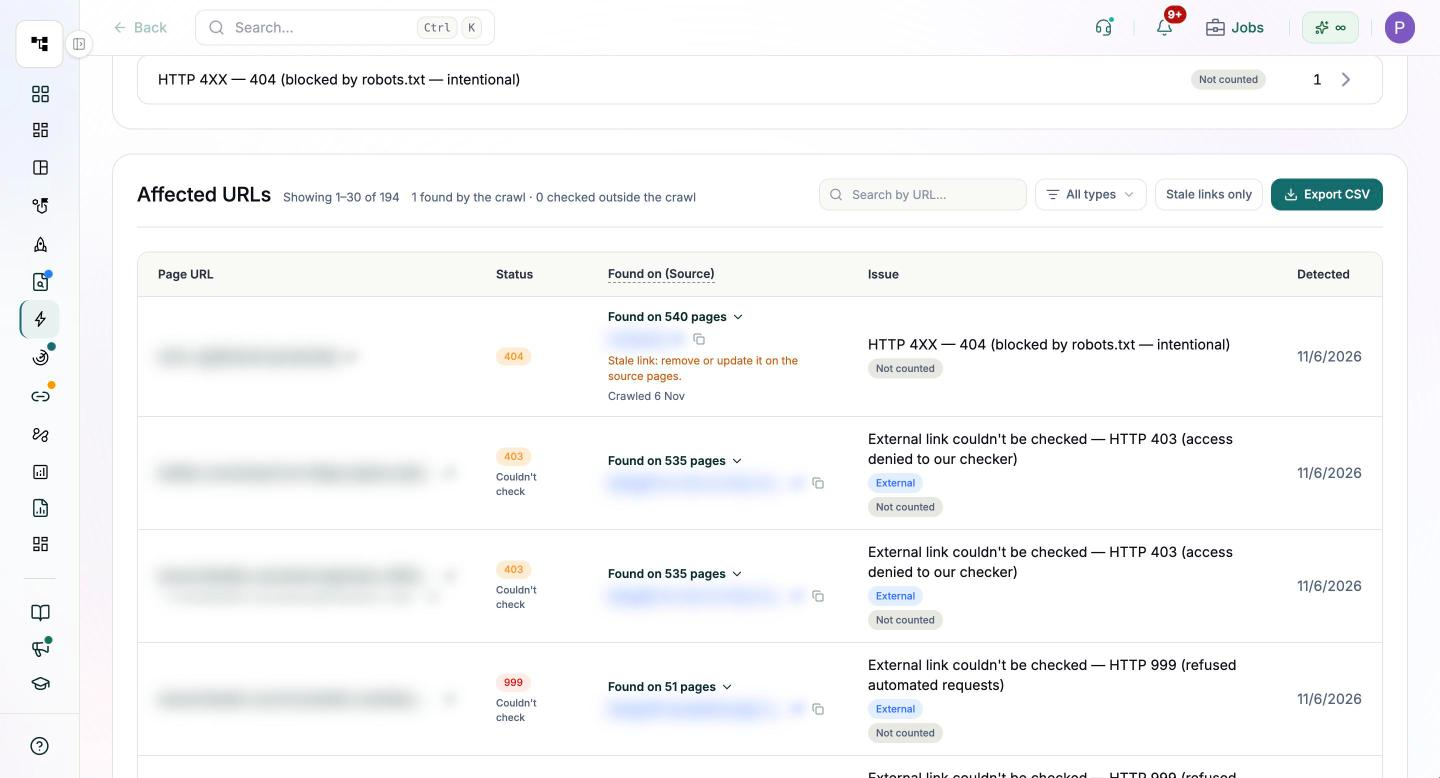
Tracing a stubborn break to the exact template, choosing between a redirect and an update, and making the change in your CMS stay with your team.
Make the next audit the easy one
Run one full crawl this week, export the source and target pairs, and fix every template-level break before anything else. Then set a schedule so the next audit only has a handful of new breaks to deal with.
Get started with Pixis Visibility to schedule technical audits that flag new broken URLs and email you when they cross your threshold.
FAQs
Do broken links hurt SEO?
A 404 on a page that should not exist is not a problem in itself. Broken internal links are worth fixing because they send users and crawlers to dead ends, and they waste links that could point to live pages.
How often should I check for broken links?
Monthly suits most sites. Large or fast-changing sites benefit from weekly checks. A 2025 small business SEO study by Shellback SEO found broken internal links on 58% of the more than 200 sites it audited.
How do I find soft 404s that Google has not flagged?
In your crawler, filter pages that return a 200 status and search titles or body text for phrases such as "not found" or "no longer available". Return a real 404 or 410 for those, or restore useful content.