
Someone in a planning meeting asks why a competitor outranks you on every keyword that matters. The usual answer is "they have more backlinks", and it is often only half right. Sometimes the competitor has more links. Sometimes they simply turn the links they have into far more traffic.
A side-by-side benchmark of domain authority, organic traffic and backlinks against a handful of competitors can tell those two situations apart. Done carelessly, it produces a table of numbers that cannot be compared and a conclusion nobody can act on.
The work is mostly discipline: the right competitors, one tool, one date, and a clear way to read the gaps.
This guide explains how to choose up to five search competitors, which metrics to pull, how to read the gaps as an authority or content problem, and how to check the result before you act on it.
Key takeaways
- Benchmark the domains that share your search results, not the brand rivals your sales team names.
- Pull every metric from one tool on one date; authority scores from different vendors use different link indices and cannot be mixed.
- Dividing organic traffic by referring domains is a quick diagnostic that hints at whether the gap is authority or content.
- Third-party authority scores are vendor estimates for comparison, not numbers Google uses to rank pages.
- Pixis Visibility benchmarks your domain against competitors on domain authority, organic traffic, backlinks, referring domains and backlink velocity, and can alert you when a competitor gains ground.
Step 1: Find your search competitors by SERP overlap
Start with your ten highest-value keywords. Search each one, and note every domain that appears in the top ten results. The domains that show up again and again are your search competitors.
They matter more than the rivals your sales team names. Brand rivals compete with you for deals; search competitors compete for the same rankings and clicks. The two lists overlap less than most teams expect.
A simple rule keeps the set honest. If a domain appears in the top ten for six of your ten keywords, and you rank for five of those six, it belongs in the table. If it does not appear in the top ten for any of your target keywords, it does not.
Keep the set to three to five competitors. That is enough to show a spread of performance and few enough to keep the table readable. If you already track rankings, your rank tracker can do most of this lookup for you; see how to check your Google keyword rankings for the options.
Step 2: Pull the same metrics for every domain
For your domain and each competitor, record five metrics:
- Domain authority (or the equivalent score in your tool)
- Estimated organic traffic
- Total backlinks
- Referring domains
- Backlink velocity, meaning how fast new referring domains are being gained or lost
Pull every number from one tool on one date. Authority scores are not interchangeable: Moz's Domain Authority and Ahrefs' Domain Rating use different crawlers, link indices and math, so a DA of 50 does not equal a DR of 50. Log the metric name and the tool in a notes column.
Lay out one row per domain and one column per metric, plus a date column. The date is what makes the next refresh a like-for-like comparison.
Treat the traffic figures as estimates. Third-party tools model traffic from rankings and search volumes, so they are useful for comparing domains with each other, not as exact visit counts.
Step 3: Read the gaps as authority or content
The raw numbers rarely tell you what to do. A simple ratio helps: divide each domain's organic traffic by its referring domains.
- A low ratio with many referring domains suggests the site has authority but is not turning it into traffic. That points toward a content or relevance problem.
- A high ratio with few referring domains suggests the content performs well but the site lacks authority. That points toward a link-building gap.
An illustrative comparison shows how this works.
- Your site: domain authority 38, 12,000 monthly organic visits, 640 referring domains, about 19 visits per referring domain.
- Top competitor: domain authority 52, 30,000 monthly organic visits, 2,400 referring domains, about 12.5 visits per referring domain.
The competitor has nearly four times your referring domains, yet earns less traffic per referring domain. Their lead is built largely on authority. Your content is converting links into visits efficiently, which suggests links, not pages, are your main constraint against this competitor.
The ratio is a diagnostic signal, not a verdict. Rankings, search intent, page quality and the topics each site covers all affect traffic. Check the ratio against page-level performance before deciding where to invest.
When the reading points to content, a keyword gap analysis is the natural next step, because it shows which queries competitors rank for that you do not.
Turn the table into two or three priorities
A benchmark that ends in a spreadsheet changes nothing. Before you close the file, write down two or three priorities, each naming a problem and an action.
Good priorities are specific. "Improve authority" is not a priority. "Earn referring domains from industry publications to close the gap with Competitor A, whose lead is mostly links" is. So is "Expand our comparison pages, because Competitor B outranks us with fewer links."
Share the priorities with the table, not instead of it, so stakeholders can see the evidence behind each one. If a priority depends on site health rather than links or content, the step-by-step SEO audit guide covers the technical checks to run first.
Where benchmarks go wrong
Benchmarking brand rivals
The competitor list from sales rarely matches who occupies your search results. A table full of brand rivals answers the wrong question. Pick from the results pages instead.
Mixing tools or dates
A DA from one tool next to a DR from another, or numbers pulled weeks apart, makes every gap meaningless. One metric, one tool, one date, across every domain.
Treating authority as a ranking factor
Domain Authority and similar scores are vendor metrics built to predict ranking ability. They are not numbers Google uses, and Google does not rank sites on a single sitewide score. Use them to compare domains within the same tool, never as a target in their own right.
Reading absolute snapshots across time
Vendors update their link indices and scoring models, so a score from a year ago may not compare cleanly with today's. Compare movement between pulls made with the same tool and settings, and note any known model change in your notes column.
Check the benchmark before you present it
Run four checks before the priorities go to a stakeholder:
- Confirm the competitors. Search a handful of target keywords and check that every domain in the table appears in the top results. Replace any that do not.
- Confirm one source and one date. Every number should come from the same tool on the same day.
- Sanity-check your own traffic. Compare the tool's estimate for your site with Google Search Console or GA4. A large mismatch means the tool's traffic model is off for your site, which casts doubt on its competitor estimates too.
- Re-pull anything implausible. If a competitor's traffic looks wrong, check the region setting and pull it again.
Then set a refresh cadence you will actually keep. A competitor far ahead on links will not be caught in a month, so a quarterly check is enough to confirm the trend. A close race justifies a monthly look at who moved.
Where Pixis Visibility fits
The manual benchmark is worth doing once by hand, so you understand every number. After that, the repeat work is re-pulling the same metrics and noticing what changed.
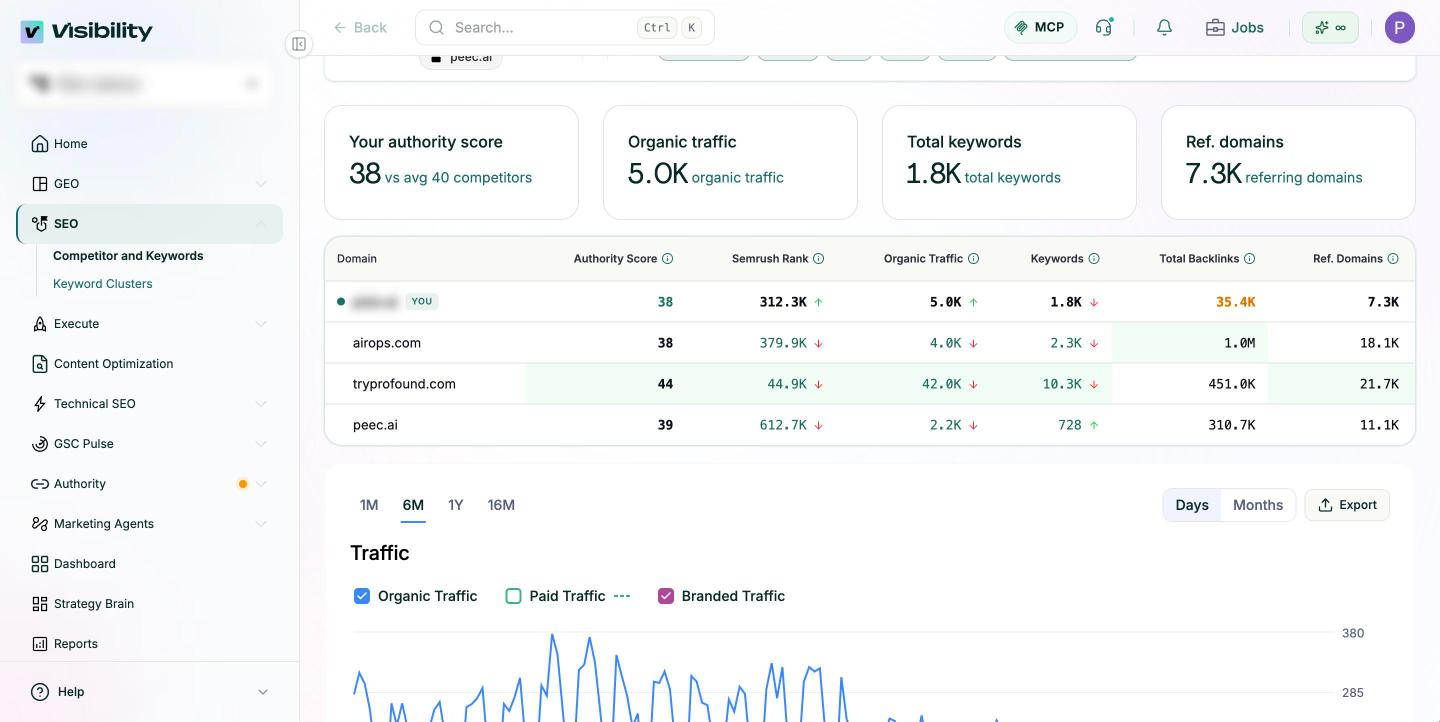
Pixis Visibility benchmarks your domain against competitors on domain authority, organic traffic, backlinks, referring domains and backlink velocity in one place, so the inputs come from a single source by default. Its Competitors and Keywords view puts your domain and up to four competitor domains in one table with authority score, organic traffic, keywords, total backlinks and referring domains, next to a link share overview and a year of backlink velocity. Keyword gap analysis and keyword clustering help when the reading points to content, and the Google Search Console connection lets you check your own figures and compare performance before and after a content change.
Scheduled custom reports keep the benchmark in front of stakeholders, and alerts can tell you when a competitor gains ground instead of waiting for the next manual refresh. Black Propeller, a paid media agency, reported 42% organic click growth with Pixis Visibility.
What stays with your team is choosing the right competitors, reading the gaps in context, and writing priorities someone will act on.
Start with your ten most valuable keywords
This week, search your ten highest-value keywords, list the domains that keep appearing, and pick three to five. Pull the five metrics from one tool on one date, calculate the traffic-per-referring-domain ratio, and write two or three priorities before you close the spreadsheet.
Then book the next refresh. The second pull is where the benchmark starts paying off, because it shows movement rather than a snapshot.
Get started with Pixis Visibility to benchmark your domain authority, traffic and backlinks against competitors and get alerted when one of them gains ground.
FAQs
Should I include a much larger competitor in the benchmark?
Yes, if it shares your search results, but do not let it set every priority. A category leader shows what the top looks like, while competitors closer to your size show the gaps you can realistically close this year. A mix of both gives the most useful reading.
Why do my traffic estimates differ from Google Search Console?
Third-party tools estimate traffic from rankings and search volumes, while Search Console reports Google's own click data for your site. Some difference is normal. If the gap is large, treat that tool's competitor traffic estimates with extra caution.
Should backlinks or referring domains carry more weight?
Referring domains are usually the better comparison. A single site can send thousands of backlinks, for example through a sitewide footer link, which inflates the backlink count without adding much authority. Use referring domains for the ratio and keep total backlinks as context.