
A release goes out on Tuesday. By Thursday, a template change has broken 40 product links, the sitemap still lists pages that now redirect, and nobody on the team knows. Search Console will eventually show the damage, but by then the cause is three releases back and much harder to trace.
A weekly technical audit with email alerts closes that gap. The scheduling part is simple: most crawlers and SEO platforms can run on a timer and send an email. The hard part is deciding what deserves an email.
Set every threshold at zero and the inbox fills with noise the team learns to ignore within a month. Set them too loose and a real regression slips through. A useful setup stays quiet on a normal week and sends one clear message when something actually breaks.
This guide explains how to choose a cadence, set thresholds from your own baseline, route alerts to the right people, and test the whole pipeline before you rely on it.
Key takeaways
- Schedule the audit for the morning after your usual release day, so a regression is caught while the change that caused it is still easy to identify.
- Set thresholds from your site's normal background noise, measured in a first manual run, not from a generic number or zero.
- Route each alert type to the person who can fix it, and give every alert a first diagnostic step and a standard fix.
- Test the pipeline with a deliberate breach in staging before you trust a quiet inbox.
- Pixis Visibility can schedule the technical audit daily, weekly or monthly and send email alerts when thresholds are breached; deciding thresholds and owners stays a team decision.
Choose a cadence that matches how often the site changes
The right cadence depends on how fast the site changes, not on how often you would like a report. The goal is to catch a regression close enough to the release that caused it that the fix is still obvious.
- Weekly suits most B2B sites that ship content and code changes every week or two.
- Daily fits large sites, ecommerce catalogs and teams that deploy continuously.
- Monthly only works for small sites that rarely change.
Then pick the day. Run the crawl the morning after your usual release day. If releases move around, anchor the audit to a fixed day anyway, so the schedule never quietly slips.
Before committing to a time window, check how long a full crawl takes on your platform. On a large site a full crawl can take hours, and an audit that finishes after the team has gone home loses most of its value.
Measure your baseline before you set any threshold
Run the first audit manually and read every issue it reports. Most sites carry a level of background noise: a handful of broken outbound links, a few images without alt text, pages that were orphaned on purpose. That noise is your baseline.
Each threshold should sit just above it. Below the baseline, the alert fires every week and stops meaning anything. Far above it, a real regression has to be large before anyone hears about it.
What to alert on
Most teams start with six checks:
- Broken URLs (internal 4xx and 5xx responses)
- Sitemap errors
- A drop in the overall site health score
- New orphan pages
- Pages with poor Core Web Vitals
- Images with issues, such as missing alt text or oversized files
For Core Web Vitals, use Google's published targets as the definition of "poor": LCP within 2.5 seconds, INP under 200 milliseconds and CLS under 0.1, according to Google's Core Web Vitals documentation.
An illustrative example
Suppose the first manual run on a 40,000-URL B2B site finds 12 broken URLs, 2 sitemap errors, 6 orphan pages and 18 images with issues, all of them known and low priority. Reasonable starting thresholds would be slightly above those numbers: 20 broken URLs, 5 sitemap errors, 10 new orphans, 25 images with issues, and a health score drop of 5 points.
These numbers are not recommendations for your site. They show the method: measure what normal looks like, then alert on a clear departure from it.
Route each alert to the person who can act on it
Sending every alert to everyone is the fastest way to make alerts useless. The SEO lead does not need deploy failures she cannot fix, and the developer does not need a list of missing alt text.
Split recipients by alert type. Broken URLs, sitemap errors and Core Web Vitals usually belong to the developer who ships releases. Orphan pages, images and health score drops usually belong to the SEO lead. Add a shared inbox as well, so alerts survive people changing roles.
Turn on notifications for failed crawls too. A crawl that cannot finish should send an email rather than fail silently, or a quiet week can mean the audit never ran.
Give every alert a first step and a standard fix
An email that says "31 broken URLs" with no next action gets read and forgotten. A short runbook turns each alert into a task. Keep it next to the alert settings and update it when the team learns something new.
- Broken URLs. Owner: developer. First check: recent deploys and server logs. Standard fix: restore the URL or add a 301 redirect.
- Sitemap errors. Owner: developer. First check: sitemap submission status. Standard fix: fix the sitemap and resubmit it.
- Health score drop. Owner: SEO lead. First check: recent content or structure changes. Standard fix: revert or correct the change that caused it.
- Orphan pages. Owner: SEO lead. First check: internal linking to the new pages. Standard fix: add links from relevant pages.
- Poor Core Web Vitals. Owner: developer. First check: field data and Lighthouse. Standard fix: fix the specific metric that regressed.
- Images with issues. Owner: SEO lead. First check: alt text and file size. Standard fix: add alt text or compress the image.
When a broken URL alert fires, how to find broken links and the exact pages they're on shows how to trace each one to the page that links to it. For deciding which parts of this workflow to automate and which to keep with a person, see what to automate versus keep human in SEO.
Test the pipeline before you trust a quiet inbox
A quiet inbox only means something once you know the alerts work. Three checks, in this order, prove the setup end to end.
- Confirm the audit ran. Check that this week's scheduled crawl started and finished. Some platforms group alerts into digests, so a delay is not always a failure.
- Cross-check one alert against Google. If the email reports 31 broken URLs, inspect a sample of those URLs with the URL Inspection tool in Search Console. Do not rely on the Page indexing report for this; Google states it is not designed to investigate individual URLs.
- Breach a threshold on purpose. In a staging environment, add a broken internal link or remove an image's alt text, run the audit and confirm the email arrives with the right count and goes to the right person.
If the test fails, fix the threshold first, then the recipient list, then the schedule, and repeat the same deliberate breach.
Keep the system useful as the site grows
Thresholds that fit a 5,000-URL site either stay uselessly loose or fire constantly at 60,000 URLs. Review them every quarter, and again whenever the site structure changes in a big way, such as a migration or a new section.
Watch for alert fatigue. If the same known issue triggers an email every week, either fix it or raise the threshold above it, and note the decision in the runbook. An alert people expect to ignore teaches them to ignore the next one too.
Finally, share a short summary with stakeholders on the same cadence as the audit. Quiet weeks are still evidence that the site is healthy, and a trend line makes the value of the work visible to leadership.
For the full manual audit process this schedule builds on, see the step-by-step SEO audit guide.
Where Pixis Visibility fits
The repeat work in this process is running the crawl, comparing results with last week, and sending the right message to the right person. That is what scheduling software should take off your hands.
Pixis Visibility runs its technical SEO audit on a daily, weekly or monthly schedule. The audit covers broken URLs, crawl errors, sitemaps, robots.txt, internal links, orphan pages, images, schema, metadata and Core Web Vitals. You can set email alerts for when a threshold is breached, and the findings come with fix suggestions such as alt text, image compression, schema and metadata. Nothing is pushed to the live site automatically. The audit can also be exported as a health check report for stakeholders or clients.
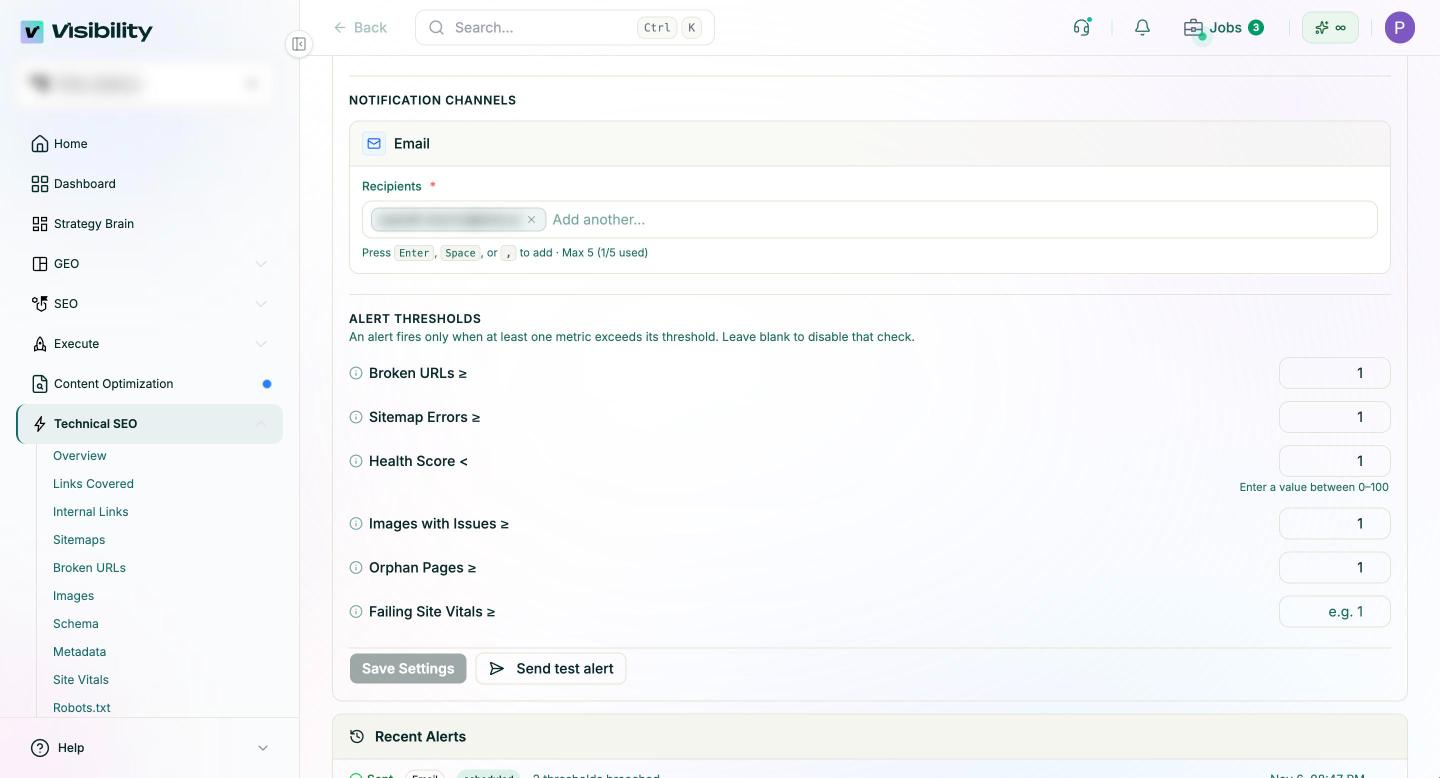
What stays with your team is the judgment: choosing thresholds from your own baseline, deciding who owns each alert, and writing the runbook that tells them what to do next.
Start with one release cycle
Set up the schedule, run the first audit by hand, and tune the thresholds against what you find. Then let one full release cycle pass and review every alert that fired. Each one should have been worth an email; if it was not, adjust it before the next cycle.
Get started with Pixis Visibility to schedule your technical audit and get email alerts when your site moves outside its normal range.
FAQs
How often should a technical SEO audit run?
Weekly suits most B2B sites. Run it the morning after your usual release day so a regression is caught while the cause is still fresh. Large or fast-changing sites may need a daily audit, while small, rarely updated sites can run monthly.
What thresholds should I set for technical SEO alerts?
Base them on your own site. Run one audit manually, record the normal level of each issue, and set each threshold just above it. Review the numbers quarterly and after big structural changes.
Can I get alerts only when things get worse?
Yes. Set thresholds above your baseline so a normal audit sends nothing, and keep notifications on for failed crawls so a missed run still reaches you. Some platforms also offer a mode that only alerts on regressions compared with the previous audit.